Building an iOS application in 2026 is no longer simply a matter of hiring a Swift developer and creating a few user interface screens. A production iOS application requires strategic decisions about product validation, platform strategy, MVP scope, user experience, technology selection, software architecture, backend infrastructure, security protocols, automated testing, App Store compliance, telemetry analytics, monetization, and long term maintenance.
The real question is not:
"How do I build an iOS app?"
It is:
"What should I build, why should I build it for iOS, and what is the smallest version that can prove the product works?"
That distinction matters because development is only one part of the product lifecycle.
A technically excellent application can still fail because:
- The underlying problem is weak
- The MVP contains too many features
- The onboarding is confusing
- The backend is unreliable
- Security was considered too late
- App Store requirements were ignored until submission
- Analytics were not planned
- The product has no clear post-launch strategy
A stronger process looks like:
Idea → Validation → MVP → UX → Technology → Architecture → Development → QA → TestFlight → App Review → Launch → ASO → Analytics → Iteration This guide explains that process from the first product decision through post launch maintenance.
Quick Answer
A production iOS app typically involves:
- Product discovery and validation
- MVP definition
- UX/UI design
- Swift-based iOS development
- Backend and API development
- Authentication and authorization
- Database and cloud infrastructure
- Third-party integrations
- Security and privacy controls
- Analytics
- Testing and accessibility
- TestFlight beta distribution
- App Store Connect preparation
- Apple App Review
- Launch and ASO
- Monitoring and continuous iteration
The cost and timeline depend far more on backend complexity, integrations, security, offline functionality, user roles and testing requirements than on the number of screens.
What Is iOS App Development?
iOS app development is the process of designing, engineering, testing, distributing and maintaining software for Apple platforms.
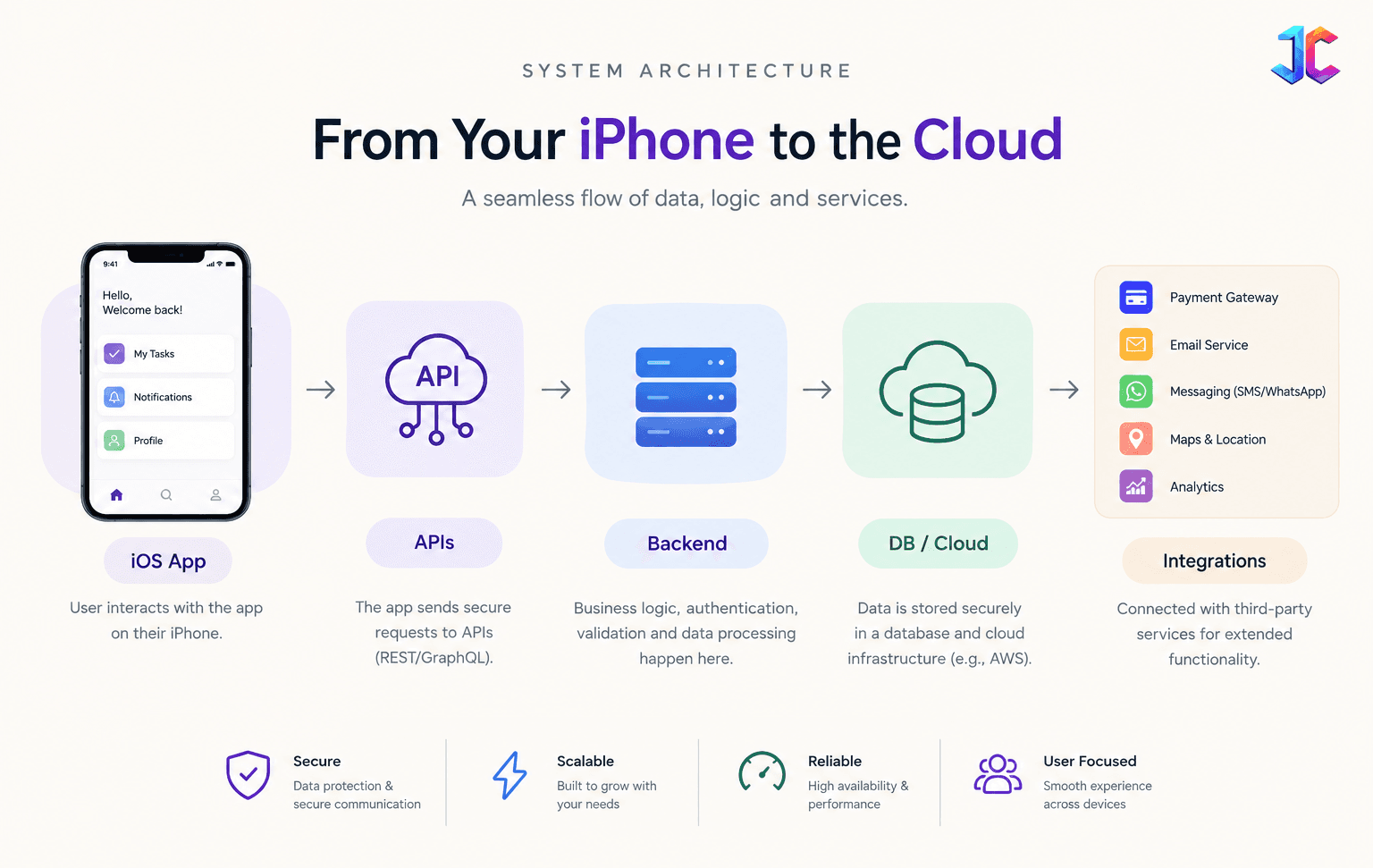
A commercial application may contain several interconnected layers:
- iOS client: The application running on the user device. It handles UI, navigation, local state, device capabilities, local caching, input validation, and API communication.
- Backend: The server side system responsible for business rules, user accounts, permissions, transactions, data processing, notifications, and integrations.
- APIs: APIs connect the iOS client with backend systems using REST, GraphQL, WebSockets, or event driven APIs.
- Database: Persistent business data including users, products, orders, messages, preferences, transactions, and subscription state.
- Cloud infrastructure: Compute, databases, object storage, CDN, queues, monitoring, logging, backups, and secrets management.
- Third party services: Payments, maps, messaging, analytics, CRM, authentication, AI services, and marketing platforms.
The result is that an iOS application should be treated as a product system, not merely a collection of screens.
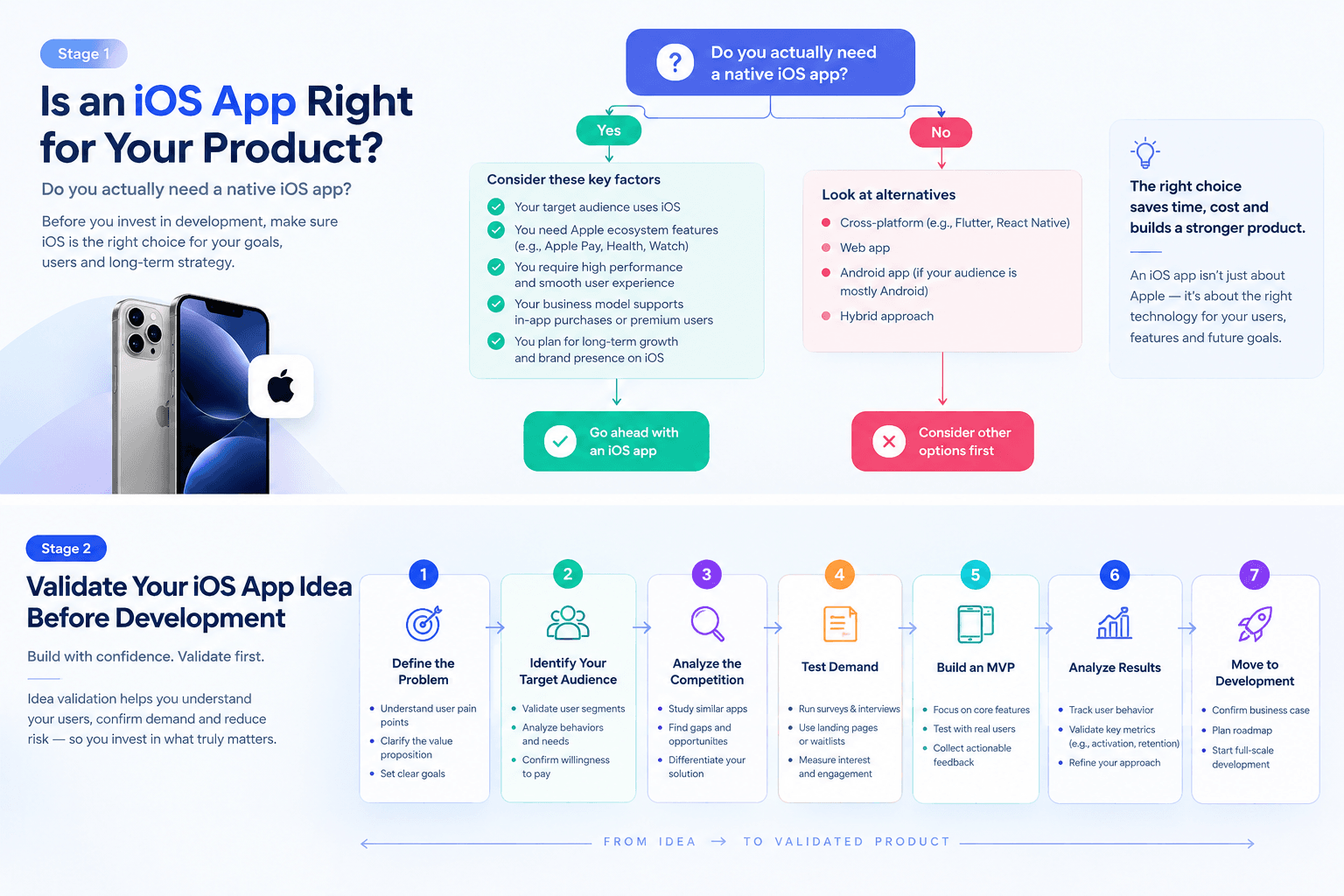
Should You Build an iOS App at All?
This is the first decision and one many development guides skip. An iOS application makes sense when mobile is directly connected to the customer workflow or the product value.
Examples include:
- Frequent mobile interactions
- Camera or media capture Location based workflows
- Push notification
- Biometric authentication
- Apple Pay, Bluetooth hardware
- Offline workflows
- Health or fitness experiences
- Real time communication, and mobile transactions.
For example, a field service application may require technicians to:
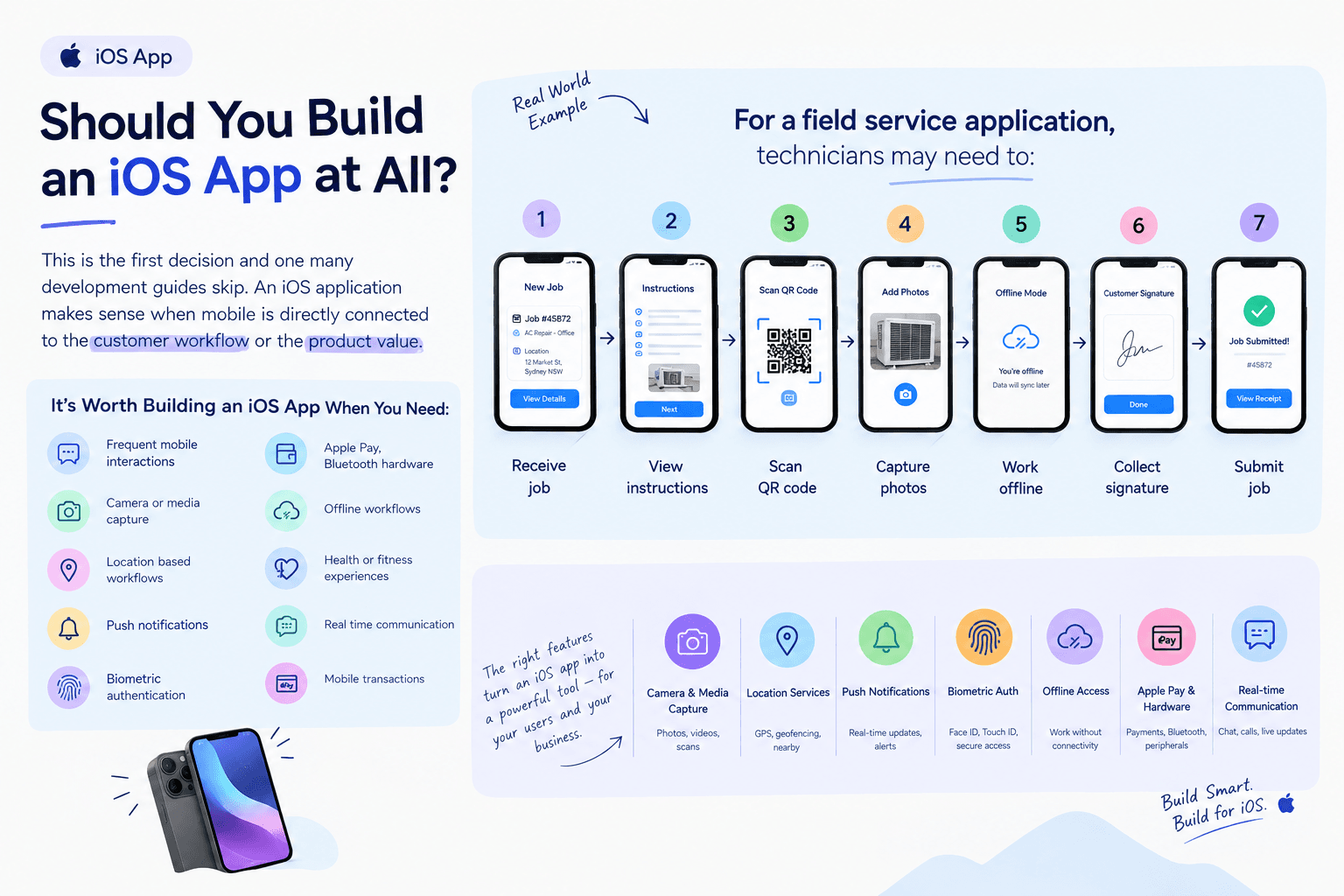
In that case, mobile is part of the product itself.
A native app may be much less justified for a business where customers only log in a few times per year to download a document. A responsive website may be sufficient.
When an iOS App May Be the Wrong First Investment
Consider delaying the app when:
- A responsive website already solves the problem
- Users interact with the product infrequently
- The core workflow is not mobile specific
- Product market fit is unproven
- There is no mobile acquisition strategy
- Native device capabilities provide little additional value.
The best first product may sometimes be a web application rather than an iOS application.
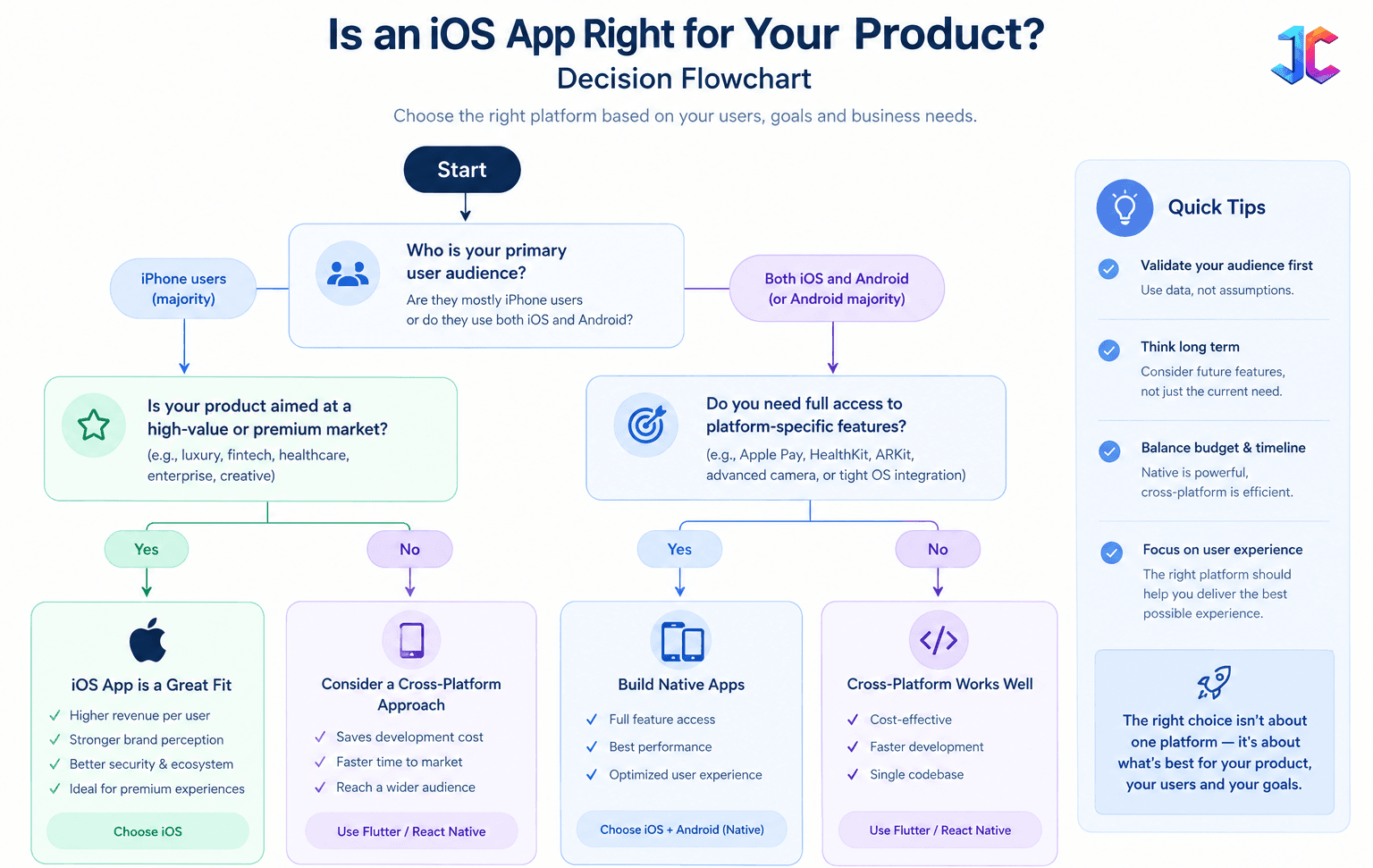
iOS-First, Android-First, or Both?
Platform choice should be based on customers and not developer preference. Before choosing iOS first, answer:
- Where are your first customers?
- Which devices do they already use?
- What percentage are iOS users?
- Is your audience premium, enterprise or mass market?
- Does Apple technology provide a meaningful product advantage?
- Is Android equally important to revenue?
- Do network effects require both platforms?
When iOS-First Makes Sense
iOS first can be attractive when:
- Your audience has high Apple adoption
- Your initial market is premium, Apple ecosystem capabilities matter
- You need deep native hardware integration
- You want to validate one platform before expanding.
When Android-First Makes More Sense
Android may be the stronger first platform when:
- Your target market is heavily Android based
- Device affordability matters
- Emerging markets are central to the strategy
- Broad hardware availability is important.
When Both Should Launch Together
Consider simultaneous development when:
- Both platforms represent major revenue
- Customers expect parity,
- Network effects depend on reach
The business model requires maximum distribution.
There is no universal rule that says iOS should always come first.
Validate the Product Before Writing Code
The most expensive mistake is building the wrong product efficiently. Validate four things:
Problem → Customer → Behavior → Business value.
Problem Validation
Instead of starting with start with Research should answer who has the problem, how often it occurs, how it is solved today, what the current workaround costs, what frustrates users, what would make them switch, and whether there is willingness to pay.
"What problem are we solving, and what evidence proves that users care enough to change their behavior?"
"We need an app with these 20 features,"
Research should answer:
- Who has the problem?
- How often does it occur?
- How is it solved today?
- What does the current workaround cost?
- What frustrates users?
- What would make them switch?
- Is there willingness to pay?
User Interviews
Ask about actual behavior. Good questions include:
- How do you solve this today?
- What is the most frustrating part?
- What happens when your current solution fails?
- How frequently does this happen?
- What takes the most time?
- What would make you switch?
Avoid relying heavily on "Would you use this app?" Hypothetical interest is weaker evidence than observed behavior.
Competitor Analysis Should Shape Your MVP
Competitor research should go beyond feature counting. Study:
- Onboarding
- Pricing
- Core workflows
- Reviews
- Complaints
- Retention mechanisms
- App Store positioning
- Missing functionality
- Performance complaints
- Permissions
- Subscription experience
Negative reviews can be especially valuable because repeated complaints reveal where competitors are failing.
The Content and Product Gap
A common competitor pattern in iOS development content is "What is iOS development?" → "Swift" → "SwiftUI" → "Cost" → "Timeline".
Those topics are useful but heavily commoditized.
A stronger guide should answer the questions businesses actually need to make decisions:
- Do I need an app at all?
- Should I launch iOS first?
- What should my MVP exclude?
- Should I use native or cross platform?
- What architecture fits my product?
- What will the backend cost?
- What security risks exist?
- What happens if the app is rejected?
- What must be ready for TestFlight?
- What should I measure after launch?
- Who owns the Apple and cloud accounts?
- How much should I budget for maintenance?
This is where practical product guidance becomes more valuable than another generic Swift tutorial.
Define the MVP
An MVP is not a smaller version of the final product. It is the smallest commercially useful product capable of testing the most important product assumptions with real users.
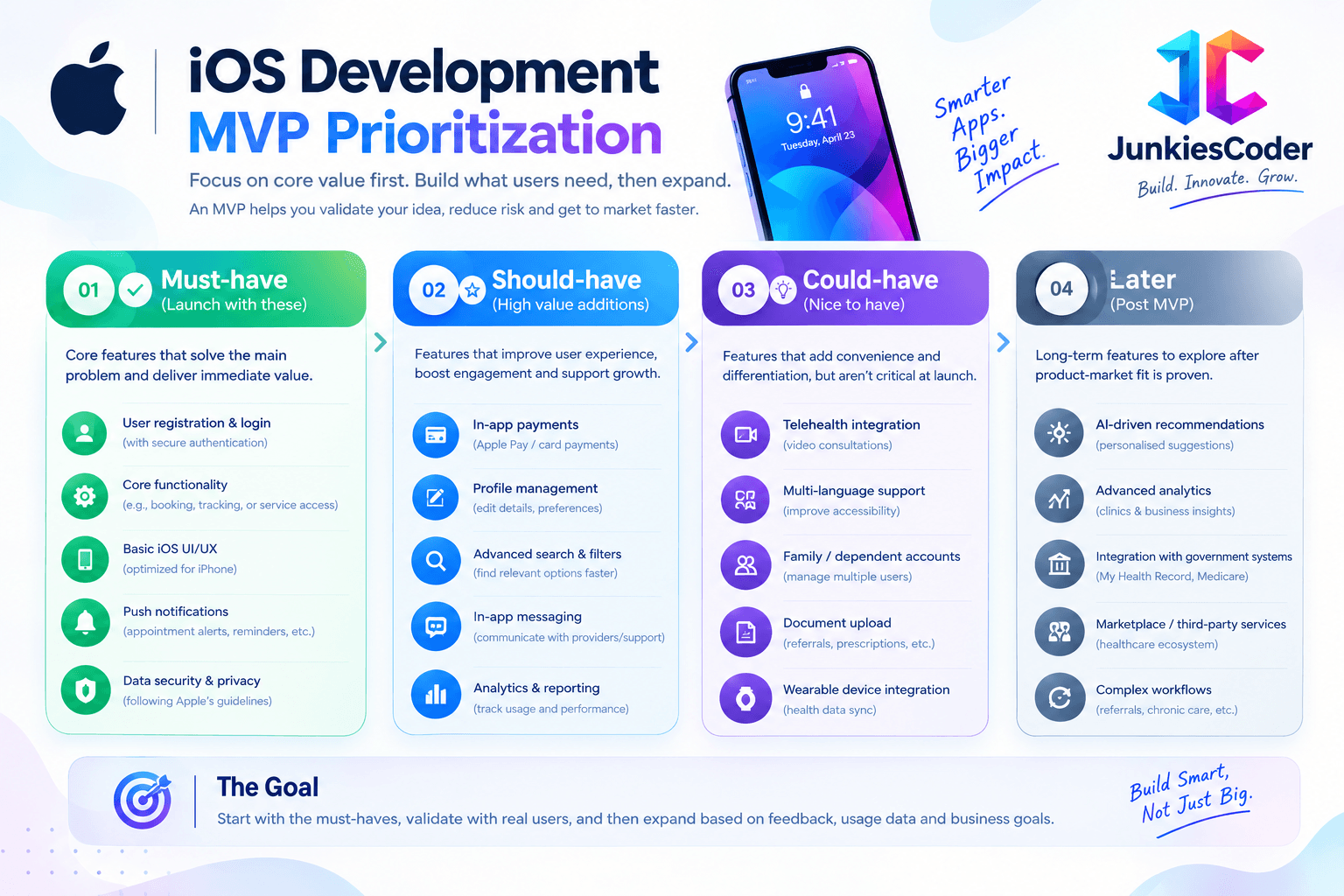 For example, an e-commerce product may eventually want:
- AI shopping assistant
- Social feed
- Loyalty program
- Personalization
- Product comparison
- Referral system
- Apple Watch app
- Advanced recommendations
But the first version may only require:
- Account
- Product browsing
- Search
- Product detail
- Cart
- Checkout
- Order tracking
- Basic notifications
- Analytics
The rest should earn its way into the roadmap through evidence.
What to Postpone
Unless essential to the core hypothesis, consider delaying:
- AI assistants
- Social feeds
- Gamification
- Apple Watch companions
- Advanced personalization
- Complex recommendation engines
- Unvalidated integrations
- Multiple payment models
The objective is not to build fewer features forever. It is to avoid paying for features before knowing whether they matter.
A Practical MVP Prioritization Framework
A useful internal framework is: User value × Business importance ÷ Implementation complexity.
This is a prioritization tool, not an industry standard formula.
| Feature | User Value | Business Importance | Complexity | Decision |
|---|---|---|---|---|
| Account creation | High | High | Low | Build |
| Core transaction | High | High | Medium | Build |
| Notifications | Medium | High | Medium | Likely build |
| AI assistant | Uncertain | Medium | High | Validate |
| Social feed | Low initially | Low | High | Postpone |
| Apple Watch app | Low initially | Medium | High | Postpone |
What Should Be Ready Before Development?
Before developers start, prepare:
- Product objective
- Target users
- MVP scope
- User journeys
- Feature requirements
- Wireframes
- Brand assets
- API requirements
- Backend requirements
- Authentication requirements
- Payment requirements
- Third-party integrations
- Analytics goals
- Security expectations
- Deployment target
You do not need every technical decision finalized, but developers should not have to discover the entire business model while preparing an estimate.
Choosing the iOS Technology Stack
Apple core native ecosystem includes:
- Swift
- SwiftUI
- UIKit
- Xcode
- Apple SDKs and frameworks
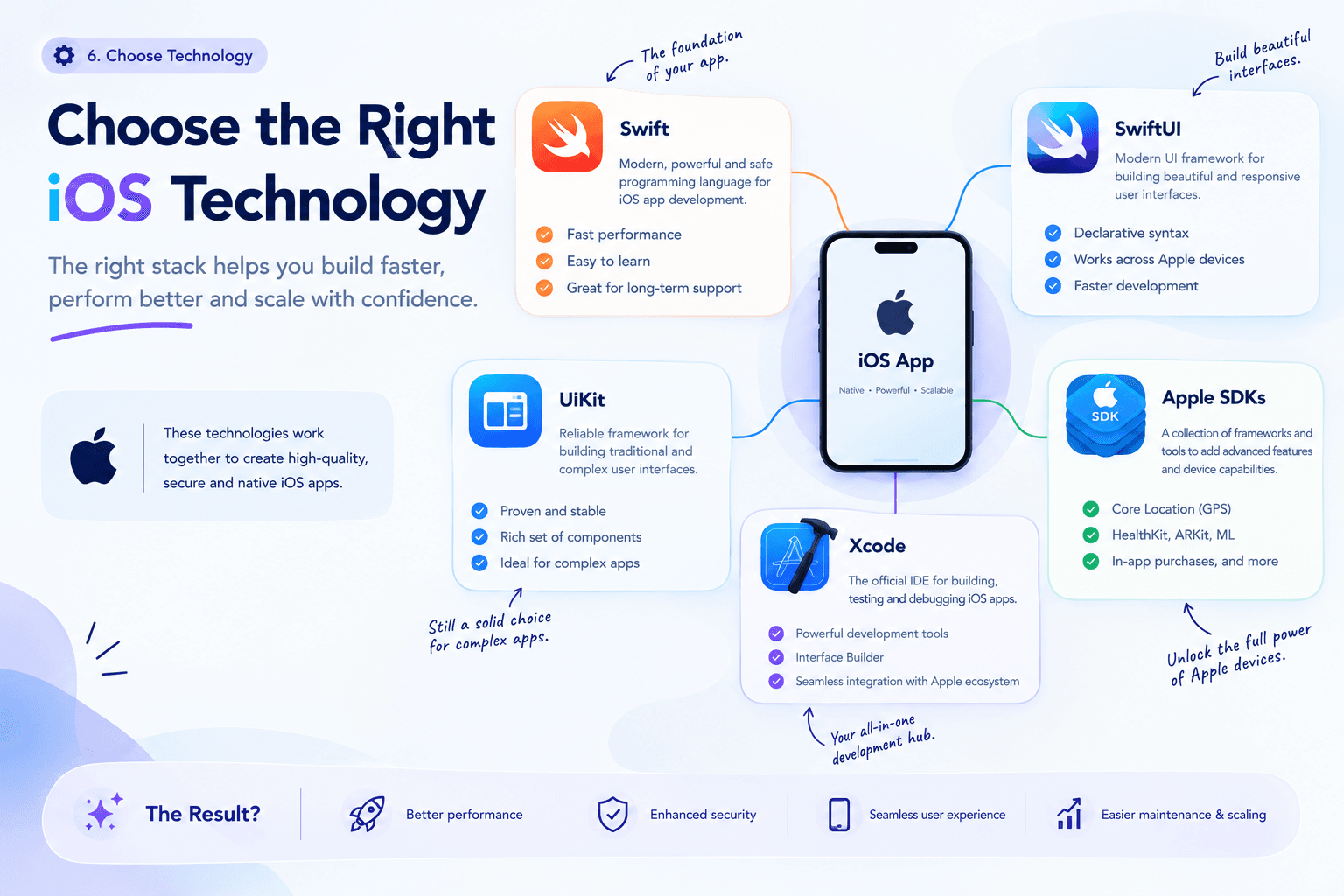
Xcode is Apple primary environment for building, testing, archiving and uploading applications for Apple platforms. Apple current 2026 distribution requirements state that iOS and iPadOS apps uploaded to App Store Connect must be built with the iOS/iPadOS 26 SDK or later as of April 28, 2026.
Swift
Swift is Apple modern programming language. It provides:
- Strong type safety
- Memory safety
- Modern concurrency
- Native Apple framework access
For new native iOS applications, Swift is generally the foundation.
SwiftUI
SwiftUI uses a declarative approach to building interfaces and is particularly attractive for new applications. However, SwiftUI does not mean UIKit has disappeared.
UIKit
UIKit remains relevant for:
- Existing applications
- Legacy systems
- Specialized interfaces
- Mature codebases
- Components where UIKit remains the practical choice
Many production applications use SwiftUI and UIKit together.
Native vs Cross-Platform
This decision should be based on the highest risk constraint in your product. Common options include:
- Native Swift
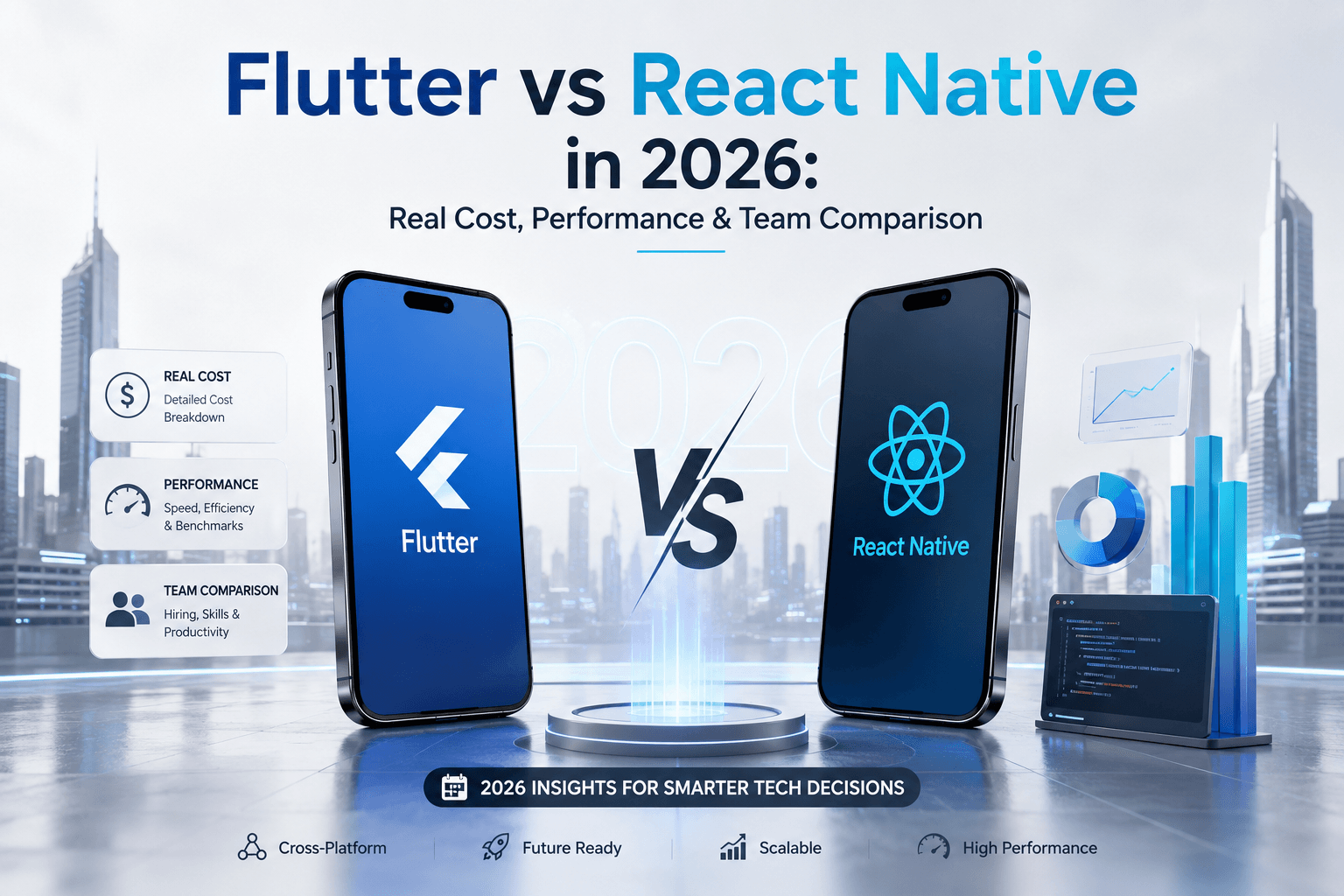
- React Native
- Flutter
- Kotlin Multiplatform
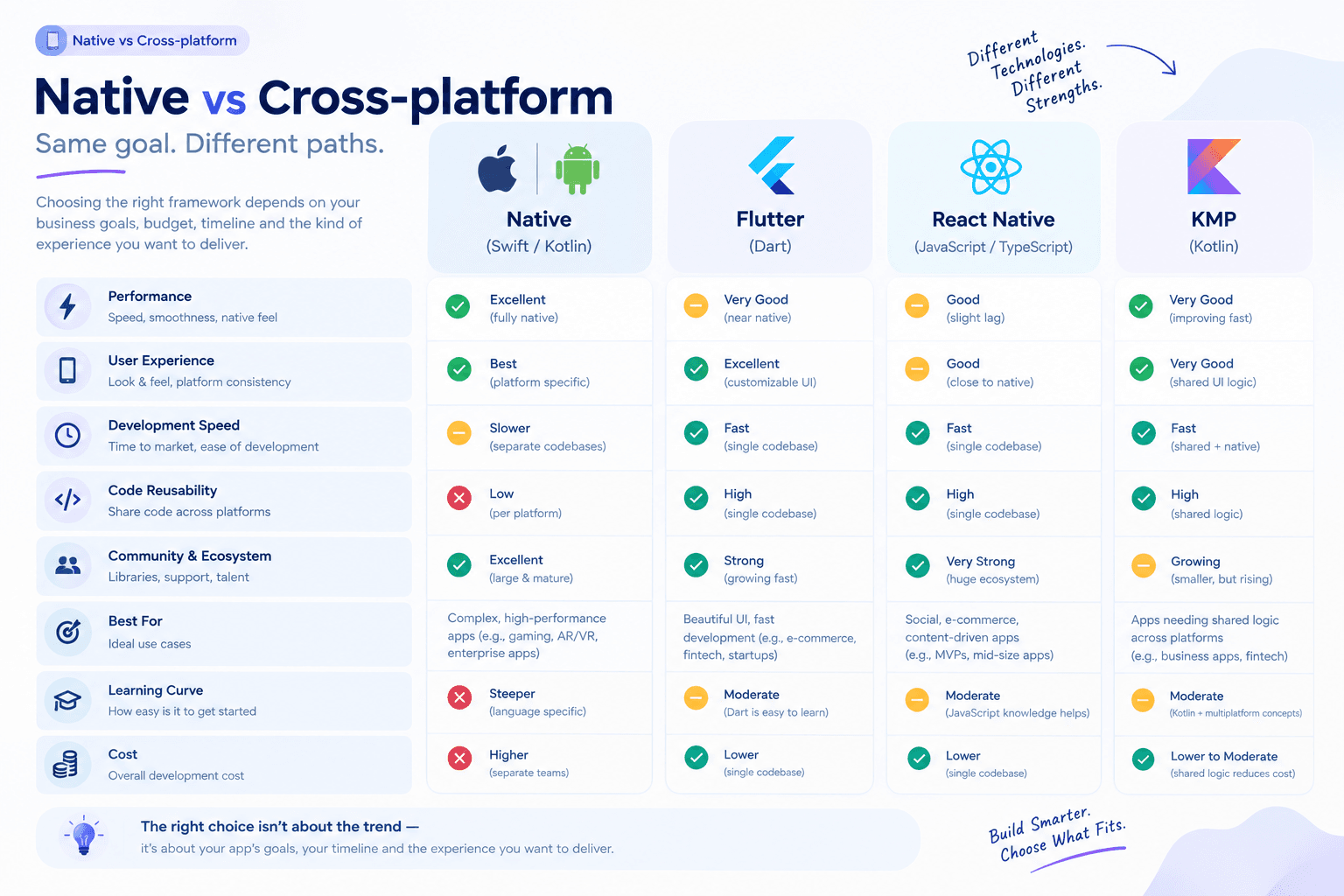 Some current industry guides emphasize cross-platform for cost sensitive MVPs, while others recommend native when deep Apple integration is central. The important point is that neither is universally superior.
| Requirement | Likely Direction |
|---|---|
| iOS-only product | Swift + SwiftUI |
| Existing UIKit application | UIKit + incremental SwiftUI |
| iOS + Android MVP | Evaluate cross-platform |
| Deep Apple hardware integration | Native |
| Maximum Apple ecosystem integration | Native |
| Existing React team | Evaluate React Native |
| Existing Kotlin investment | Evaluate Kotlin Multiplatform |
| Shared UI/codebase is highest priority | Evaluate Flutter |
Choose Native When
- iOS is strategically primary
- Apple APIs are central
- Performance is critical
- Platform-specific UX matters
- Hardware integration is important
- Apple ecosystem expansion is likely
Consider Cross-Platform When
- iOS and Android are both important
- Business logic is highly shared
- Speed and shared engineering resources matter
- Platform-specific requirements are limited
The correct question is not
"Which framework is trending in 2026?"
It is:
"Which approach reduces the biggest technical or business risk in this product?"
The Seven Stages of iOS App Development
A practical development lifecycle follows seven clear stages:
Stage 1: Discovery
Define:
- Business objective
- Target users
- Problem
- Scope
- Technical constraints
- Integrations
- Success metrics
Deliverables include product brief, personas, user journeys, initial requirements and risk register. Decision gate: Is iOS actually the right platform?
Stage 2: Product Planning
Convert research into a prioritized MVP. Deliverables :
- MVP definition
- Product requirements
- Acceptance criteria
- Release plan
- Analytics requirements
Decision gate: Is there enough evidence to justify development?
Stage 3: UI/UX Design
Design:
- Information architecture
- Wireframes
- High-fidelity screens
- Prototypes
- Loading states
- Empty states
- Error states
- Accessibility behavior
Do not design only the happy path. You also need designs for:
- No network
- Expired sessions
- Failed payments
- Empty data
- Permission denial
- Slow loading
- Server errors
- Invalid input
Decision gate: Can users complete the core workflow without unnecessary friction?
Stage 4: Architecture
Define:
- Application architecture
- API contracts
- Data model
- Authentication
- Authorization
- Security
- Cloud infrastructure
- Third-party integrations
- CI/CD
Decision gate: Can the architecture support the MVP without creating unnecessary long term complexity?
Stage 5: Development
Development should happen incrementally. A typical cycle is: Implement → Test → Review → Integrate → QA → Release.
Do not wait until the final week to connect the frontend, backend and business logic.
Stage 6: Testing
Test:
- Unit logic
- Integration
- UI flows
- Performance
- Security
- Accessibility
- Network conditions
- Device compatibility
- OS compatibility
- Payments
- Authentication
- Notifications TestFlight can then be used for real world beta testing.
Apple currently supports up to 100 internal testers and 10,000 external testers for an app through TestFlight.
Stage 7: Launch and Iteration
The lifecycle becomes:
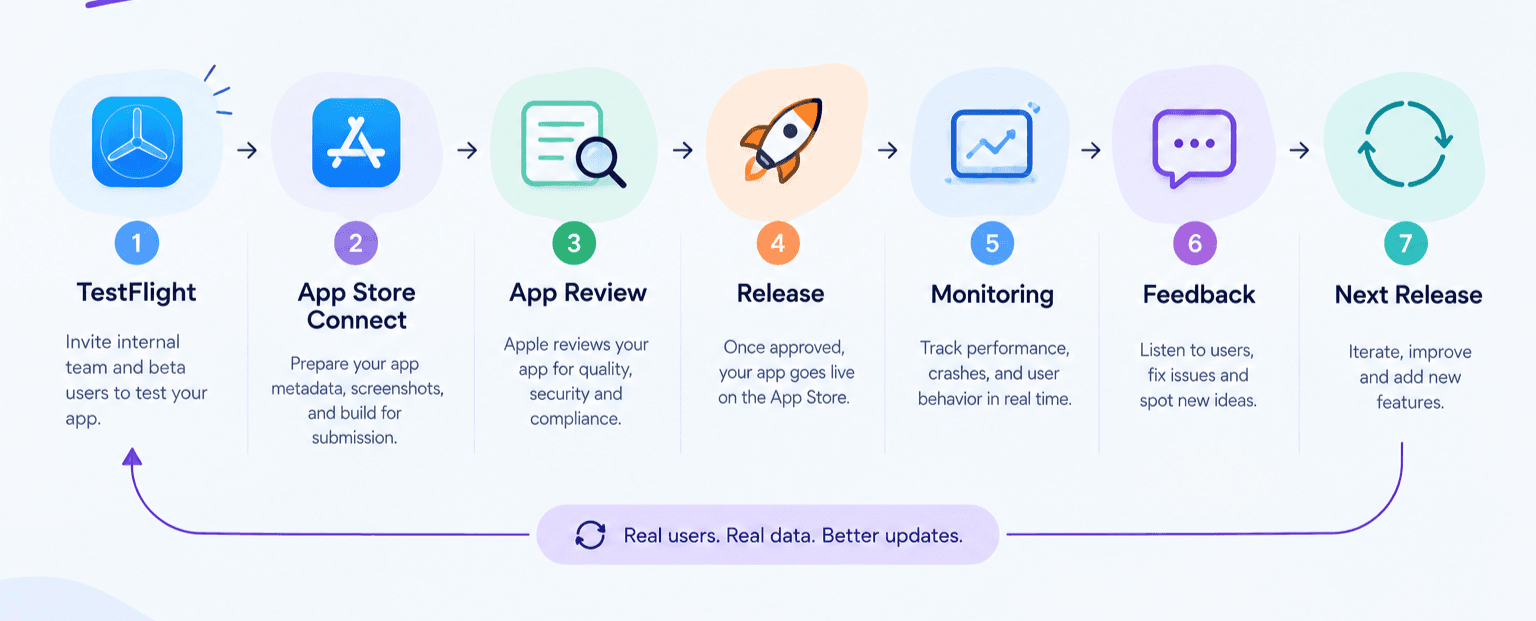
The launch is not the end of development; it is the beginning of the evidence gathering phase.
iOS App Architecture
A typical production system looks approximately like this:
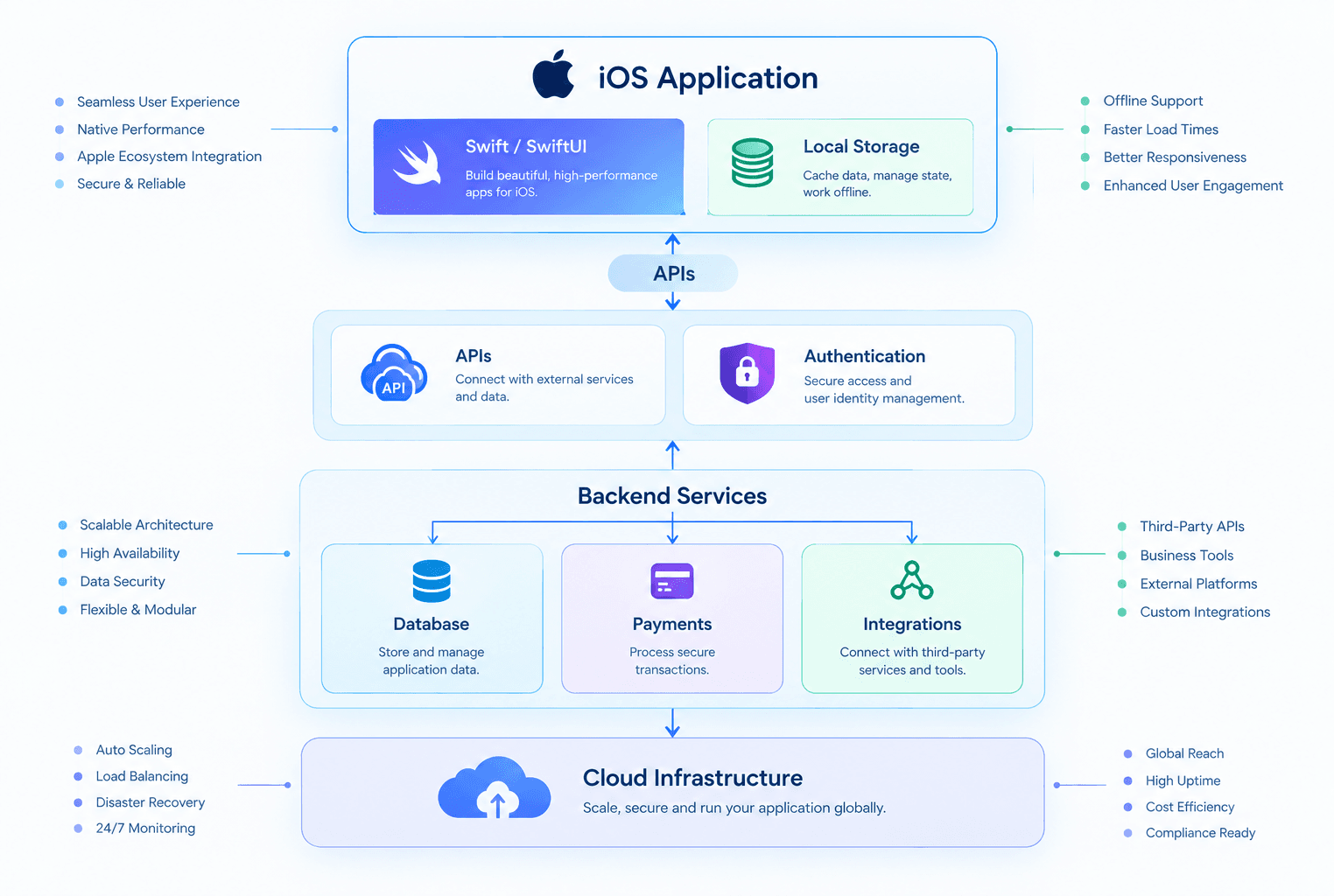
Frontend Responsibilities
The iOS application handles:
- Interface
- Navigation
- Local state
- Device APIs
- Input validation
- Caching
- Secure local storage
- API communication
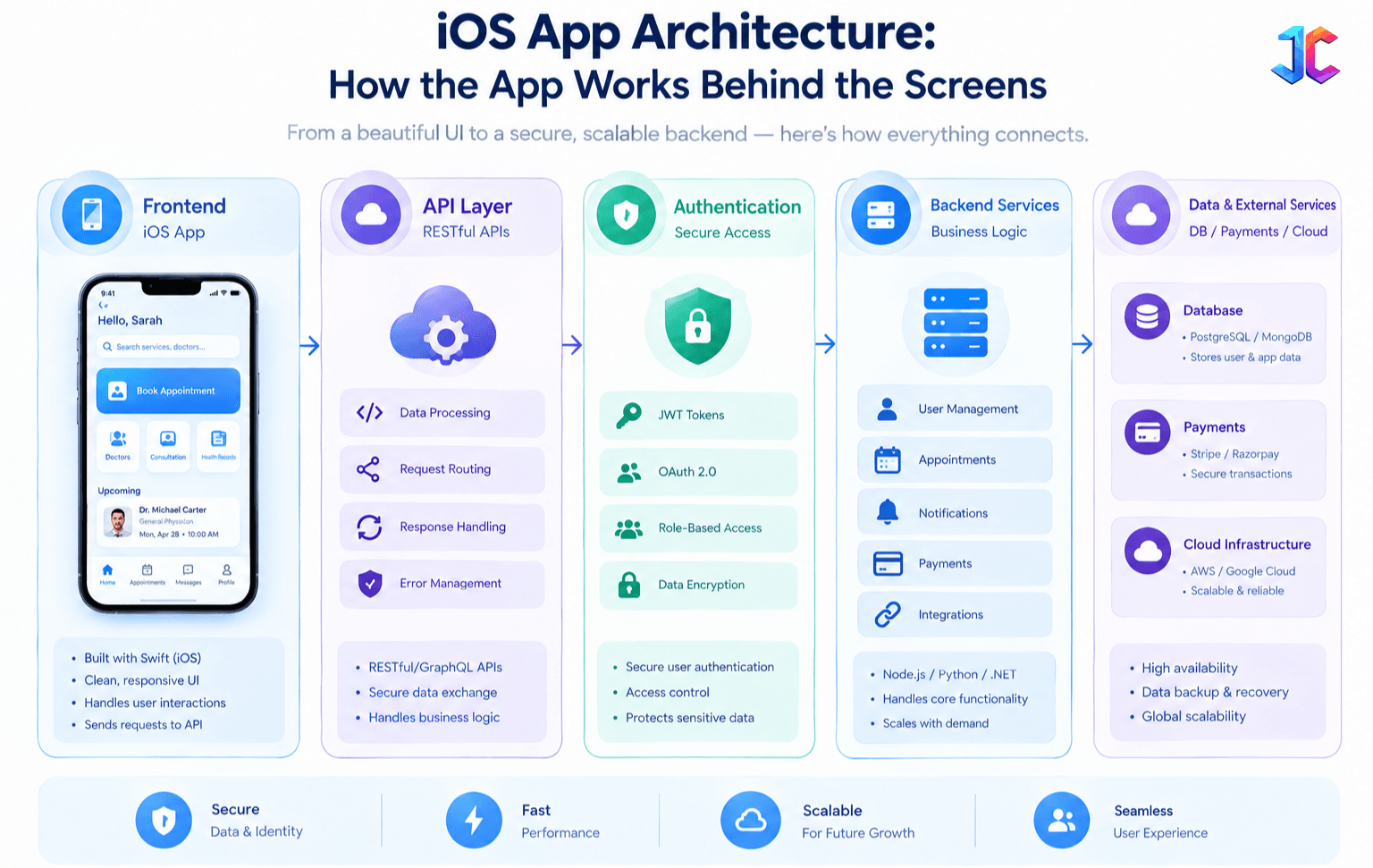
Backend Responsibilities
The backend handles:
- Business rules
- Permissions
- Transactions
- User data
- Notifications
- Integrations
- Server-side security
A critical rule: Never treat the iOS client as the security boundary.
The server must independently enforce authorization.
UX: Design for Real Conditions
Good iOS UX is not simply attractive visual design. It reduces uncertainty and friction.
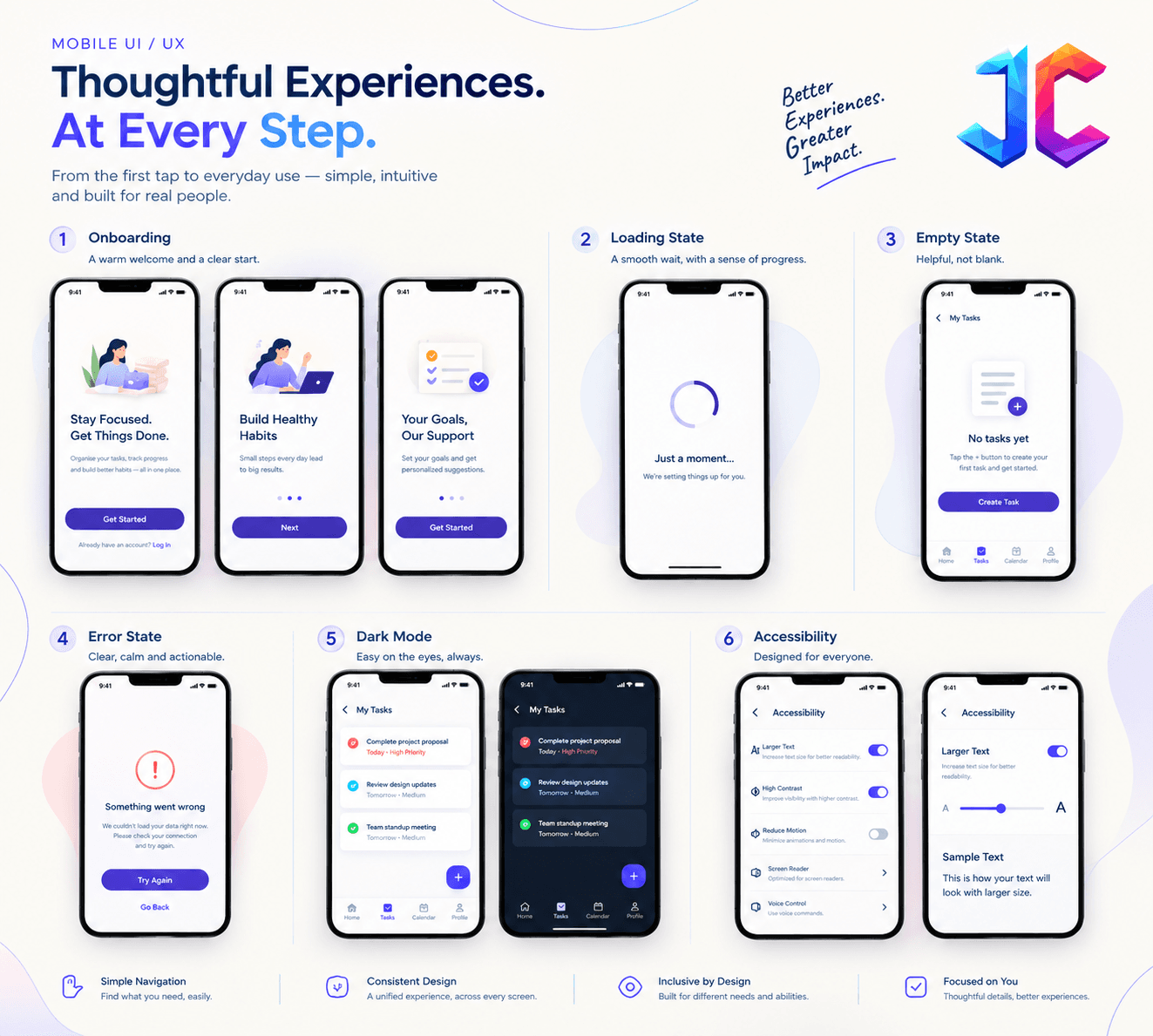
- Onboarding: Only request information that is genuinely necessary.
- Navigation: Users should understand where they are, what they can do, how to go back, and what happens next.
- Loading: Every network dependent workflow needs an appropriate loading state.
- Empty States: Explain why content is missing, what the user can do, and what happens next.
- Errors: Prefer actionable errors. Instead of "Something went wrong," use "We could not load your orders. Check your connection and try again."
- Accessibility: Plan for VoiceOver, Dynamic Type, larger text, contrast, reduced motion, Voice Control, and appropriate touch targets.
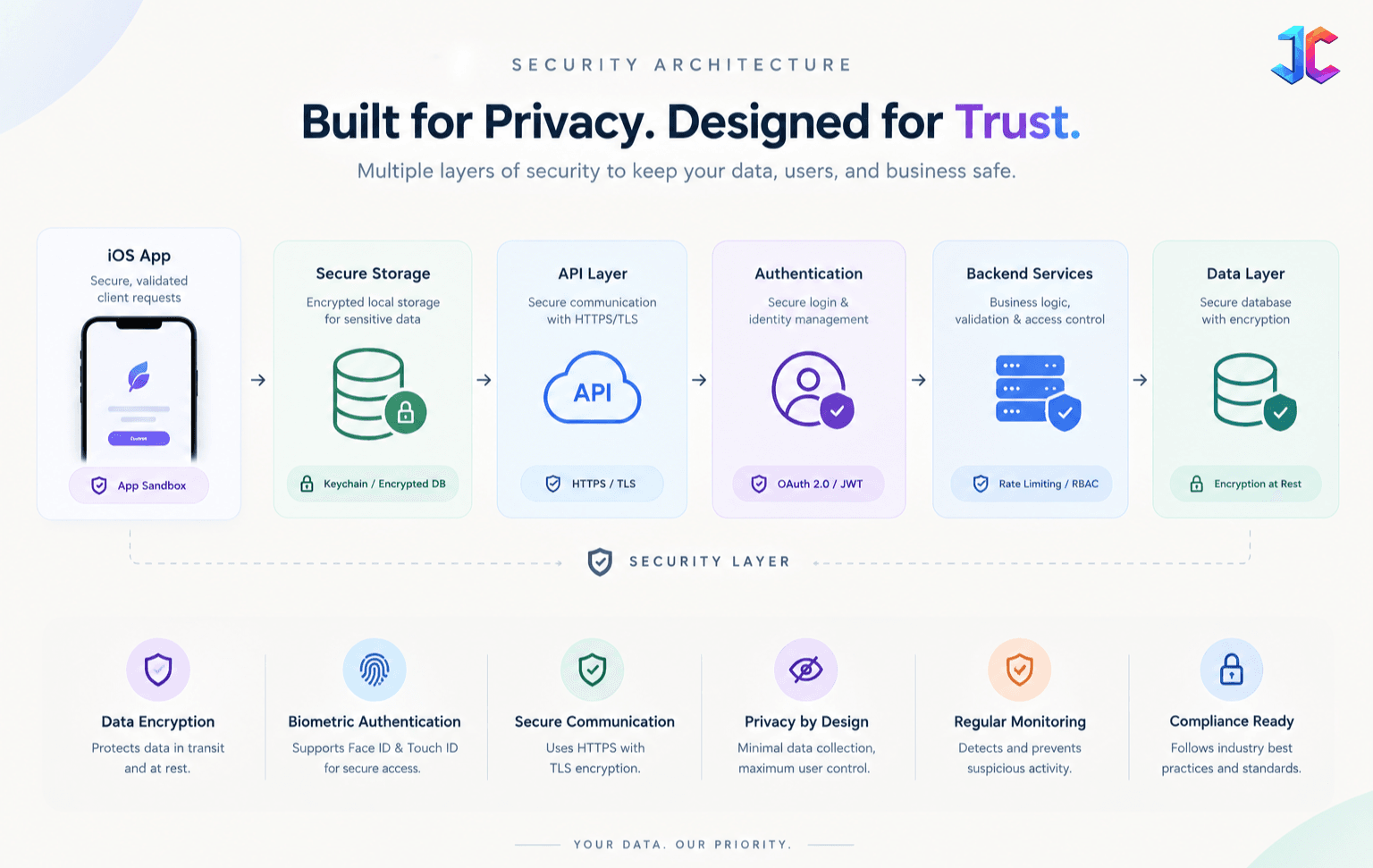
Security and Privacy
Security should be part of architecture and not a final QA checklist.
- Authentication: Depending on the product, consider secure login, Sign in with Apple, OAuth, MFA, session expiration, account recovery, and biometric unlock.
- Secure Local Storage: Sensitive credentials and tokens should use appropriate platform security mechanisms rather than ordinary application storage.
- Server-Side Authorization: Never rely exclusively on client side checks. For example, this:
if user.isAdmin {
    allowAction()
    allowAction()
}
cannot be the actual authorization boundary. The backend must verify the user permissions.
- Avoid Hardcoded Secrets: Do not embed sensitive production credentials in the application.
- Review Third-Party SDKs: Third party SDKs can affect privacy, security, performance, data collection, and App Store compliance.
- Data Minimization: Before collecting information, ask why it is needed, where it will be stored, who can access it, how long it will be retained, whether it leaves the device, and whether a third party service receives it.
This is especially important for applications involving financial, health, identity or location data.
App Development Cost in 2026
There is no single reliable "iOS app development cost." Current 2026 market guides publish very different ranges because they are describing different products and delivery models. For example, recent India focused estimates range from roughly ₹5 to 40 lakh depending on complexity, while broader agency estimates can extend from tens of thousands of dollars for MVPs to hundreds of thousands for enterprise products.
That variation is expected. A five-screen fintech app may cost more than a fifteen-screen content app because of:
- Security
- Transactions
- Backend complexity
- Audit requirements
- Compliance
- Fraud prevention
Major Cost Drivers
| Cost Area | What Changes the Cost |
|---|---|
| Discovery | Research and requirements clarity |
| UX/UI | Number and complexity of workflows |
| iOS development | Native features and app complexity |
| Backend | Business rules, APIs and data |
| Integrations | Payments, maps, CRM, AI, messaging |
| Security | Authentication, authorization and compliance |
| QA | Devices, automation and edge cases |
| Infrastructure | Traffic, storage, databases and monitoring |
| Maintenance | OS updates, dependencies and bugs |
| Product management | Coordination and release management |
Better Cost Estimation Method
Instead of asking
"How much does a 20-screen app cost?"
Ask:
- What is the core workflow?
- How many user roles exist?
- Is there a backend?
- What integrations are required?
- Is offline support required?
- Are transactions involved?
- What security requirements exist?
- What platforms must launch?
- What devices must be supported?
- What must be maintained after launch?
That produces a much more meaningful estimate.
Development Cost Is Not Total Product Cost
Your initial development invoice is only one component. Budget for:
- Development
- UX/UI
- Backend/cloud
- Apple Developer membership
- Third-party APIs
- Analytics
- Monitoring
- QA devices
- Security
- Maintenance
- Support
- Marketing
- Future features
Apple currently lists the Apple Developer Program at $99 USD per membership year, with local currency pricing where applicable.
If your business uses Apple payment infrastructure for digital goods or services, App Store commercial terms also need to be incorporated into the financial model.
Do not treat platform economics as a surprise after launch.
How Long Does It Take to Build an iOS App?
A prototype may take days or weeks. A focused production MVP can take several weeks to several months. A complex enterprise application may take many months.
Current market guides commonly place simple MVP projects around the 6 to 12 week range, while more complex applications can extend into several months or longer.
The biggest timeline risks are usually:
- Unclear requirements
- Scope changes
- Backend complexity
- Third-party integrations
- Security
- Offline synchronization
- QA
- App Store preparation
Screen count alone is a poor schedule predictor.
Testing Before Launch
Testing should start during development:
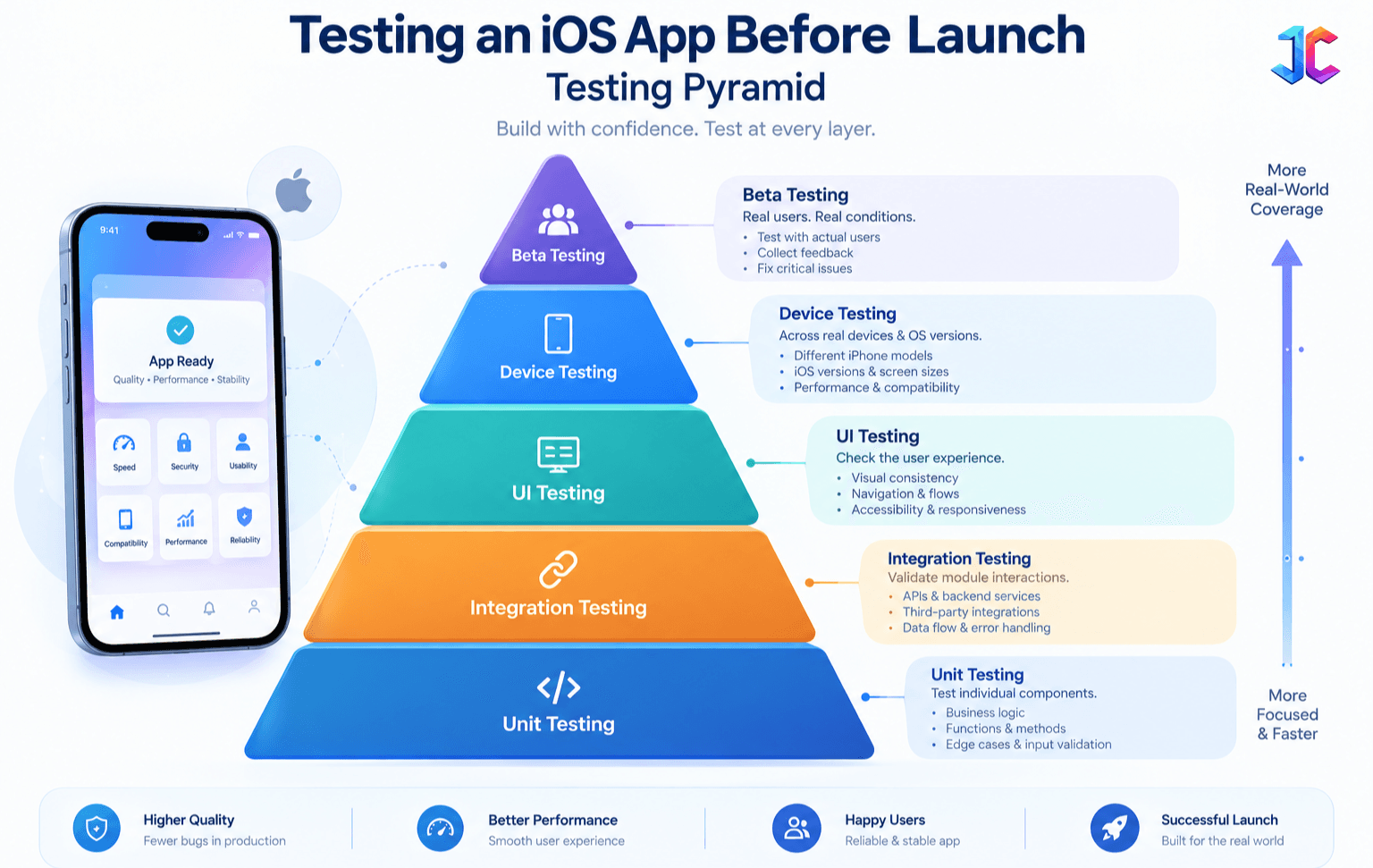
- Unit Testing: Useful for business rules, calculations, validation, and data transformation.
- Integration Testing: Checks iOS ↔ API, API ↔ database, authentication ↔ backend, and backend ↔ payment provider.
- UI Testing: Tests real journeys such as registration, login, search, booking, checkout, subscription, and account recovery.
- Performance Testing: Checks startup, memory, CPU, battery, network usage, scrolling, and image loading.
- Security Testing: Checks authentication, authorization, session management, sensitive storage, API security, logging, and secrets.
- Real Device Testing: Do not rely entirely on Simulator. Apple specifically recommends testing across supported devices and operating system versions.
TestFlight
TestFlight is the bridge between development and public launch.
Apple workflow is:
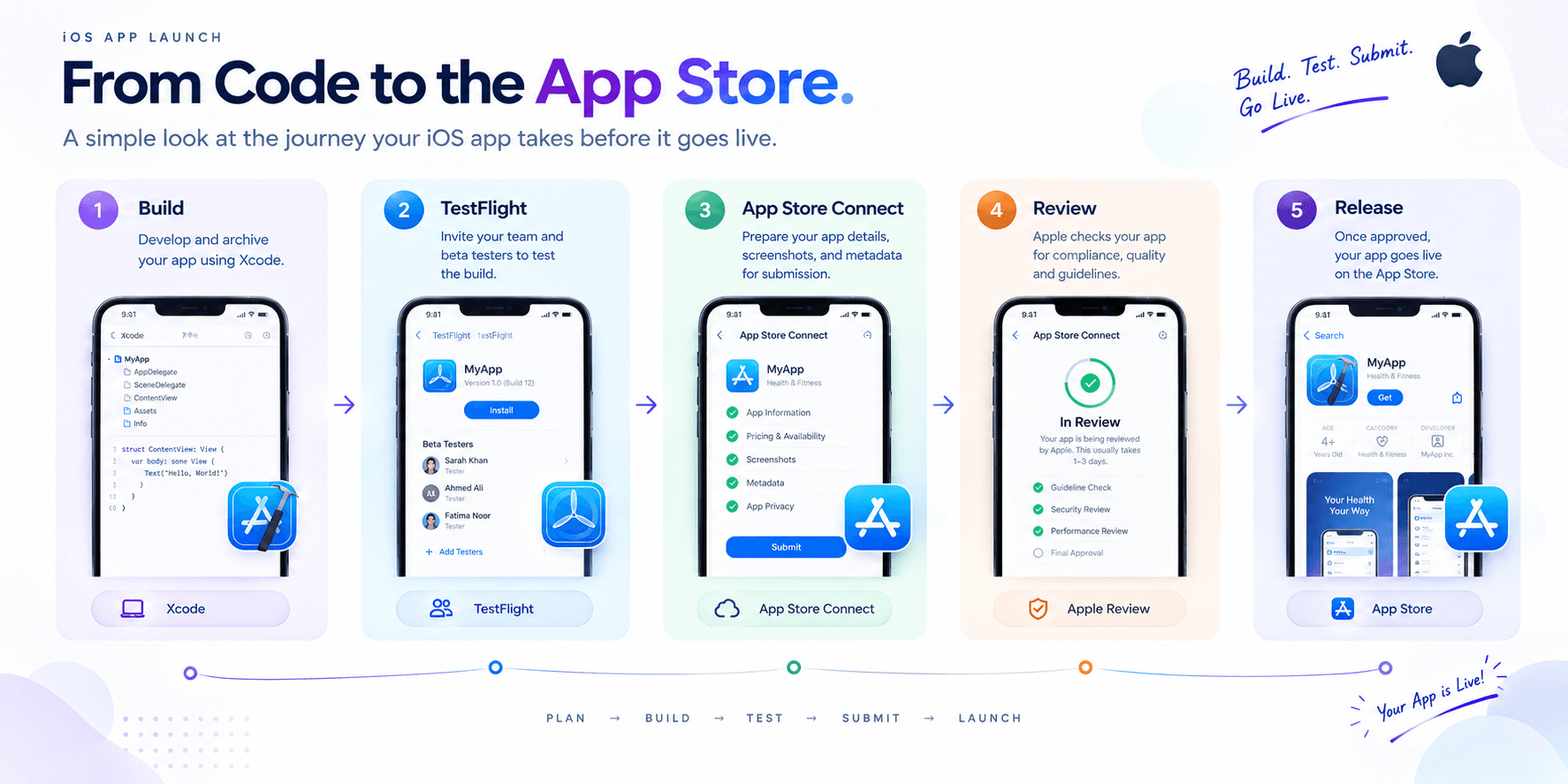
TestFlight builds can be tested for up to 90 days. Apple currently supports up to 100 internal testers and 10,000 external testers.
Use beta testing to find:
- Crashes
- Confusing onboarding
- Broken workflows
- Device-specific bugs
- Slow API calls
- Notification problems
- Accessibility issues
- Unexpected user behavior
A good TestFlight process is not simply:
"Does the app open?" It should test the actual customer journey.
App Store Preparation
Do not wait until the final day to prepare App Store materials. Apple current publishing workflow requires you to prepare the app record, metadata, pricing/availability and build before submission. After submission, App Review evaluates the app; once approved, release can be managed manually, automatically or in phases.
Prepare:
- Apple Developer account
- App Store Connect record
- Bundle ID
- App icon
- Screenshots
- App description
- Support information
- Privacy information
- Age rating
- Review notes
- Demo credentials if needed
- In-App Purchases
- Subscription configuration
- Production backend
Apple App Review: What Can Go Wrong?
App Review evaluates privacy, security, safety, reliability and other requirements. Apple explicitly recommends reviewing the App Review Guidelines early in development rather than waiting until submission.
| Risk | Prevention |
|---|---|
| Broken functionality | Test complete workflows |
| Required login | Provide appropriate review access |
| Privacy mismatch | Match declared and actual data use |
| Broken backend | Keep review environment functional |
| Incomplete purchases | Test purchase and restoration |
| Misleading metadata | Ensure screenshots reflect the app |
| Crashes | Test release builds |
| Minimum-functionality concerns | Provide meaningful app functionality |
| Privacy-policy issues | Prepare required privacy information |
A key example is Apple Guideline 4.2, which addresses minimum functionality and can create problems for applications that essentially behave like repackaged websites. The lesson is simple:
App Review requirements should influence product decisions before development, not after rejection.
App Store Launch Is Not Product Success
Approval is only a distribution milestone. An approved app can still have:
- Poor activation
- Low retention
- High uninstall rates
- Weak conversion
- Confusing onboarding
- Poor ratings
- High crash rates
Therefore the real lifecycle is:
Approval → Release → Measure → Learn → Improve.
Analytics Should Be Designed Before Development
Define important events before developers implement features (e.g., app_opened, onboarding_completed, account_created, search_started, item_viewed, checkout_started, purchase_completed, subscription_started, feature_used, notification_opened).
Then define what each event means. For example, onboarding_completed measures activation, checkout_started → purchase_completed measures payment funnel conversion, and feature_used shows whether an expensive feature is actually being adopted. Apple App Store Connect Analytics provides data across acquisition, engagement, monetization, retention and app quality.
App Store Optimization
ASO connects product positioning with acquisition. Important areas include:
App title
Subtitle
Description
Screenshots
App previews
Ratings
Reviews
Localization
Search positioning
Product-page conversion If many users view the product page but few download it, investigate:
Positioning
Screenshots
Value proposition
Reviews
Pricing
Product-market fit
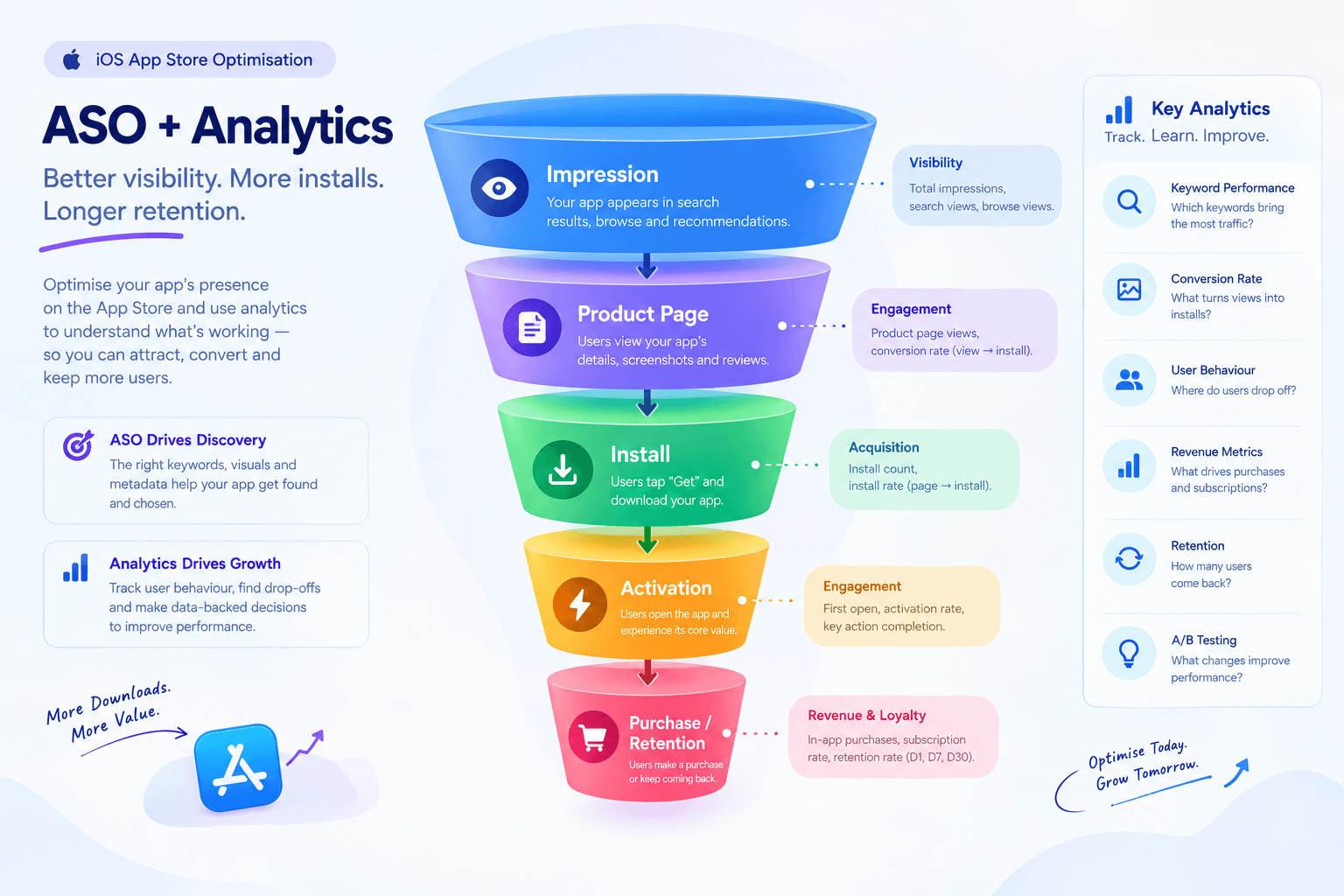
ASO should be treated as an ongoing optimization process rather than a one time keyword exercise.
Monetization
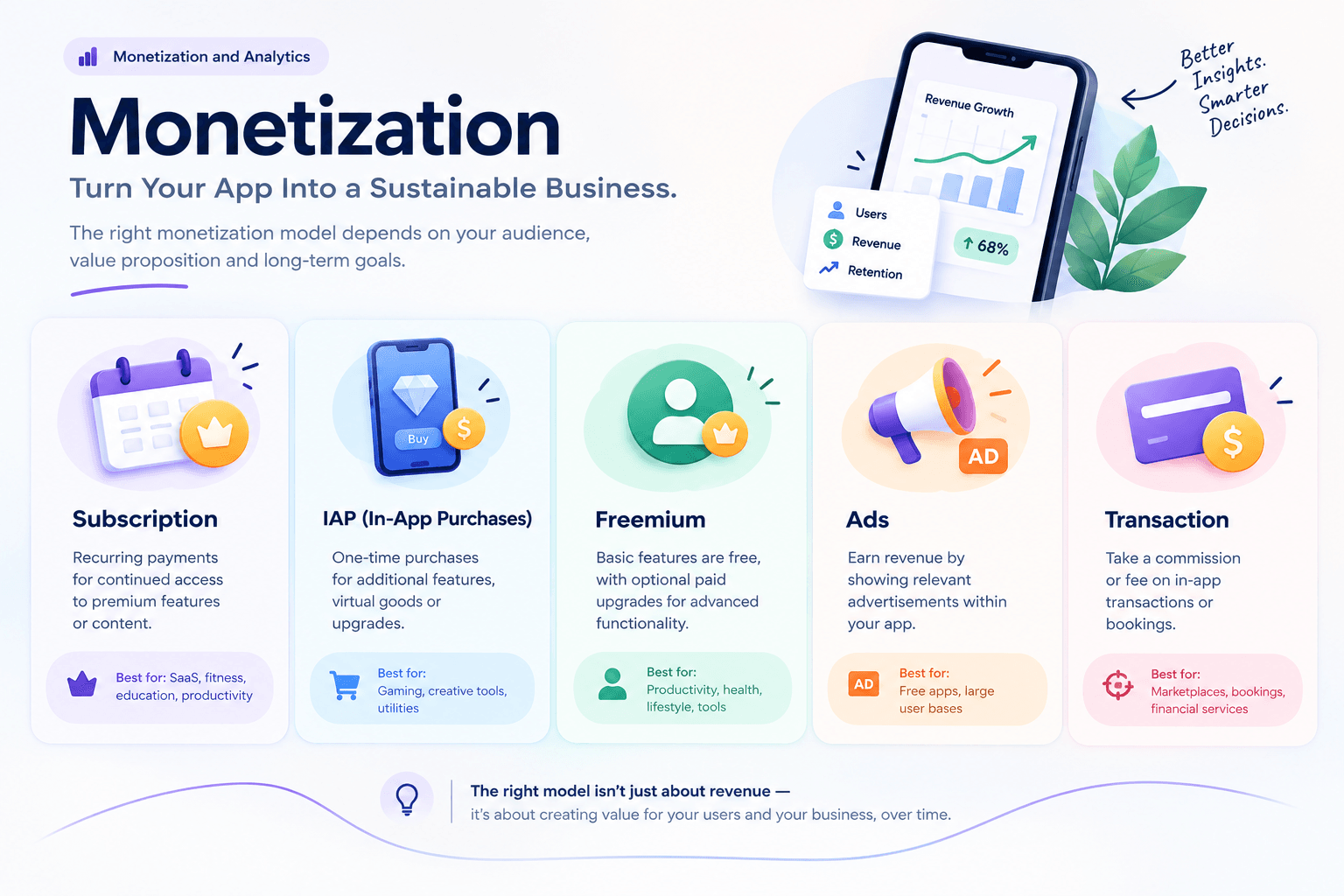
The monetization model should influence architecture from the beginning. Common models include:
- Subscription: Suitable for recurring value products such as SaaS, fitness, education, productivity, and content.
- In-App Purchases: Useful for digital products and content.
- Freemium: Free core functionality with paid capabilities.
- Advertising: Useful for high volume products with frequent engagement.
- Transactional: The business earns through transactions or commissions.
The important point is to design the payment and entitlement architecture before monetization becomes difficult to retrofit.
2026 iOS Changes Developers Should Know
The biggest 2026 changes affect product architecture and distribution strategy:
Xcode 26 and iOS 26 SDK
Apple states that, as of April 28, 2026, iOS and iPadOS apps uploaded to App Store Connect must be built with the iOS/iPadOS 26 SDK or later. This makes SDK planning part of release planning.
App Intents
App Intents can expose application actions and information to system experiences such as Siri, Shortcuts and Spotlight, including Apple newer intelligence driven experiences. Instead of thinking only "Which screens does my app have?", teams can also ask "Which useful actions should the system be able to perform using my app?"
For example, a travel application might expose:
- Show itinerary
- Find reservation
- Add booking
- Display trip details
Foundation Models and On-Device Intelligence
Apple current developer ecosystem provides frameworks for integrating Apple Foundation Models into applications for:
- Text summarization
- Classification
- Content transformation
- Intelligent search
- Context-aware experiences
- On-device AI workflows
But AI should be added because it solves a real product problem and not because it is fashionable.
Offline-First and Connectivity Planning
Ask:
- What happens when the network disappears?
- Can users continue working?
- What data should be cached?
- What happens when changes conflict?
- Which actions can be queued?
- What happens after reconnection?
For a field service or logistics application, offline functionality can be a core requirement. For a simple content application, it may not be worth the added complexity. When considering how to develop a mobile app in 2026, offline support should be treated as a product decision based on real user needs, rather than an automatic architecture requirement.
Ownership and Vendor Risk
If an external team builds your application, make sure your company owns:
- Git repository
- Apple Developer account
- App Store Connect account
- Cloud accounts
- Domain
- Analytics account
- Payment accounts
- Third-party service accounts
- Source code
- Design files
- Documentation
Avoid a situation where:
"The agency owns the App Store account and we'll transfer it later."
Account ownership should be established correctly from the beginning. This is one of the most practical areas where development projects can create long-term business risk.
Build In-House, Hire Freelancers, or Use an Agency?
- Freelancer: Useful for small projects, defined features, and short term work. Potential weakness: One person may not cover product, UX, backend, QA and DevOps.
- In-House Team: Useful for long term products, continuous development, deep internal ownership, and strategic technology.
- Development Company: Useful when you need product discovery, UX, iOS, backend, QA, and DevOps launch support under one delivery structure.
- Dedicated Team: Useful when you already have product leadership but need additional engineering capacity.
Questions to Ask an iOS Development Company
- Technical Ask:
- What Swift architecture do you use?
- How do you structure SwiftUI applications?
- How do you handle UIKit?
- What is your testing strategy?
- How do you manage CI/CD?
- How do you handle security?
- How do you monitor production performance?
- Product Ask:
- How do you define an MVP?
- Who owns requirements?
- How are scope changes handled?
- How often are builds delivered?
- How do you measure product success?
- Ownership Confirm:
- Source-code ownership
- Git ownership
- Apple account ownership
- App Store Connect ownership
- Cloud ownership
- Design ownership
- Documentation
- Post-launch Ask:
- Who fixes production bugs?
- Who handles iOS updates?
- How are security issues handled?
- What is the support SLA?
- How are future features estimated?
Red Flags When Hiring Developers
Be cautious if a vendor:
- Gives a fixed price before understanding the product
- Talks only about screens
- Cannot explain backend architecture
- Has no testing strategy
- Ignores App Review
- Does not discuss security
- Does not clarify ownership
- Promises every feature extremely quickly
- Uses the same technology stack for every project
- Treats maintenance as an afterthought
A strong technical partner should explain why a particular architecture or technology fits your product.
Can You Develop iOS Apps on Windows?
Some cross platform development work can be performed on Windows. However, the complete native Apple development and distribution workflow depends on Apple toolchain, particularly Xcode. For 2026, Apple current submission workflow is centered around Xcode 26 and the required platform SDKs. Therefore, serious native iOS development should include access to:
- A Mac
- Remote Mac infrastructure
- Or a development team with Mac infrastructure
Do not leave this requirement until the deployment stage.
Example: Fintech App
- MVP: Authentication, account dashboard, transactions, transfers, and notifications.
- Architecture: Native iOS client + secure APIs + transaction backend + audit logging.
- Key risks: Authentication, authorization, transaction accuracy, fraud, data protection, and network interruptions. The interface may be relatively simple while the engineering requirements are extremely demanding.
Example: E-Commerce App
- MVP: Product catalog, search, product detail, cart, checkout, orders, and notifications.
- Architecture: iOS client + commerce APIs + payment system + inventory integration.
- Hidden complexity: The number of screens may be modest, but the backend must coordinate inventory, pricing, promotions, payments, orders, shipping, and customer accounts.
Example: Field-Service App
- MVP: Technician login, job list, job details, offline access, photo capture, QR scanning, signature, job completion, and notifications.
- Key architectural requirement: Offline synchronization may matter more than visual complexity.
- Testing priority: Test poor connectivity, offline mode, sync conflicts, large photo uploads, battery usage, background behavior, and permission denial.
Post-Launch Maintenance
Launching the app creates an ongoing engineering obligation. Maintenance includes:
- iOS updates
- Xcode/SDK updates
- Dependency updates
- Security patches
- Crash fixes
- Performance optimization
- API changes
- Device compatibility
- App Store compliance
- New features
A useful financial principle is to budget for maintenance from day one rather than assuming the initial build is the final expense.
Some 2026 industry guides use roughly 15–25% of initial development cost annually as a planning benchmark, but the appropriate number depends heavily on product complexity and release frequency.
The Complete iOS Development Framework
The strongest process looks like this:
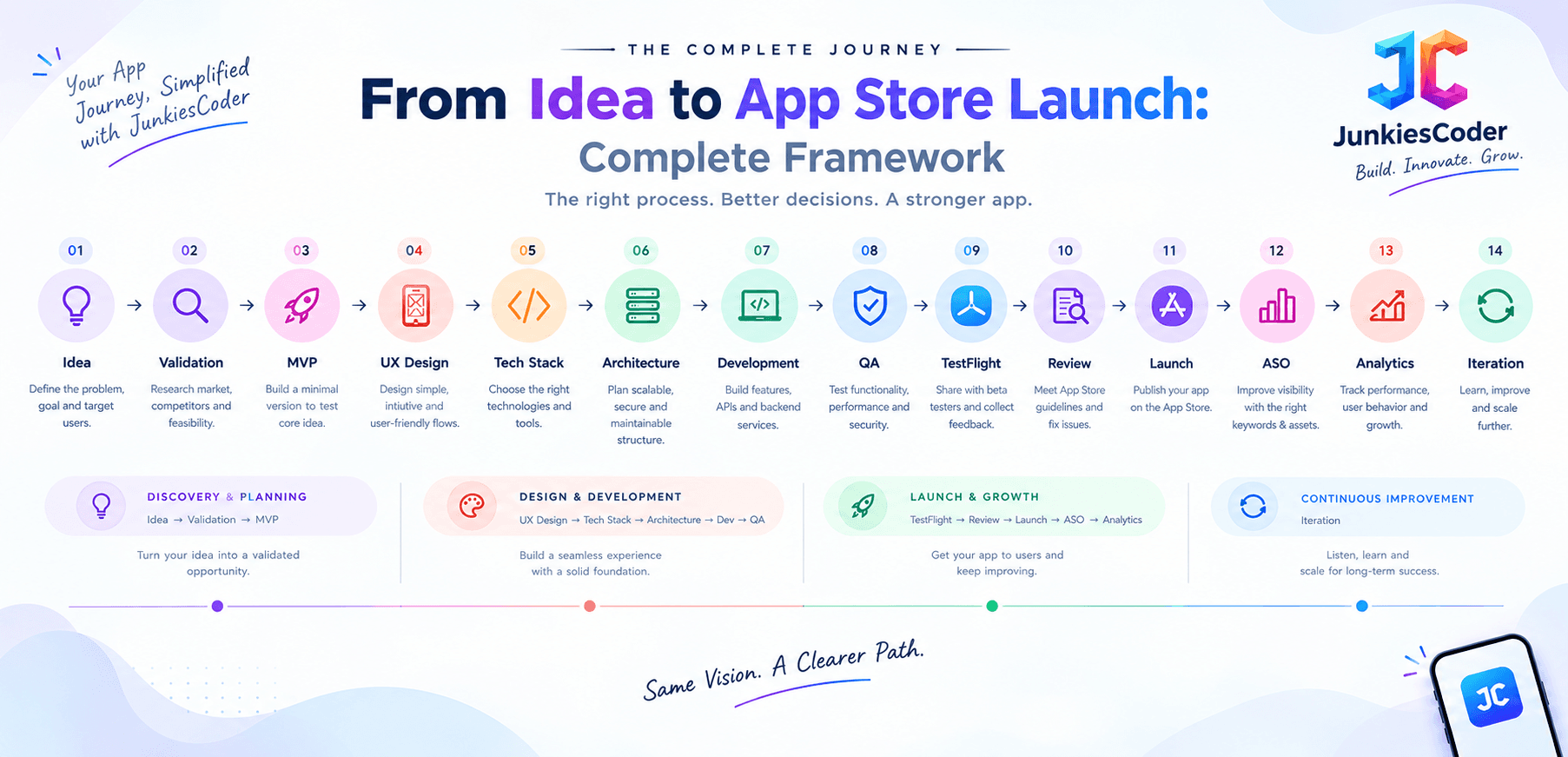
Every stage should produce either evidence, a decision, or a working product increment.
Complete iOS App Development Checklist
Before Development
- Problem validated
- Target users identified
- Competitors researched
- Platform decision made
- MVP defined
- Success metrics defined
- User journeys mapped
- Budget planned
- Timeline estimated
Product Design
- Wireframes
- UI design
- Design system
- Loading states
- Empty states
- Error states
- Accessibility
- Dark Mode
- Dynamic Type
Engineering
- Swift architecture
- SwiftUI/UIKit strategy
- API contracts
- Backend
- Database
- Authentication
- Authorization
- Security
- Push notifications
- Payments
- Analytics
- CI/CD
- Logging and monitoring
QA
- Unit tests
- Integration tests
- UI tests
- Performance tests
- Security testing
- Accessibility testing
- Real device testing
- Network condition testing
- TestFlight testing
App Store
- Developer account
- App Store Connect
- Bundle ID
- App icon
- Screenshots
- Description
- Privacy information
- Age rating
- Review notes
- Demo credentials if required
- Production backend
- In-App Purchases tested
- Required SDK/Xcode version
Post-Launch
- Crash monitoring
- Analytics
- Reviews monitoring
- Retention tracking
- Conversion tracking
- ASO
- Security updates
- iOS compatibility
- Feature roadmap
- Maintenance budget
Frequently Asked Questions About iOS App Development
What are the seven stages of iOS app development?
A practical seven-stage process is:
- Discovery
- Product planning
- UI/UX design
- Architecture
- Development
- Testing
- Launch and iteration The important point is that each stage should have a decision gate rather than simply passing work to the next team.
How much does it cost to build an iOS app in 2026?
There is no universal price. Current published estimates vary widely because "iOS app" can mean anything from a simple utility to an enterprise platform with payments, offline functionality, real-time systems, compliance and multiple integrations. Recent 2026 market estimates span from several lakh rupees for simpler Indian projects to substantially higher budgets for complex applications. The best estimate comes after defining scope, architecture, backend and integrations.
How long does an iOS app take to build?
A prototype can take days or weeks. A focused MVP commonly takes several weeks to several months. Complex applications can take many months. The largest schedule risks are usually unclear requirements, integrations, backend complexity, security and QA.
Is SwiftUI better than UIKit?
They solve related but different needs. Swift is the programming language, SwiftUI is Apple declarative UI framework, and UIKit is Apple established UI framework. For a new application, SwiftUI is often an attractive starting point, but the right decision depends on the project.
Is native iOS better than Flutter or React Native?
Not automatically. Native is generally stronger when Apple specific capabilities, performance or platform integration are central. Cross platform can be attractive when iOS and Android need to share substantial code and speed or team efficiency is the primary constraint.
Can I build an iOS app on Windows?
Some cross platform work can be done on Windows, but native iOS development and Apple complete distribution workflow rely on Apple development tooling, particularly Xcode. Apple current 2026 submission requirements are tied to Xcode 26 and the relevant SDKs.
How many testers can use TestFlight?
Apple currently supports up to 100 internal testers and 10,000 external testers per app. TestFlight builds can be tested for up to 90 days.
What happens after an app is submitted to Apple?
The build enters App Review where Apple evaluates the application against its requirements. If issues are identified, the developer receives review information and can address the problems before resubmitting. Once approved, the app can be released according to the configured release method.
What is the biggest mistake when developing an iOS app?
The biggest mistake is usually building too much before validating the core product hypothesis. A focused MVP with a clear customer problem is generally a stronger starting point than a feature heavy application with uncertain demand.
Final Takeaway
Successful iOS development is not primarily about writing Swift faster. It is about making the right decisions in the right order: Validate the problem. Choose the right platform. Define the smallest useful MVP. Choose technology based on actual product constraints. Design architecture before complexity becomes expensive. Build security, accessibility and analytics into the product. Test on real devices and real user journeys. Prepare App Store requirements before submission. Use TestFlight to discover problems before customers do. Treat App Review as a product-readiness checkpoint. Measure what users actually do after launch.
Then use that evidence to decide what to build next.
The strongest iOS development process is therefore not:
Idea → Code → App Store It is:
Idea → Evidence → MVP → Architecture → Product → Validation → Launch → Learning → Iteration
That is the difference between simply building an iOS application and building an iOS product that can continue to evolve after its first release.