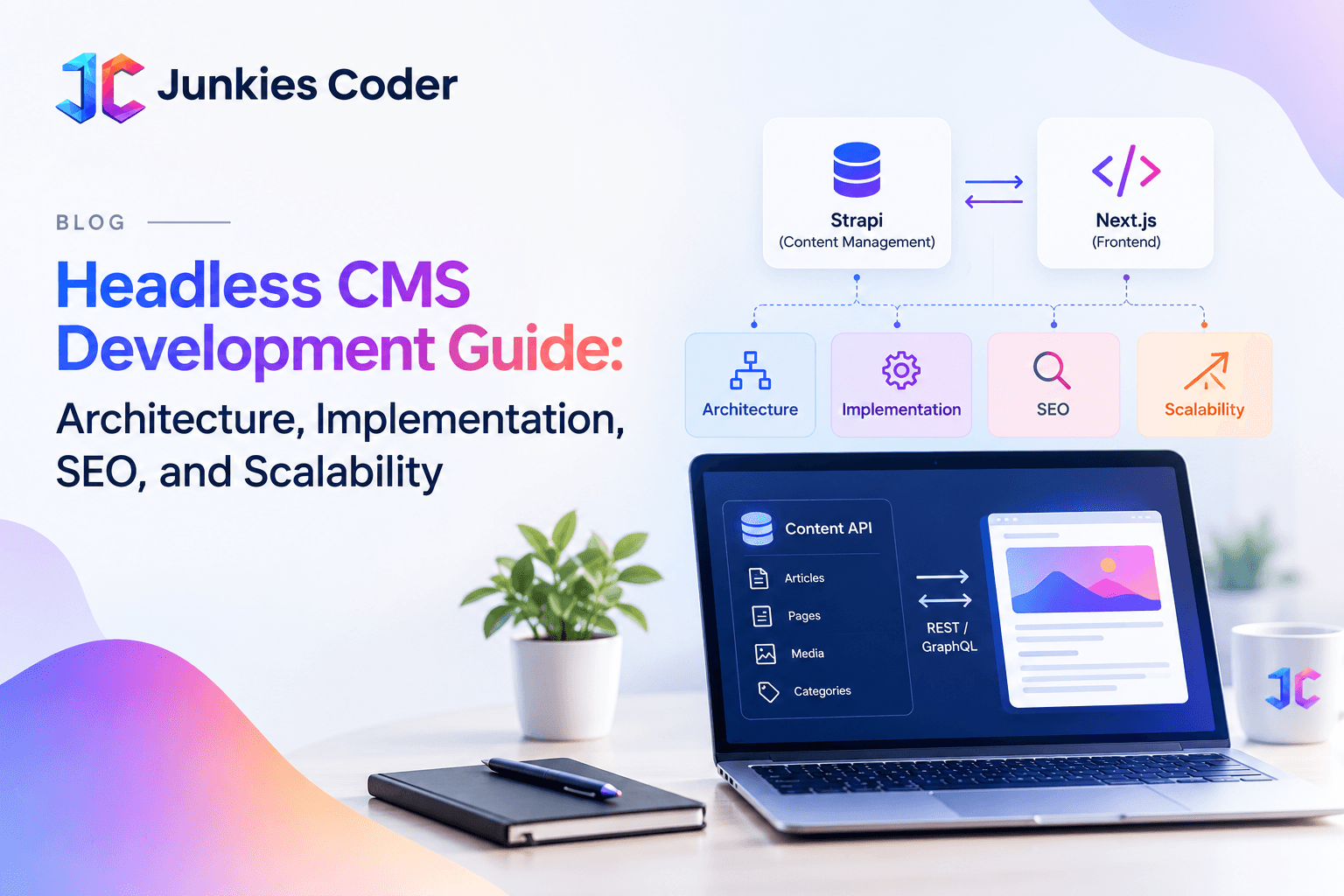
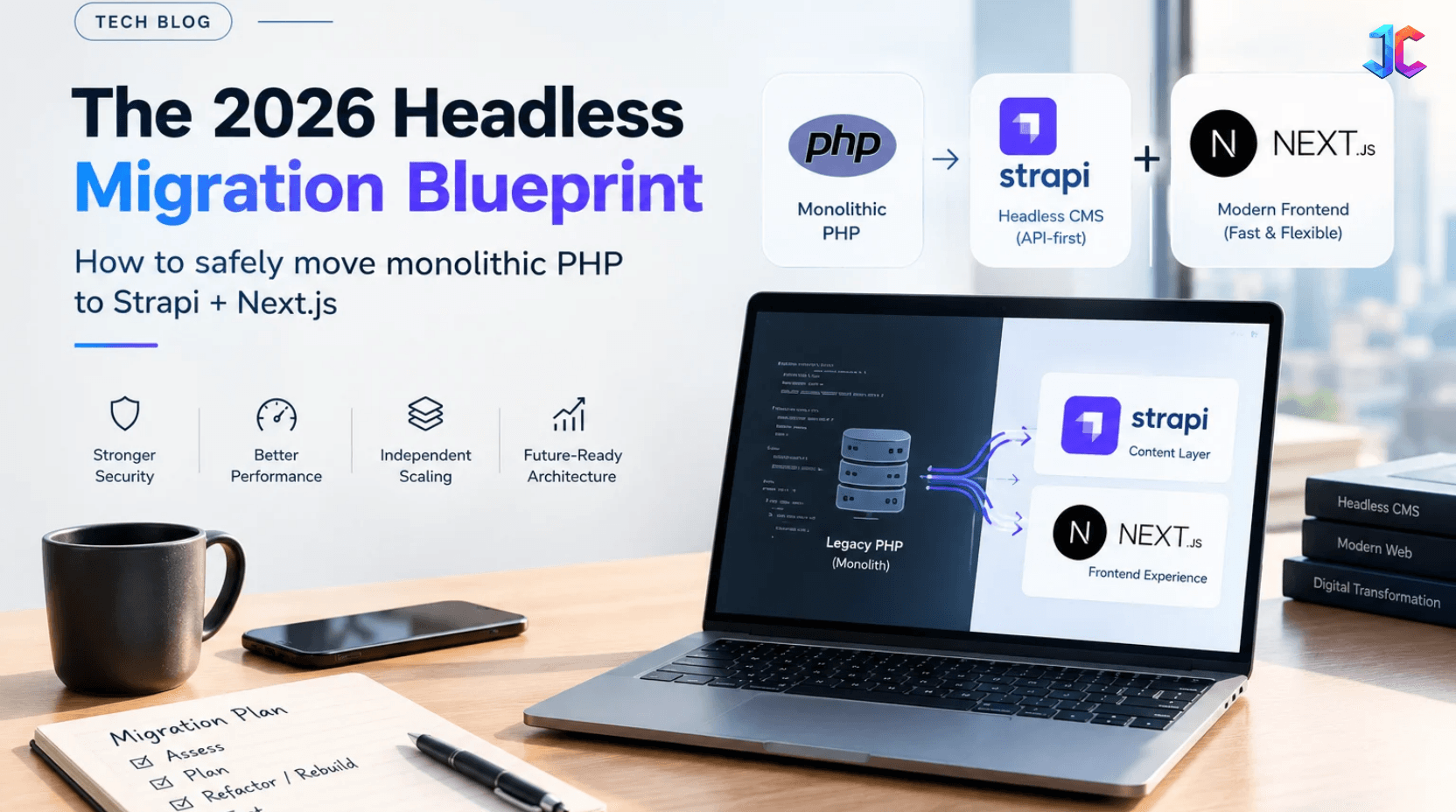
- Architectural Paradigm Shift: Moving from legacy monolithic CMS databases such as WordPress, Drupal, or custom PHP to Strapi 5 requires translating denormalized Entity, Attribute, Value (EAV) tables and HTML text blobs into structured, typed components and dynamic zones.
- Strapi 5 Stable Document Identifiers: In Strapi 5, relationships, localization, and draft and publish workflows use stable documentId strings rather than auto-incrementing integer IDs. Your ETL pipeline must preserve a persistent ID to documentId lookup map.
- Polymorphic and Junction Table Resolution: Reconstructing WordPress term relationships, Drupal entity references, and polymorphic associations requires a deterministic two-pass resolution pipeline that links associations only after all target documents exist.
- Idempotent ETL Pipeline Architecture: Production migration pipelines must enforce deterministic record identifiers, persistent checkpointing, and retry-safe upsert logic to ensure jobs can resume without creating duplicate records or data drift.
- AST-Driven Page Builder Ingestion: Monolithic visual builders such as Elementor, Gutenberg, and WPBakery must be recursively transformed from serialized layout trees into intermediate JSON Abstract Syntax Trees before compiling into Strapi Dynamic Zone components.
- Zero-Downtime CDC Cutover: Large-scale enterprise migrations capture live database mutations between initial data dumps and DNS cutovers using Change Data Capture (CDC) over MySQL binlog or PostgreSQL logical replication.
- Multilingual Entity Mapping: WPML, Polylang, and Drupal translations map to Strapi 5's unified document model by populating language variants under the same documentId with explicit locale codes and localized SEO metadata.
Quick Answer
How do you map legacy content types, relationships, and media to Strapi? Mapping legacy data requires auditing monolithic database schemas, converting serialized Entity, Attribute, Value rows into structured Strapi 5 Collection Types and Components, ingesting files into the upload plugin with full metadata, and maintaining a bi-directional ID translation table to link foreign relationships during an automated ETL pipeline.
Migrating legacy data to Strapi is not a flat database table export; it is an architectural translation from unstructured templates and serialized database rows into normalized, componentized API-first schemas that preserve relational integrity, media metadata, and editorial workflows.
When engineering teams attempt a raw database dump from monolithic platforms like WordPress, Drupal, or custom Laravel systems, they import legacy technical debt directly into modern headless systems. Executing legacy PHP application modernization requires systematic schema modeling, repeatable ETL scripts, and strict relational reconciliation.
Why Direct Database Dumping Fails: The Monolithic to Headless Shift
Monolithic content management systems were engineered around server-rendered HTML templates. Platforms like WordPress store structured post metadata inside the wp_postmeta table using an Entity, Attribute, Value (EAV) design pattern, where a single post record can trigger dozens of separate database queries to assemble simple custom fields.
During comprehensive PHP migration initiatives, teams frequently discover that legacy database structures rely heavily on unindexed postmeta keys that cause severe query throttling. Furthermore, legacy platforms frequently store layout configurations, page builder components, and styling rules serialized inside large text or blob columns. If you directly copy these legacy database rows into a headless CMS, the frontend application receives dirty HTML strings laden with deprecated shortcodes, inline CSS styling, and broken asset paths.
Strapi 5 operates on a fundamentally different paradigm. Content is modeled as structured API resources with strict data typing, native JSON support, repeatable components, and clean relational schemas. This separation gives frontend frameworks like Next.js clean JSON payloads that can be statically generated or incrementally revalidated at the network edge.
When modernizing monolithic platforms through dedicated CMS migration services, decoupling the content model from the display layer is the primary prerequisite for building scalable digital products. Organizations that previously relied on routine PHP upgrade services often reach an architectural ceiling where simply upgrading runtime versions fails to resolve monolithic database bottlenecks.
Strapi 5 Document Identity and Version Mapping Architecture
Before writing migration scripts, architects must understand how Strapi 5 handles document lifecycle states, versions, and relationships. Strapi 5 introduces a fundamental architectural departure from earlier versions through the implementation of stable document identifiers.
Stable Document Identifiers (documentId) vs Legacy Primary Keys
In legacy monolithic relational databases, every record is identified by an auto-incrementing integer primary key (such as wp_posts.ID or node.nid). In earlier headless CMS iterations, relationships were similarly anchored to auto-incrementing integers. However, this model breaks down when supporting concurrent drafts, version histories, and multi-region localization, because each state revision creates a new database row with a different auto-incrementing primary key.
Strapi 5 resolves this through permanent, unique string identifiers known as documentId. While internal SQL rows still maintain an integer id for low-level storage indexes, all public API queries, relationship bindings, and Document Service mutations operate exclusively on documentId.
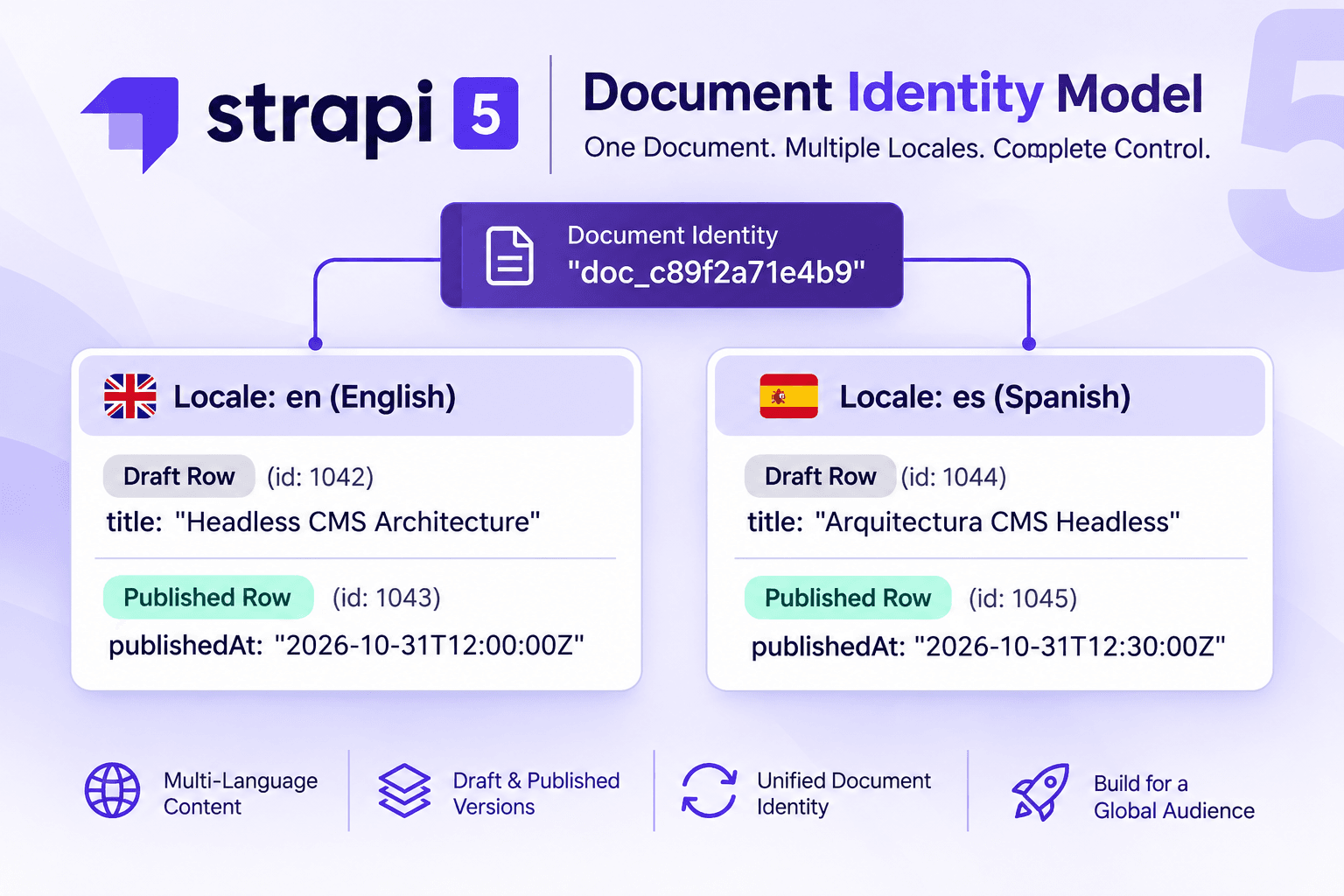
When building an enterprise PHP application migration pipeline, your migration scripts must establish and maintain a persistent translation table. This mapping ensures that whenever a legacy record references a foreign entity, the loader script resolves the foreign key to the permanent documentId rather than an ephemeral internal database integer.
For engineering teams evaluating architectural division across modern stacks, our companion guide on What Moves to Strapi, What Moves to Next.js, and What Stays Backend outlines how to isolate content repositories from transactional microservices.
Strapi 5 Structural Types
Strapi organizes data models into four fundamental structural patterns:
- Collection Types: Entities with multiple instances, such as blog posts, authors, service pages, product catalogs, and case studies.
- Single Types: Unique, standalone entries that exist once across the application, such as global site configurations, navigation menus, and company privacy policies.
- Components: Reusable, modular field structures that can be nested inside Collection Types or Single Types. Components can be non-repeatable (such as an SEO metadata block) or repeatable (such as an FAQ accordion or image gallery).
- Dynamic Zones: Ordered arrays that accept multiple different components, empowering marketing teams to assemble custom page layouts without developer intervention.
Reverse Engineering Legacy EAV Schemas and Custom Field Normalization
Monolithic CMS platforms store custom attributes using Entity, Attribute, Value (EAV) tables. In WordPress, wp_postmeta stores millions of rows consisting of post_id, meta_key, and meta_value. In Drupal, custom fields are fractured across dozens of individual SQL tables (such as node__field_subtitle and node__field_price).
Deconstructing Serialized PHP Arrays
The most challenging legacy data pattern is serialized PHP strings. Monolithic platforms frequently serialize complex configurations directly into text columns:
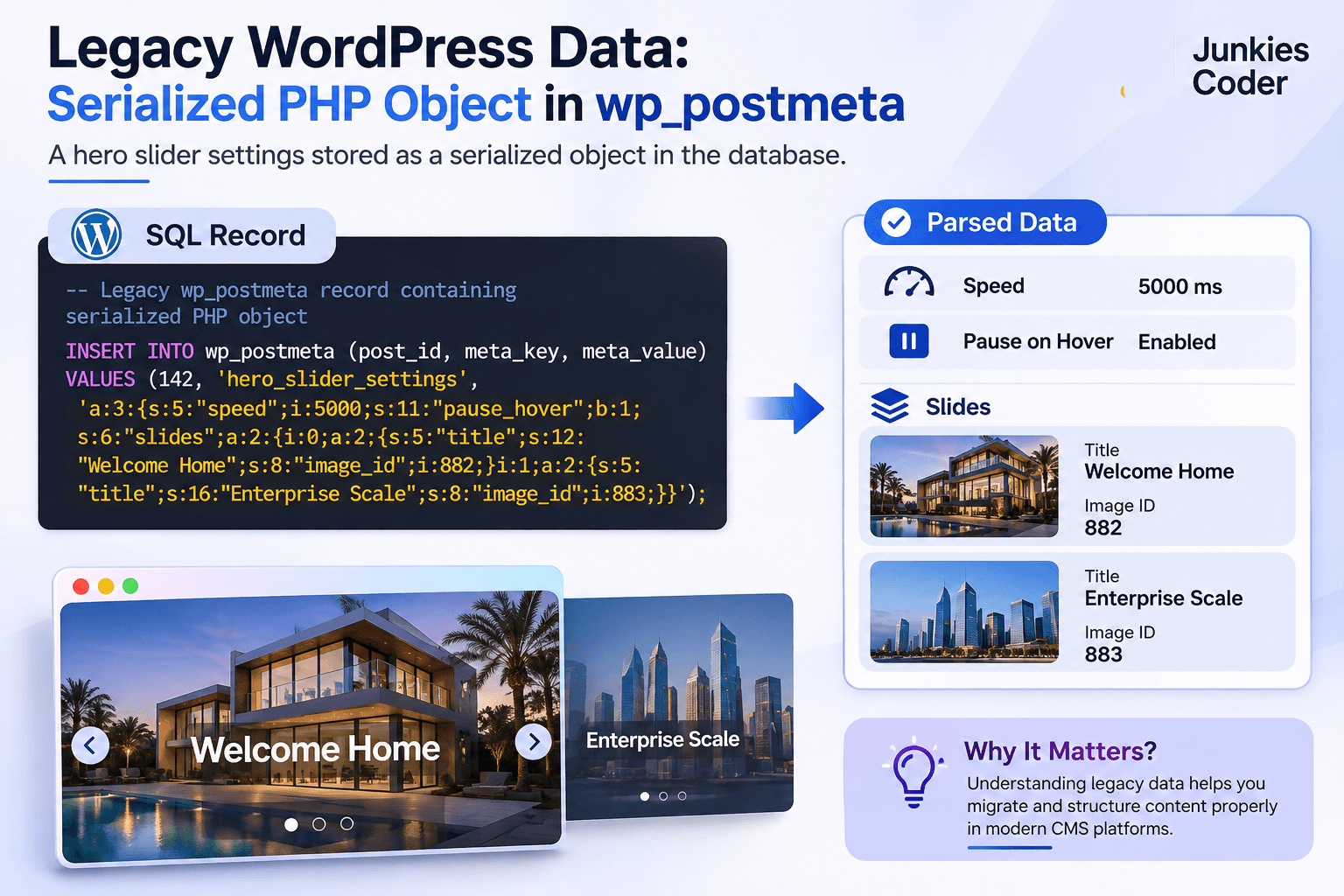
Attempting to query or parse these records directly in SQL results in fragile string parsing errors. Your ETL extraction script must unpack these structures using PHP serialization parsers or specialized Node.js packages (such as php-unserialize), validate their internal structures, and convert them into strongly typed Strapi schemas.
Field Type Normalization Rules
Legacy databases treat almost everything as unstructured strings or text blobs. Strapi enforces strict data typing. Your ETL transformation layer must normalize legacy values into explicit Strapi data types:
- Dates and Timestamps: Legacy MySQL datetime stamps or Unix integer timestamps must be normalized to strict ISO-8601 strings (for example,
2026-10-31T08:30:00.000Z). - Booleans: Legacy databases often represent flags as integer
0or1, string"yes"or"no", or serializedb:1;. These must be coerced to strict JavaScript booleans. - Numbers and Currency: Monolithic systems frequently store prices as formatted text (such as
"$1,499.00"). The ETL pipeline must sanitize currency strings, stripping symbol characters and commas, and casting the value into a 64-bit float or decimal field. - Enumerations: Inconsistent category strings must be normalized against pre-defined Strapi enumeration lists, mapping invalid or obsolete legacy entries to safe defaults.
The Complete Legacy Content Mapping Blueprint
| Legacy Monolithic Structure | Monolithic Example | Strapi 5 Target Structure | Transformation Logic | Relational Integrity Risk |
|---|---|---|---|---|
| Primary Content Table | wp_posts (post_type = 'page') | Collection Type: api::page.page |
Map title, slug, creation date, and status. Convert content into Markdown or Blocks. | Duplicate slugs and unmapped draft publication states |
| Serialized Custom Fields (EAV) | wp_postmeta (meta_key = 'pricing_tiers') | Repeatable Component: pricing_table |
Unserialize PHP arrays, validate schema, and map into nested component fields. | Missing keys, invalid scalar values, and type mismatch errors |
| Hierarchical Taxonomies | wp_terms, wp_term_taxonomy | Collection Type: api::category.category |
Map categories as self-referencing One-to-Many relations to preserve parent-child trees. | Broken tree hierarchy and circular reference loops |
| Author Attribution | wp_users, users table | Collection Type: api::author.author |
Extract display name, bio, and social links. Map email for editorial tracking. | Orphaned posts when legacy user accounts are deleted |
| Shortcodes & Form Embeds | [contact-form-7 id="45"] | Dynamic Component: form_embed |
Strip shortcodes; extract form ID and map to a structured form selector component. | Broken interactive lead forms and unrendered strings |
| Page Builder Blobs | Elementor / Gutenberg JSON | Dynamic Zone: page_sections |
Parse serialized layout JSON, extract text and media, and map to pre-built Strapi UI components. | Lost column styling and untranslatable layout blocks |
| SEO Plugin Meta | Yoast / All in One SEO fields | Single Component: shared.seo |
Map meta title, meta desc, canonical URL, and JSON-LD schema into dedicated SEO component. | Missing canonical directives and invalid Open Graph metadata |
Section A: Migrating Polymorphic Relationships and Legacy Junction Tables
Relational integrity is the most critical failure point in legacy content migrations. Monolithic platforms handle associations across diverse entity types through loose junction tables or polymorphic patterns that lack foreign key constraints at the database engine level.
Understanding Legacy Polymorphic Junctions
Consider how WordPress manages taxonomy assignments. The wp_term_relationships table links an object_id to a term_taxonomy_id. However, object_id is polymorphic; it can refer to a standard post, a custom portfolio item, an e-commerce product, or an attachment.
Similarly, in Drupal, entity reference tables store entity_id, bundle, and target_id. In custom PHP and Laravel applications, polymorphic relationships utilize pairs such as taggable_id (integer) and taggable_type (string, such as App\Models\Post or App\Models\Product).
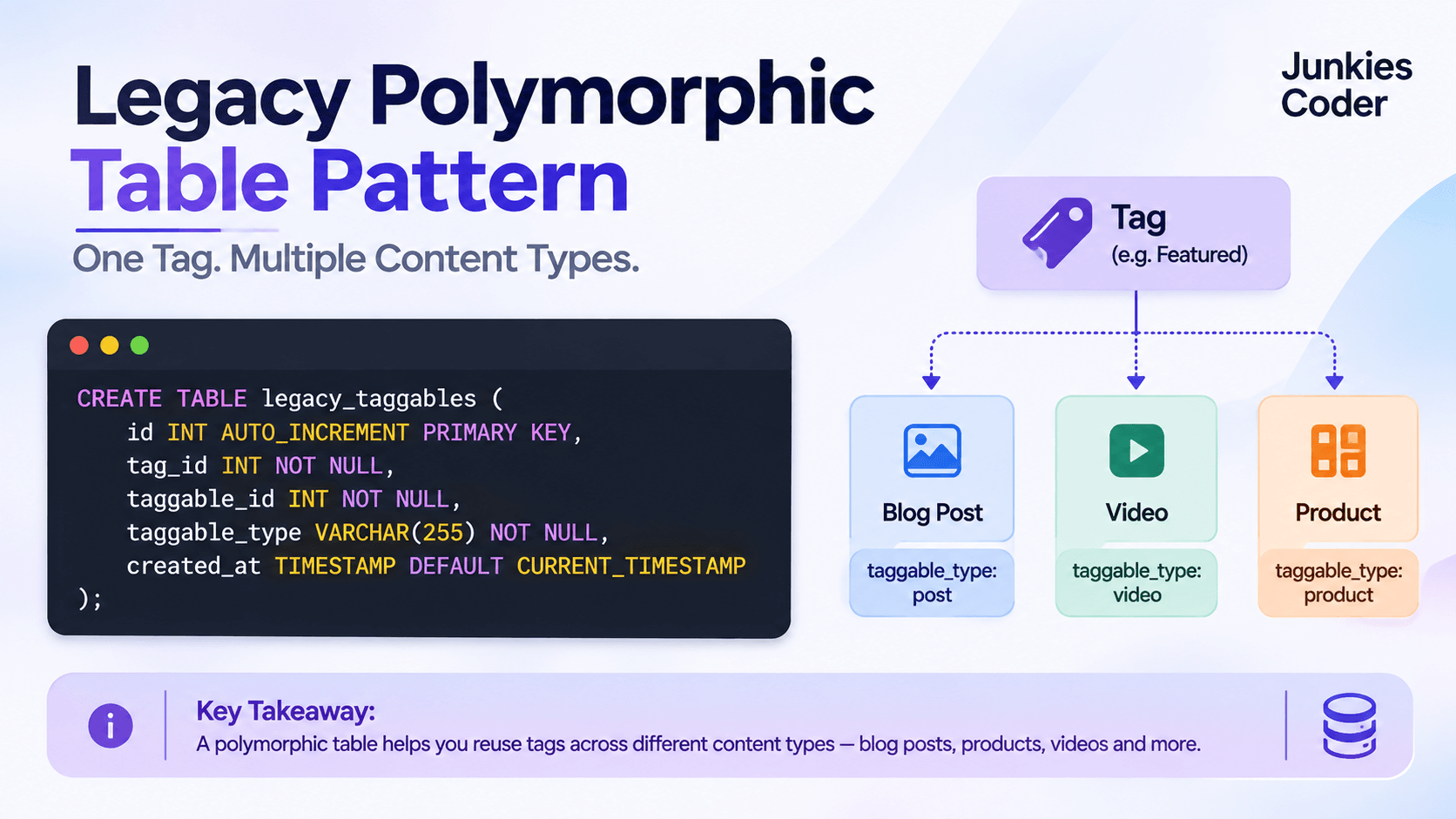
If you attempt to import relationships in a single pass while creating primary records, the ETL script inevitably fails. Child entities reference parent entities that have not yet been extracted, or circular references cause runtime deadlocks. When orchestrating a complex Laravel migration, relational junction tables must be systematically untangled into explicit Strapi bi-directional connections.
The Two-Pass Relational Resolution Strategy
To guarantee zero orphaned records, production migration pipelines must employ a strict two-pass resolution architecture:
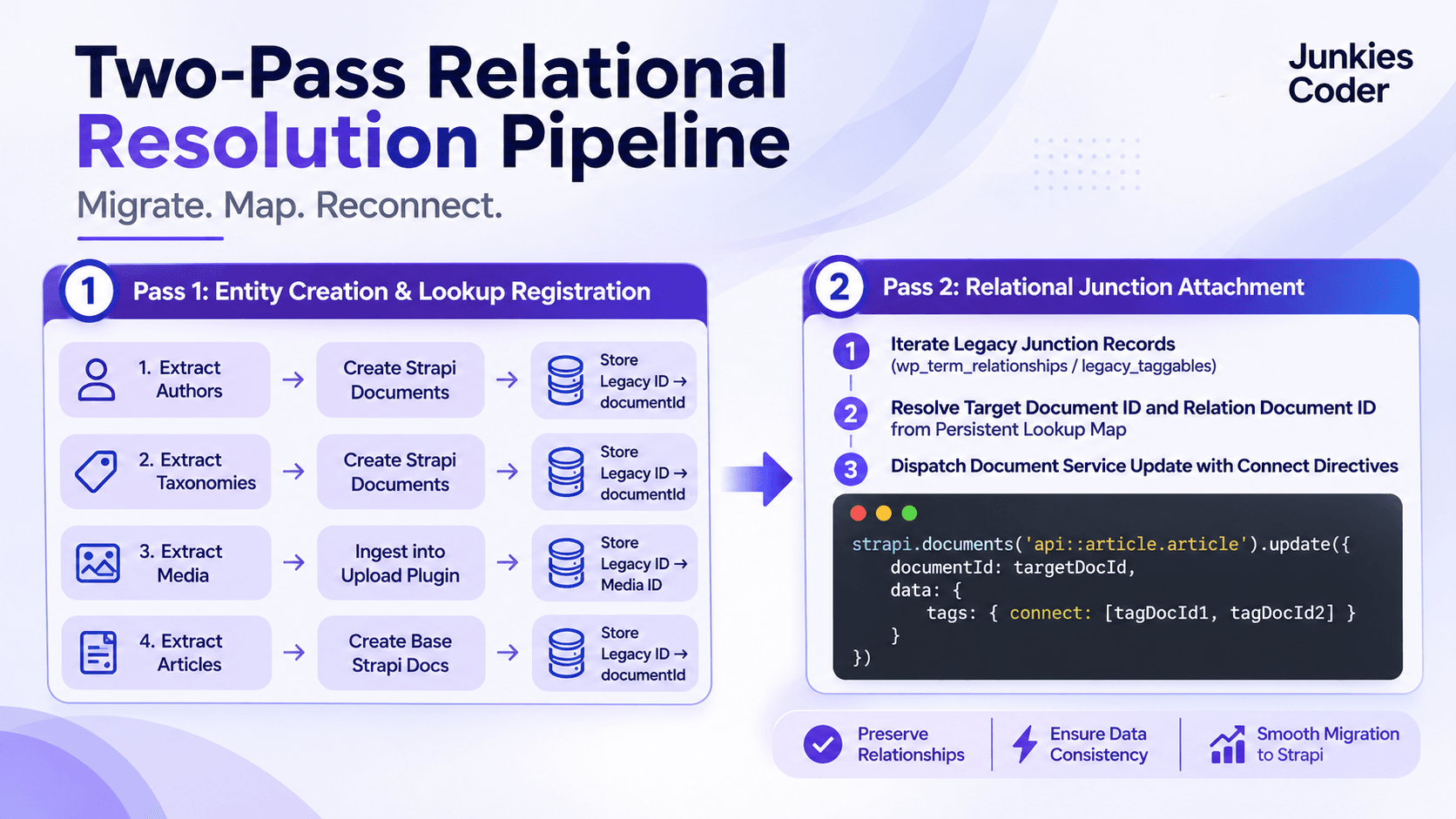
Source-to-Target Relational Mapping Implementation
The following Node.js script demonstrates how our specialized Laravel migration services resolve polymorphic and many-to-many junction tables using the Strapi 5 Document Service API:
Section B: Designing Idempotent ETL Pipelines for Strapi 5
A migration pipeline that cannot be safely rerun after a network timeout, rate limit failure, or database crash is a dangerous liability in enterprise environments. In large-scale systems with hundreds of thousands of documents, partial failures are inevitable.
Executing an enterprise Laravel database migration requires designing idempotent pipelines. An idempotent migration ensures that executing the pipeline multiple times yields the exact same state without producing duplicate documents, corrupted relational links, or redundant media uploads.
Persistent Migration Lookup Table Architecture
The foundation of idempotent ETL design is a dedicated, persistent lookup database. This can be hosted inside an independent SQLite file, a PostgreSQL database, or Redis.
-- Schema for persistent migration lookup tracking
CREATE TABLE migration_lookup (
  id INT AUTO_INCREMENT PRIMARY KEY,
  source_system VARCHAR(50) NOT NULL,          -- e.g., 'wordpress_prod'
  source_table VARCHAR(100) NOT NULL,          -- e.g., 'wp_posts'
  source_id VARCHAR(100) NOT NULL,             -- e.g., '4192'
  strapi_uid VARCHAR(100) NOT NULL,            -- e.g., 'api::article.article'
  strapi_document_id VARCHAR(64) NOT NULL,     -- Strapi 5 permanent documentId
  strapi_locale VARCHAR(10) DEFAULT 'en',      -- Locale code
  content_checksum CHAR(64) NOT NULL,          -- SHA-256 hash of transformed source payload
  sync_status VARCHAR(20) DEFAULT 'completed', -- 'pending', 'completed', 'failed'
  error_message TEXT NULL,
  last_synced_at TIMESTAMP DEFAULT CURRENT_TIMESTAMP,
  UNIQUE KEY uq_source_record (source_system, source_table, source_id, strapi_locale),
  INDEX idx_strapi_doc (strapi_document_id)
);
Deterministic Reconciliation Strategy
Before dispatching an API request to Strapi, the migration engine calculates a deterministic SHA-256 hash of the normalized source record. It queries migration_lookup:
- Record Does Not Exist: Dispatch
strapi.documents('api::...').create(). Upon success, persist the generateddocumentIdand checksum tomigration_lookup. - Record Exists and Checksum Matches: Skip immediately. The document is already migrated and identical, consuming zero network bandwidth and zero CMS write operations.
- Record Exists but Checksum Differs: Dispatch
strapi.documents('api::...').update()using the storeddocumentId. Update the checksum and timestamp upon success. - Execution Crash Recovery: If the job aborts halfway through a 100,000-record batch, restarting the script immediately resumes where it left off, bypassing previously verified entries.
Production Idempotent Loader Implementation
// idempotent_loader.js: Resilient Strapi 5 ETL ingestion engine
import crypto from 'crypto';
import { db } from './lookup_database.js';
import { strapiClient } from './strapi_connection.js';

export class IdempotentMigrationEngine {
  constructor(sourceSystem, strapiUid) {
    this.sourceSystem = sourceSystem;
    this.strapiUid = strapiUid;
  }

  calculateChecksum(payload) {
    return crypto.createHash('sha256').update(JSON.stringify(payload)).digest('hex');
  }

  async syncRecord(sourceTable, sourceId, payload, isPublished = true, locale = 'en') {
    const checksum = this.calculateChecksum(payload);

    // Check existing lookup state
    const existing = await db.query(
      `SELECT strapi_document_id, content_checksum FROM migration_lookup
       WHERE source_system = ? AND source_table = ? AND source_id = ? AND strapi_locale = ?`,
      [this.sourceSystem, sourceTable, sourceId.toString(), locale]
    );

    if (existing.length > 0) {
      const match = existing[0];
      if (match.content_checksum === checksum) {
        // Document already up to date; bypass completely
        return { action: 'skipped', documentId: match.strapi_document_id };
      }

      // Checksum changed: execute idempotent update
      try {
        const updatedDoc = await strapiClient.documents(this.strapiUid).update({
          documentId: match.strapi_document_id,
          locale: locale,
          data: payload,
          status: isPublished ? 'published' : 'draft'
        });

        await db.query(
          `UPDATE migration_lookup SET content_checksum = ?, last_synced_at = NOW(), sync_status = 'completed'
           WHERE source_system = ? AND source_table = ? AND source_id = ? AND strapi_locale = ?`,
          [checksum, this.sourceSystem, sourceTable, sourceId.toString(), locale]
        );

        return { action: 'updated', documentId: updatedDoc.documentId };
      } catch (error) {
        await this.logError(sourceTable, sourceId, locale, error.message);
        throw error;
      }
    }

    // New record: execute safe creation
    try {
      const createdDoc = await strapiClient.documents(this.strapiUid).create({
        data: payload,
        locale: locale,
        status: isPublished ? 'published' : 'draft'
      });

      await db.query(
        `INSERT INTO migration_lookup
         (source_system, source_table, source_id, strapi_uid, strapi_document_id, strapi_locale, content_checksum, sync_status)
         VALUES (?, ?, ?, ?, ?, ?, ?, 'completed')`,
        [this.sourceSystem, sourceTable, sourceId.toString(), this.strapiUid, createdDoc.documentId, locale, checksum]
      );

      return { action: 'created', documentId: createdDoc.documentId };
    } catch (error) {
      await this.logError(sourceTable, sourceId, locale, error.message);
      throw error;
    }
  }

  async logError(sourceTable, sourceId, locale, message) {
    await db.query(
      `INSERT INTO migration_lookup
       (source_system, source_table, source_id, strapi_uid, strapi_document_id, strapi_locale, content_checksum, sync_status, error_message)
       VALUES (?, ?, ?, ?, 'FAILED', ?, '', 'failed', ?)
       ON DUPLICATE KEY UPDATE sync_status = 'failed', error_message = ?`,
      [this.sourceSystem, sourceTable, sourceId.toString(), this.strapiUid, locale, message, message]
    );
  }
}
Section C: Migrating Page Builder JSON into Strapi Dynamic Zones
Monolithic web platforms frequently leverage drag-and-drop page builders such as WordPress Elementor, Gutenberg block editors, or WPBakery Visual Composer. These visual builders store layouts as deeply nested, proprietary JSON trees or shortcode-riddled HTML strings.
When migrating to a headless architecture, frontend developers cannot cleanly render raw Elementor JSON trees. Instead, visual layouts must be parsed through an Abstract Syntax Tree (AST) transformer that normalizes arbitrary nested builder blocks into strongly governed Strapi Dynamic Zone components.
+-------------------------------------------------------------------------------------------------+
|                               PAGE BUILDER AST TRANSFORMATION PIPELINE                          |
+-------------------------------------------------------------------------------------------------+
|                                                                                                 |
|   1. SOURCE BUILDER FORMAT                                                                      |
|      Elementor JSON / Gutenberg Block Tree / WPBakery Shortcode Strings                         |
|                                       |                                                         |
|                                       v                                                         |
|   2. RECURSIVE AST NORMALIZER                                                                   |
|      - Traverse Sections, Columns, and Widget Nodes                                             |
|      - Extract Typography, URLs, and Embedded Image IDs                                         |
|      - Filter out unsupported layout styling, margin divs, and obsolete scripts                 |
|                                       |                                                         |
|                                       v                                                         |
|   3. NORMALIZED INTERMEDIATE AST                                                                |
|      Clean, decoupled JSON representing semantic components (Hero, Features, Testimonials)     |
|                                       |                                                         |
|                                       v                                                         |
|   4. STRAPI DYNAMIC ZONE COMPILER                                                               |
|      - Resolve Media IDs to Strapi Upload File IDs                                              |
|      - Attach Component Keys: __component: 'sections.hero_banner'                              |
|      - Output Valid Strapi 5 Dynamic Zone Payload Array                                         |
+-------------------------------------------------------------------------------------------------+
Transformation Walkthrough: Elementor JSON to Strapi Dynamic Zone
Let us trace an actual transformation. A marketing landing page in Elementor contains a hero section with a headline, call-to-action button, and background image, followed by a feature grid.
Step 1: Raw Elementor JSON Snippet
[
  {
    "id": "sec_7a1b",
    "elType": "section",
    "settings": { "background_image": { "id": 4021, "url": "https://legacy.domain.com/wp-content/uploads/bg-hero.jpg" } },
    "elements": [
      {
        "id": "col_8c2d",
        "elType": "column",
        "elements": [
          {
            "id": "wid_9e3f",
            "elType": "widget",
            "widgetType": "heading",
            "settings": { "title": "Modernize Your Enterprise Digital Architecture", "header_size": "h1" }
          },
          {
            "id": "wid_0a4b",
            "elType": "widget",
            "widgetType": "button",
            "settings": { "text": "Schedule Architectural Review", "link": { "url": "/contact" } }
          }
        ]
      }
    ]
  }
]
Step 2: AST Parser Algorithm
The Node.js transformer recursively walks the tree, detecting section patterns and extracting values into an intermediate semantic representation:
// ast_transformer.js: Recursive builder parser
import { getLookupMapping } from './lookup_database.js';

export async function parseElementorTreeToDynamicZone(elementorSections) {
  const dynamicZoneComponents = [];

  for (const section of elementorSections) {
    if (section.elType !== 'section') continue;

    // Detect Hero Banner pattern: Section containing heading and button widgets
    const widgets = extractWidgetsFromSection(section);
    const headingWidget = widgets.find(w => w.widgetType === 'heading');
    const buttonWidget = widgets.find(w => w.widgetType === 'button');

    if (headingWidget && buttonWidget) {
      // Resolve legacy background image ID to Strapi upload file ID
      let backgroundMediaId = null;
      if (section.settings?.background_image?.id) {
        backgroundMediaId = await getLookupMapping('wp_attachments', section.settings.background_image.id);
      }

      dynamicZoneComponents.push({
        __component: 'sections.hero-banner',
        headline: headingWidget.settings.title,
        buttonText: buttonWidget.settings.text,
        buttonUrl: buttonWidget.settings.link?.url || '/',
        backgroundImage: backgroundMediaId
      });
      continue;
    }

    // Detect Feature Grid pattern
    const featureWidgets = widgets.filter(w => w.widgetType === 'icon-box');
    if (featureWidgets.length > 0) {
      dynamicZoneComponents.push({
        __component: 'sections.feature-grid',
        features: featureWidgets.map(fw => ({
          title: fw.settings.title_text,
          description: fw.settings.description_text,
          iconName: fw.settings.selected_icon?.value || 'check-circle'
        }))
      });
      continue;
    }

    // Fallback for unrecognized widgets: Convert raw content into clean rich text component
    const rawHtml = fallbackExtractText(widgets);
    if (rawHtml) {
      dynamicZoneComponents.push({
        __component: 'sections.rich-text',
        content: rawHtml
      });
    }
  }

  return dynamicZoneComponents;
}

function extractWidgetsFromSection(section) {
  const widgets = [];
  function recurse(node) {
    if (node.elType === 'widget') {
      widgets.push(node);
    }
    if (Array.isArray(node.elements)) {
      node.elements.forEach(recurse);
    }
  }
  recurse(section);
  return widgets;
}
Step 3: Strapi 5 Dynamic Zone Payload
The parser produces a clean, strongly typed array ready for ingestion via the Document Service API:
[
  {
    "__component": "sections.hero-banner",
    "headline": "Modernize Your Enterprise Digital Architecture",
    "buttonText": "Schedule Architectural Review",
    "buttonUrl": "/contact",
    "backgroundImage": 128
  },
  {
    "__component": "sections.feature-grid",
    "features": [
      {
        "title": "Decoupled Scalability",
        "description": "High performance edge delivery with Next.js Server Components.",
        "iconName": "server"
      },
      {
        "title": "Strict Security Boundaries",
        "description": "Eliminate database vulnerabilities with headless separation.",
        "iconName": "shield-check"
      }
    ]
  }
]
Rich Text AST Conversion and Media Embedding
Monolithic CMS posts often contain massive HTML blobs filled with deprecated styling tags, broken table structures, and hardcoded relative links. Strapi 5 provides native support for Markdown and Strapi Blocks (a structured JSON format for rich text).
HTML to Structured AST Parsing
Rather than using fragile regular expressions, conversion pipelines must parse HTML strings into an Abstract Syntax Tree using robust DOM libraries such as Cheerio or unified/remark:
- Headings (H1 to H6): Preserve hierarchical depth, stripping inline font styles and non-semantic wrapper spans.
- Lists and Tables: Transform nested
<ul>and<ol>tags into clean markdown or structured blocks. Ensure table cells are properly closed and formatted. - Inline Links: Check link destinations. Rewrite internal legacy links (such as
href="https://legacy.domain.com/about-us") to relative modern routes (href="/about-us"), and verify external hyperlinks. - Inline Image Extraction: Scan post bodies for
<img src="...">tags. In a headless environment, leaving hardcoded legacy server URLs creates broken image links once the legacy server is decommissioned. Your ETL script must parse image URLs, match them against the media lookup database, replace the markup with optimized responsive CDN components, or upload missing inline assets directly into Strapi.
Strapi Media Library Metadata and Provider Migration
A common misconception among engineering teams is that migrating assets involves copying the /uploads directory over SSH or rsync. In Strapi, files that exist on disk without corresponding database rows in plugin::upload.file are completely invisible to the CMS admin panel and GraphQL or REST APIs.
The Strapi Upload Database Record
Strapi tracks technical metadata for every file to manage responsive breakpoint transformations, deduplication, and cloud storage providers:
{
  "name": "cloud-infrastructure-diagram.png",
  "alternativeText": "Enterprise Cloud Infrastructure Diagram",
  "caption": "Three tier decoupled topology",
  "width": 1920,
  "height": 1080,
  "formats": {
    "thumbnail": { "url": "/uploads/thumbnail_cloud_diagram.png", "width": 245, "height": 138 },
    "small": { "url": "/uploads/small_cloud_diagram.png", "width": 500, "height": 281 },
    "medium": { "url": "/uploads/medium_cloud_diagram.png", "width": 750, "height": 422 },
    "large": { "url": "/uploads/large_cloud_diagram.png", "width": 1000, "height": 563 }
  },
  "hash": "cloud_infrastructure_diagram_a72c91b",
  "ext": ".png",
  "mime": "image/png",
  "size": 348.5,
  "url": "https://cdn.junkiescoder.com/uploads/cloud_infrastructure_diagram.png",
  "provider": "aws-s3"
}
Media Deduplication Through SHA-256 Content Hashing
Monolithic content editors frequently upload identical images across multiple blog posts, creating thousands of redundant files. In your migration pipeline, compute the cryptographic SHA-256 hash of each file buffer prior to uploading.
If the hash matches an existing media entry in your persistent lookup database, reuse the existing Strapi media record ID immediately. This practice cuts total cloud storage volume by thirty to fifty percent and prevents bloated media indexes.
Furthermore, legacy PHP uploads frequently conceal unpatched Laravel security vulnerabilities or PHP file execution exploits inside static upload folders. Ingesting files into Strapi backed by an isolated cloud provider like AWS S3 or Google Cloud Storage eliminates server-side code execution risks completely.
Section D: Zero-Downtime Migration Using Change Data Capture (CDC)
For large enterprise websites, e-commerce platforms, and publishing portals, a migration that requires an extended maintenance window is commercially unacceptable. If an initial full ETL pipeline takes forty-eight hours to extract, normalize, and load three hundred thousand articles and media files, editorial teams cannot simply halt production for two days.
Bridging the gap between initial extraction and final DNS cutover demands a Change Data Capture (CDC) architecture.
+-------------------------------------------------------------------------------------------------+
|                                 ZERO-DOWNTIME CDC ARCHITECTURE                                  |
+-------------------------------------------------------------------------------------------------+
|                                                                                                 |
|   1. HISTORICAL BASELINE                       2. CONTINUOUS CDC REPLICATION                    |
|   +-----------------------+                    +--------------------------------------------+   |
|   | Legacy Database       |                    | MySQL Binlog / PostgreSQL Logical WAL      |   |
|   | Full Snapshot Dump    |                    +--------------------------------------------+   |
|   | (Timestamp: T0)       |                                         |                           |
|   +-----------------------+                                         v                           |
|               |                                +--------------------------------------------+   |
|               v                                | Debezium / Kafka / Node.js Binlog Listener |   |
|   +-----------------------+                    +--------------------------------------------+   |
|   | Initial ETL Batch     |                                         |                           |
|   | Execution             |                                         v                           |
|   +-----------------------+                    +--------------------------------------------+   |
|               |                                | CDC Delta Processor (INSERT, UPDATE, DELETE|   |
|               v                                +--------------------------------------------+   |
|   +-----------------------------------------------------------------------------------------+   |
|   | Strapi 5 Headless CMS (Document Service API)                                            |   |
|   +-----------------------------------------------------------------------------------------+   |
|                                               ^                                                 |
|                                               |                                                 |
|   3. CUTOVER VERIFICATION & DNS SWAP (T_final) ------------------------------------------------+   |
+-------------------------------------------------------------------------------------------------+
Full Snapshot vs Incremental Synchronization
- Step 1: Point-in-Time Baseline Snapshot (T0): Record the exact database binary log coordinate (MySQL
SHOW MASTER STATUS) or PostgreSQL Log Sequence Number (LSN). Execute the primary bulk ETL migration pipeline against this historical dump. - Step 2: Continuous Delta Ingestion: Activate a CDC listener engine (such as Debezium, Kafka Connect, or a custom Node.js MySQL binlog subscriber). The CDC listener captures all subsequent database events occurring after point T0.
- Step 3: Event Normalization and Application:
INSERT: Run the transformation parser and callstrapi.documents('api::...').create(). Persist the new ID pair in the lookup database.UPDATE: Resolve the legacy ID todocumentIdvia the lookup database and callstrapi.documents('api::...').update().DELETE: Resolve thedocumentIdand invokestrapi.documents('api::...').delete().
- Step 4: Cutover Validation and DNS Swap: Put the legacy CMS into read-only mode for five minutes. Allow the CDC pipeline to drain the remaining event queue to zero lag. Run automated reconciliation checks. Switch DNS records to route traffic to the modern Next.js and Strapi stack.
Section E: Migrating Multilingual Content and Locale Relationships
Multilingual content migration represents an advanced technical discipline. Legacy platforms manage translations through fractured database schemas:
- WordPress (WPML): Relies on
wp_icl_translations, linking distinct post IDs across languages via a translation group ID (trid). - WordPress (Polylang): Maps language relationships using serialized taxonomy terms and term relationship junction rows.
- Drupal: Manages localization via node translation revisions or field-level translation tables (
node__field_title_fieldwith alangcodecolumn).
Strapi 5 Unified Internationalization (i18n)
Strapi 5 handles multilingual content natively within the Document Service. Instead of creating disconnected content entries, translations share the same permanent documentId while distinguishing records by their locale ISO code.
+-------------------------------------------------------------------------------------------------+
|                               MULTILINGUAL ENTITY MAPPING IN STRAPI 5                           |
+-------------------------------------------------------------------------------------------------+
|                                                                                                 |
| Legacy WPML Group (trid: 840)                                                                   |
|   - wp_posts ID 101 (lang: 'en')  =======>  Strapi documentId: "art_99f1a2e4b6c8"               |
|                                             locale: 'en'                                        |
|                                             title: "Enterprise Decoupled Migration"             |
|                                                                                                 |
|   - wp_posts ID 102 (lang: 'es')  =======>  Strapi documentId: "art_99f1a2e4b6c8"               |
|                                             locale: 'es'                                        |
|                                             title: "Migración Desacoplada Empresarial"          |
|                                                                                                 |
|   - wp_posts ID 103 (lang: 'fr')  =======>  Strapi documentId: "art_99f1a2e4b6c8"               |
|                                             locale: 'fr'                                        |
|                                             title: "Migration Découplée d'Entreprise"           |
+-------------------------------------------------------------------------------------------------+
Multilingual Ingestion Implementation
When migrating localized records, the ETL script first checks whether a base language document has already been created for that translation group. If it exists, it creates the localized variant under the identical documentId:
// multilingual_loader.js: Localized ingestion into Strapi 5
import { getLookupMapping, storeLookupMapping } from './lookup_database.js';
import { strapiClient } from './strapi_connection.js';

export async function migrateLocalizedArticle(legacyTranslationGroup, articleData) {
  const { trid, sourcePostId, locale, isDefaultLocale } = legacyTranslationGroup;

  // Check if any language variant from this translation group has already been created
  const existingMasterDocId = await getLookupMapping('wpml_groups', trid);

  if (!existingMasterDocId) {
    // First translation in group: Create base document
    const createdDoc = await strapiClient.documents('api::article.article').create({
      locale: locale,
      data: {
        title: articleData.title,
        slug: articleData.slug,
        excerpt: articleData.excerpt,
        content_mode: 'markdown',
        markdown_content: articleData.body,
        seo: {
          meta_title: articleData.seoTitle,
          meta_description: articleData.seoDesc,
          canonical_url: articleData.canonicalUrl,
          no_index: false
        }
      },
      status: articleData.isPublished ? 'published' : 'draft'
    });

    // Store translation group mapping for subsequent locales
    await storeLookupMapping('wpml_groups', trid, createdDoc.documentId, locale);
    await storeLookupMapping('wp_posts', sourcePostId, createdDoc.documentId, locale);
    console.log(`Created primary locale [${locale}] document: ${createdDoc.documentId}`);
    return createdDoc.documentId;
  }

  // Group exists: Add localized variant to the existing documentId
  try {
    const localizedDoc = await strapiClient.documents('api::article.article').create({
      documentId: existingMasterDocId,
      locale: locale,
      data: {
        title: articleData.title,
        slug: articleData.slug,
        excerpt: articleData.excerpt,
        content_mode: 'markdown',
        markdown_content: articleData.body,
        seo: {
          meta_title: articleData.seoTitle,
          meta_description: articleData.seoDesc,
          canonical_url: articleData.canonicalUrl,
          no_index: false
        }
      },
      status: articleData.isPublished ? 'published' : 'draft'
    });

    await storeLookupMapping('wp_posts', sourcePostId, localizedDoc.documentId, locale);
    console.log(`Attached localized variant [${locale}] to document: ${existingMasterDocId}`);
    return localizedDoc.documentId;
  } catch (error) {
    console.error(`Failed to attach localized variant [${locale}] for group ${trid}:`, error.message);
    throw error;
  }
}
Preserving the Legacy URL Graph, Canonical Relationships, and Historical Redirects
Search engine visibility depends entirely on maintaining URL parity and indexable graph structures during migration. If page paths change without exact redirection directives, organic ranking and backlink equity suffer immediate erosion.
- Exact Slug and Path Parity: The Strapi model must preserve legacy slugs exactly. If a legacy WordPress article resolved at
/insights/cloud-modernization, your Next.js dynamic routing path must mirror that segment without altering casing or punctuation. - Category Hierarchy Preservation: If category structures are nested three levels deep (
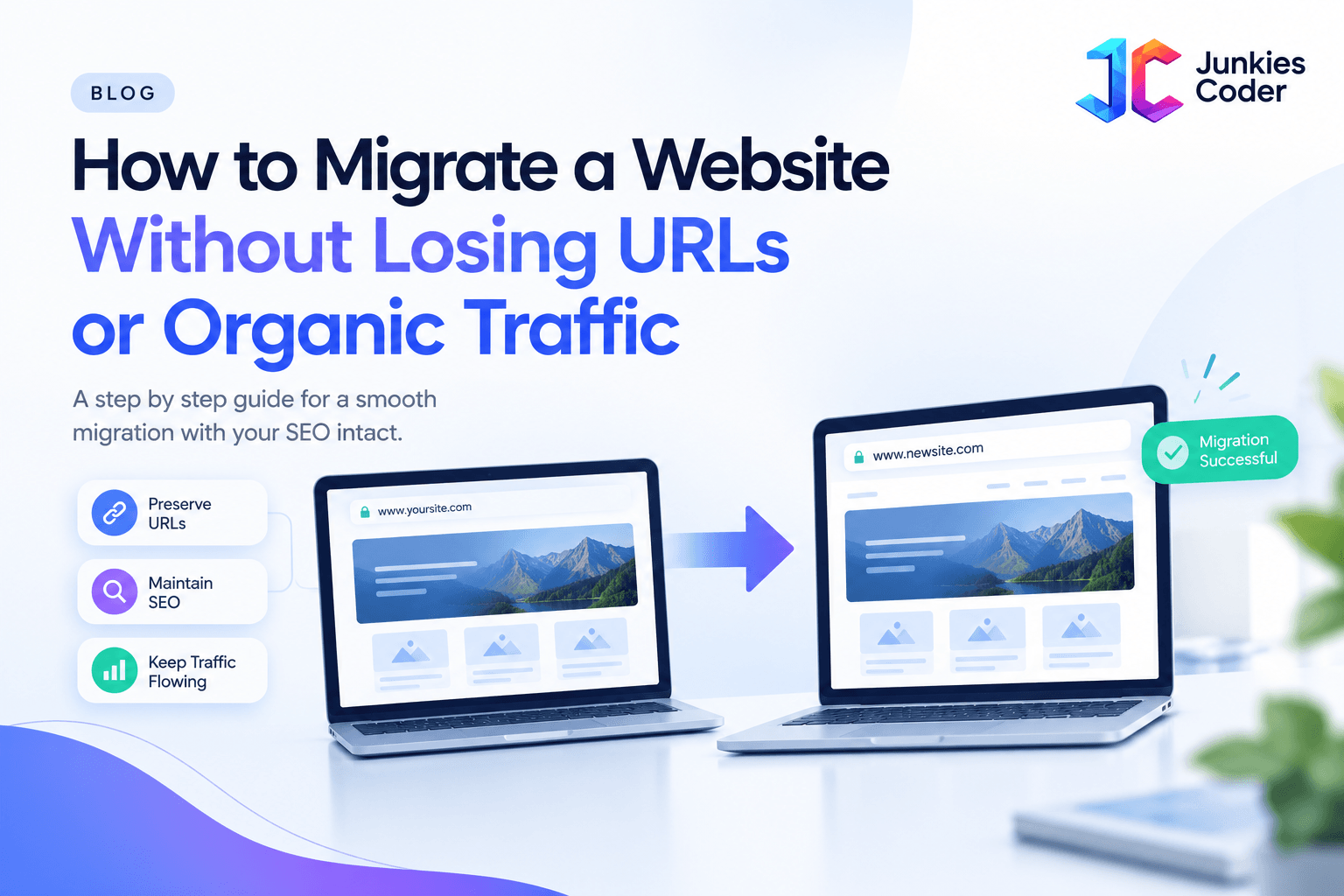
/category/enterprise/cloud/security), the Strapi category model must support self-referencing relationships (parentandchildren). This allows edge frontends to reconstruct the exact hierarchical URL graph. - Automated 1-to-1 Redirect Graph: When URL structures must be consolidated, create an edge redirect table. Detailed architectural best practices for zero-loss routing are covered in our technical analysis on how to migrate a website without losing URLs or organic traffic.
- Structured Schema Parity: Legacy plugins such as Yoast output structured JSON-LD graphs. Your Strapi migration must extract these custom metadata overrides and serialize identical or superior Schema.org
Article,BreadcrumbList, andFAQPagespecifications.
Large-Scale Migration Performance Engineering & Data Reconciliation
When moving enterprise repositories containing hundreds of thousands of records, uncontrolled migration scripts can easily trigger database lock contention, memory exhaustion, or API rate limits.
Concurrency Control and Worker Pools
Do not send unbounded asynchronous requests using Promise.all() over massive arrays. Running thousands of simultaneous requests overwhelms the Node.js event loop and triggers connection pool exhaustion in Strapi's database.
Instead, employ concurrency limiters like p-limit or worker queues like BullMQ backed by Redis. Maintain an optimal concurrency window of ten to twenty simultaneous document operations:
// concurrency_limiter.js: Managing throughput and database pressure
import pLimit from 'p-limit';

const limit = pLimit(15); // Maximum 15 concurrent operations

export async function processBatchWithThrottling(records, processorFn) {
  const tasks = records.map(record => limit(() => processorFn(record)));
  return Promise.all(tasks);
}
Memory Management and Streaming
Avoid loading massive SQL dumps into memory with SELECT * FROM wp_posts. In Node.js, stream query results using database cursor streams (mysql2/promise query streaming or PostgreSQL pg-query-stream). This guarantees that script memory consumption remains constant regardless of whether the migration contains ten thousand or ten million records.
Accurately evaluating overall PHP migration cost depends on database size, the volume of custom post types, and the complexity of unstructured layout blobs that must be parsed.
Automated Data Integrity Reconciliation
Following batch execution, run an automated reconciliation script to verify migration completeness across four critical metrics:
- Entity Count Parity: Compare total source records against total target Strapi documents per collection type.
- Relational Integrity Audits: Assert that zero foreign key connections resolve to null or orphaned states.
- Media Asset Verification: Ensure that every image linked inside content records exists on the cloud storage CDN and returns an HTTP 200 OK header.
- Cryptographic Checksum Audits: Sample five percent of migrated records at random, recalculating content hashes to verify zero data loss during transformation.
Future Impact: Structuring Strapi Content Models for AI Agents and Vector Search (RAG)
Modern content modeling extends far beyond traditional screen rendering. Generative answer engines like SearchGPT, Perplexity, and Google Gemini, as well as autonomous enterprise AI agents, require structured, semantically typed data chunks to cite technical sources with precision.
Monolithic CMS platforms present severe barriers to AI retrieval because unstructured HTML strings and inline styling introduce noise into retrieval pipelines. Migrating to Strapi 5 provides architectural advantages for artificial intelligence workflows:
- Deterministic Semantic Chunking: Unlike flat blog posts that require heuristic text splitters, Strapi components allow automated ingestion pipelines to chunk content by exact semantic unit. An FAQ component, a technical comparison matrix, or a code snippet can be ingested into vector databases such as Pinecone, Milvus, or PostgreSQL pgvector with zero extraction ambiguity.
- Metadata-Rich Vector Embeddings: In Strapi 5, every document maintains strict relational metadata including author credentials, verified timestamps, and parent category hierarchies. Embedding these attributes directly into vector metadata enables hybrid search, combining dense vector embeddings with sparse keyword filtering for enterprise Retrieval-Augmented Generation (RAG).
- Agentic Function Calling via Typed Schemas: Autonomous AI workflows interact with systems via API tool calls. Strapi's auto-generated REST and GraphQL schemas give enterprise AI agents well-typed endpoints to query, filter, and summarize verified organizational knowledge without scraping frontends.
- Decoupled Omnichannel Distribution: Structuring content into modular components guarantees your editorial data flows seamlessly into headless frontends, native mobile apps, conversational agents, and edge workers without duplicating content repositories.
FAQs
How does Strapi 5 handle relational mapping compared to Strapi 4?
Strapi 5 introduces stable documentId strings that persist across draft, published, and localized versions of a record. While Strapi 4 mapped relations using numeric database IDs, Strapi 5 manages relationships and Document Service operations through documentId, requiring migration pipelines to maintain a persistent legacy-ID-to-documentId lookup map.
What distinguishes the Document Service API from the REST API during migration?
The REST API is designed for external client consumption and enforces HTTP authentication, rate limits, and output sanitization. Strapi's internal Document Service API runs directly inside the Node.js runtime with administrative access, supporting transactional lifecycle operations, batch processing, and programmatic draft and publish state management.
How does an idempotent ETL pipeline recover from a partial migration failure?
An idempotent ETL pipeline maintains a persistent lookup table recording source IDs, destination documentIds, and cryptographic content hashes. If a batch fails midway through execution, restarting the script compares hashes, bypassing already-migrated records and resuming processing at the exact point of interruption without creating duplicate entries.
How are polymorphic relationships in WordPress or Drupal resolved in Strapi 5?
Polymorphic associations are resolved using a two-pass architecture. In the first pass, all independent entities (authors, taxonomies, media, and articles) are created, and their legacy IDs are mapped to Strapi documentIds in a persistent lookup table. In the second pass, the migration script iterates legacy junction tables, resolves foreign keys, and connects associations using the Document Service connect directive.
What is the process for transforming visual page builder JSON into Strapi Dynamic Zones?
Visual page builder data from Elementor, Gutenberg, or WPBakery is parsed recursively through an Abstract Syntax Tree (AST) transformer. The parser extracts semantic elements (headings, text, buttons, icons, and image IDs), strips legacy styling classes and layout wrapper divs, and outputs an ordered array of typed Strapi components conforming to Dynamic Zone schemas.
How does Change Data Capture (CDC) enable zero-downtime CMS cutover?
Change Data Capture streams real-time database mutations from MySQL binary logs or PostgreSQL logical write-ahead logs during the migration process. While the primary ETL pipeline imports historical data, the CDC listener captures subsequent live inserts, updates, and deletes, syncing deltas continuously until the DNS cutover is executed with zero editorial downtime.
How does Strapi 5 manage multilingual translations under a single document identity?
In Strapi 5, all localized versions of an entry share the exact same documentId string. To migrate translations from WPML, Polylang, or Drupal, the migration script creates the primary document first, and subsequently attaches translated content using the create or update method on the Document Service while specifying the target locale parameter.
How should legacy media assets be deduplicated before importing into Strapi?
Media deduplication is achieved by generating SHA-256 cryptographic fingerprints of each file buffer prior to uploading. If an incoming file hash matches an asset already registered in the persistent migration lookup table, the ETL script reuses the existing Strapi media file ID instead of uploading a redundant duplicate asset.
Can Strapi handle deep parent-child category hierarchies from legacy CMS platforms?
Yes. Strapi supports self-referencing relationships where a Collection Type contains a Many-to-One parent relation and a One-to-Many children relation pointing back to itself. This allows teams to construct multi-level nested taxonomies and tree structures identical to legacy platforms.
How does modern content modeling prepare organizations for AI search and RAG workflows?
Modern content modeling separates layout presentation from atomic semantic entities. By structuring content into discrete Strapi components, automated embedding pipelines can vectorize exact units like FAQs and comparison tables without HTML styling noise, producing higher accuracy for LLM answers and vector search retrieval.
Strategic Modernization Guidance
Transitioning from monolithic database architectures to Strapi requires balanced expertise across database engineering, content modeling, and headless frontend integration.
If your organization is planning to modernize a high-traffic WordPress, Drupal, or custom PHP platform, our engineering team can audit your legacy data models, design clean Strapi collection types, and execute zero-downtime ETL pipelines.
Explore how our CMS migration services deliver robust data reconciliation, complete URL equity retention, and high-performance digital platforms built for long-term scalability.