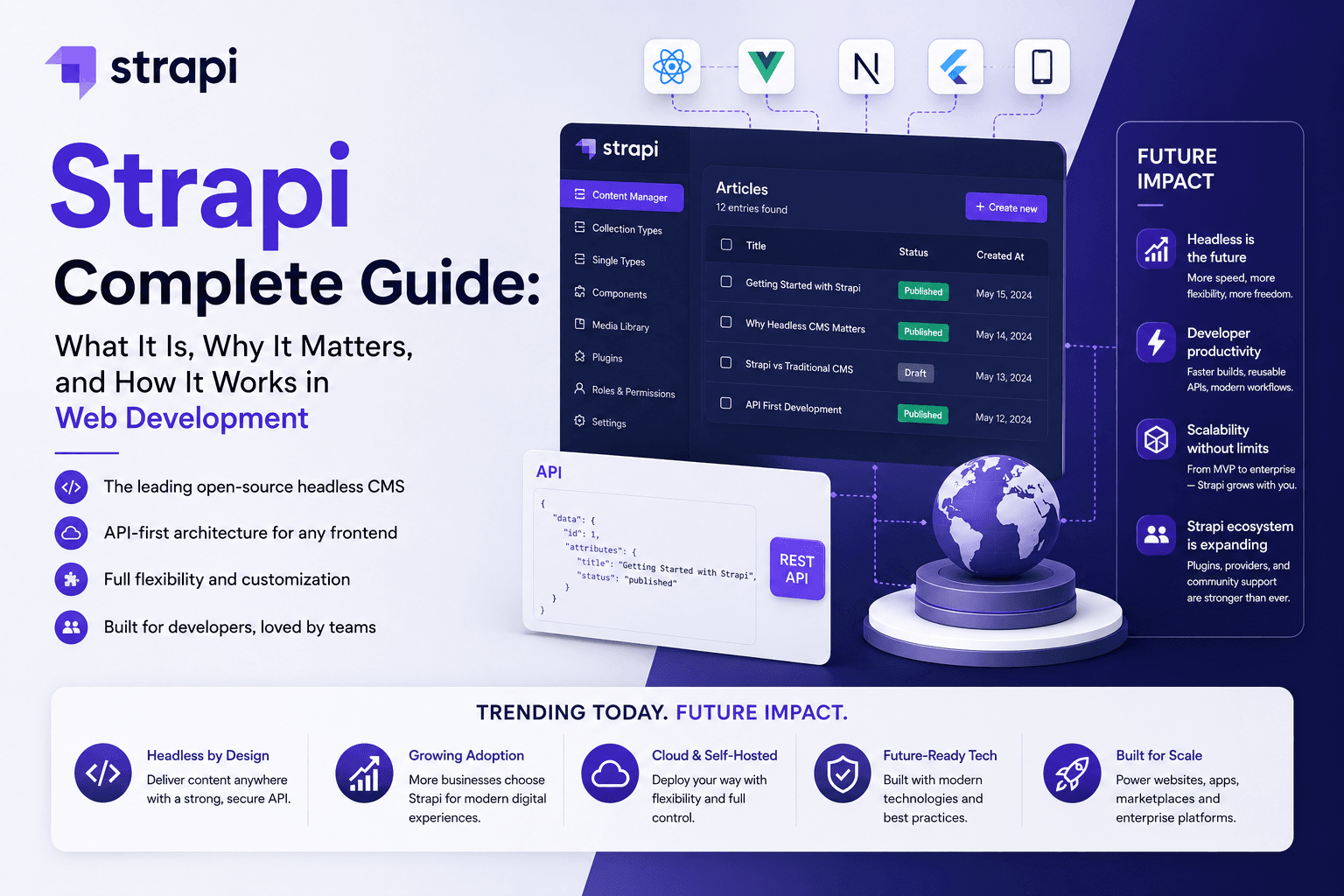
Moving a monolithic PHP application to a headless architecture using Strapi 5 and Next.js decouples content management from the presentation layer, improving scalability, security, performance, and future channel readiness.
- Audit before rebuilding: Catalog database tables, custom post types, taxonomies, media, forms, authentication, ecommerce flows, cron jobs, integrations, and legacy URLs.
- Separate content from logic: Move editorial content to Strapi; keep complex transactional workflows in Laravel, PHP services, or dedicated APIs.
- Design for Strapi 5: Use Collection Types, Single Types, Components, and Dynamic Zones instead of copying legacy EAV tables directly.
- Use stable identifiers: Preserve a mapping between legacy IDs and Strapi 5 documentId values to protect relationships, localization, and versioning.
- Build a repeatable ETL pipeline: Extract, transform, validate, import, reconcile, and report on every migration run.
- Migrate media deliberately: Transfer files, preserve URLs where possible, fix alt text, and connect S3-compatible storage when needed.
- Use Next.js App Router: Combine static generation, ISR, server-side rendering, and webhook-driven revalidation based on content risk.
- Preserve SEO equity: Maintain URL slugs where possible, map every retired URL to a precise 301/308 redirect, and validate canonicals, metadata, sitemaps, and structured data.
- Use a strangler migration: Run PHP and the new stack in parallel, migrate route groups gradually, and avoid a risky big-bang release.
- Harden the API layer: Apply RBAC, scoped API tokens, CORS restrictions, rate limiting, TLS, secret management, and server-side token handling.
- Test business outcomes: Validate forms, CRM delivery, checkout flows, authentication, analytics, Core Web Vitals, and publish-to-live latency.
- Measure migration success: Track indexed pages, organic sessions, conversion rate, 404/500 errors, API failures, cache hit rate, and lead delivery, not just visual completion.
Quick Answer
A safe PHP migration to Strapi 5 and Next.js is a phased modernization project, not a simple redesign. The goal is to decouple content, frontend, and business logic while preserving SEO equity, data integrity, security, and operational continuity.
The most reliable approach is to audit the PHP system, map legacy data to Strapi content models, build a repeatable ETL pipeline, run both systems in parallel, migrate one route group at a time, and cut over only after redirects, forms, performance, and rollback paths are validated. Strapi 5 provides stable documentId values for content operations, which helps maintain data integrity across imports, localization, and versioning.
Core principle: Do not migrate pages first. Migrate the system behind the pages, content, dependencies, business rules, URLs, media, and integrations.
Who This Blueprint Is For
This blueprint is for CTOs, engineering leaders, product owners, and digital teams operating a WordPress, Laravel, Symfony, custom MVC, or raw PHP website that has become difficult to evolve safely.
It is most valuable for organizations that need faster publishing, modern frontend performance, secure APIs, multilingual readiness, and a foundation for mobile apps, customer portals, partner platforms, and AI-driven experiences.
Why Monolithic PHP Becomes a Constraint
A monolithic PHP application often starts with PHP templates, a MySQL database, and server-rendered pages. Over time, custom plugins, direct database queries, hardcoded routes, legacy sessions, duplicated SEO logic, and tightly coupled frontend code accumulate.
The result is not just technical debt. It becomes an operational constraint where marketing cannot publish independently, developers cannot release safely, and every new digital channel requires custom work.
| Constraint | Business impact |
|---|---|
| Developer-dependent publishing | Marketing waits for engineering to launch pages or campaigns |
| Coupled templates and logic | Small UI changes can break forms, queries, routing, or caching |
| Legacy security surface | Outdated dependencies and weak access controls increase risk |
| Limited omnichannel readiness | The system serves one website, not APIs, apps, or portals |
| Poor content reusability | The same content cannot easily power web, mobile, and AI experiences |
| The objective is not to declare PHP obsolete. PHP and Laravel can still power strong systems. The real question is whether the current architecture supports safe releases, scalable content operations, and future product growth. |
What Changes With Strapi 5 + Next.js
Strapi 5 becomes the structured content and API layer, while Next.js becomes the presentation, routing, caching, and user-experience layer. This separation makes the platform easier to scale, secure, and extend.
Strapi becomes the content operating system
Strapi lets teams model content types, relations, media, locales, roles, permissions, publishing states, and reusable components independently from the frontend. It provides REST and GraphQL APIs, and Strapi 5 uses stable documentId values for content operations rather than relying only on changing numeric IDs.
Typical Strapi models include:
- Articles, categories, tags, and authors
- Service pages and landing pages
- Case studies and testimonials
- Products, features, and pricing sections
- FAQs, locations, and team profiles
- Navigation, footer, SEO, and global settings
Next.js becomes the experience layer
Next.js handles routing, rendering, components, metadata, redirects, forms, authentication boundaries, and frontend performance. It can pre-render content-heavy pages and selectively refresh them after a Strapi publish event.
Next.js supports ISR and on-demand revalidation through functions such as revalidatePath() and revalidateTag(), allowing targeted updates without rebuilding the entire website.
Target architecture
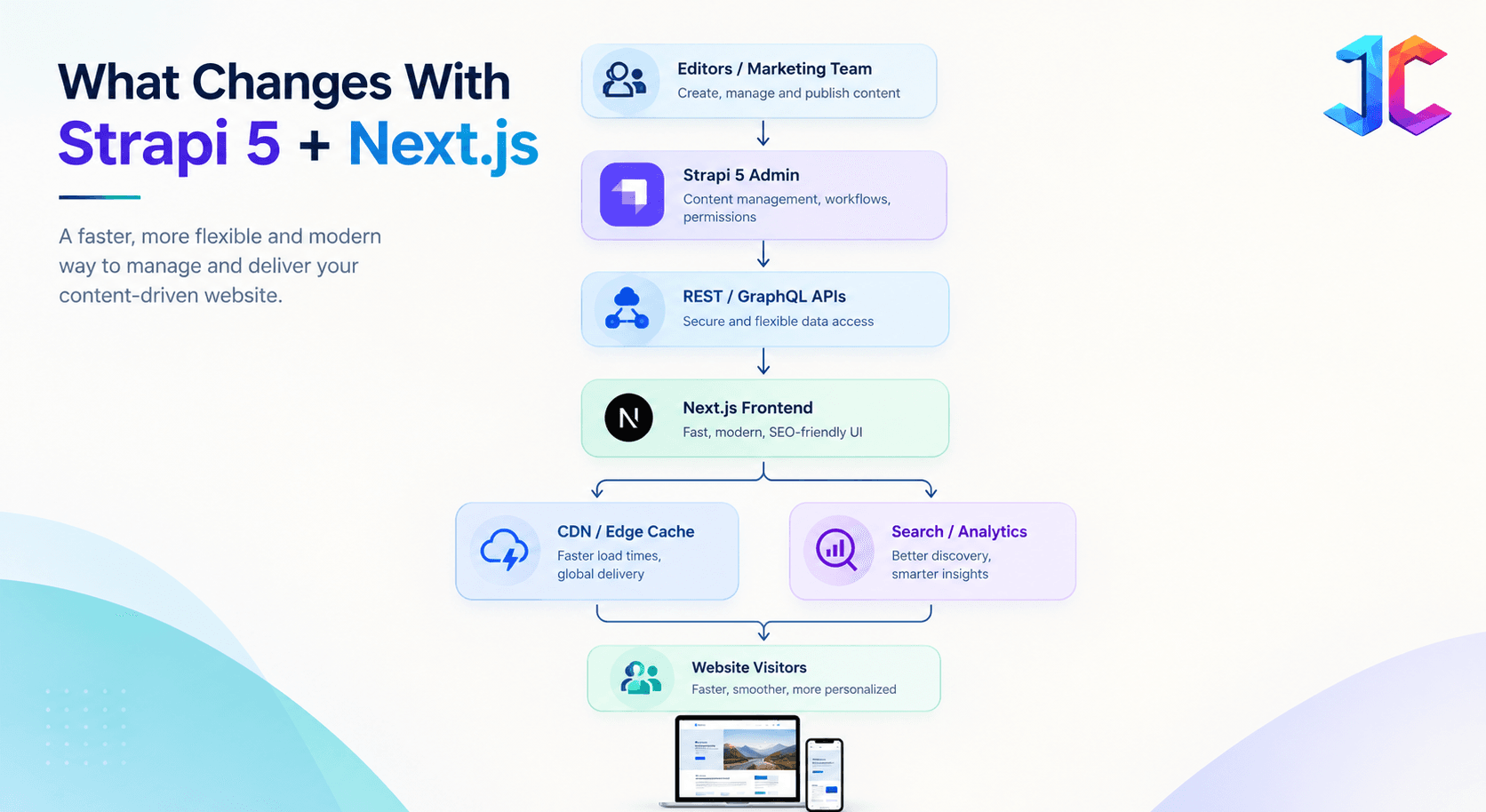
This architecture allows content, design, integrations, and delivery channels to evolve independently.
Rebuild, Refactor, or Replace: Choose the Right Path
Not every part of a PHP monolith needs to be rebuilt. The strongest migration strategy separates stable business value from technical debt and assigns the right treatment to each layer.
A full rebuild can put critical workflows at risk, while copying legacy architecture into a new stack simply moves technical debt to a different platform.
| Condition | Recommended approach |
|---|---|
| Stable business logic, outdated frontend | Keep backend, rebuild frontend in Next.js |
| Content-heavy pages, poor publishing workflow | Move content to Strapi |
| Complex transactional workflows | Keep Laravel, PHP services, or dedicated APIs |
| Security debt and unsupported dependencies | Refactor, isolate, or replace critical modules |
| Duplicated templates and hardcoded logic | Rebuild with component-based architecture |
| Low-value legacy pages | Retire, consolidate, or redirect |
| This decision framework prevents the most expensive mistake: rebuilding a system without understanding which components create value and which create risk. |
Phase 1: Pre-Migration Audit and Planning
Start with a complete inventory of the PHP application before writing frontend components or importing content. The audit should cover content, database structure, media, workflows, integrations, SEO assets, and hidden dependencies.
The output should be a prioritized migration matrix that defines what moves first, what stays in the legacy system, and what needs deeper engineering discovery.
Content inventory
Catalog every content source in the PHP monolith:
- Database tables and relationships
- Custom post types or custom entities
- Taxonomies, categories, and tags
- Pages, blogs, products, and landing pages
- Media assets, PDFs, videos, and documents
- Metadata, canonical tags, and Open Graph data
- Drafts, scheduled posts, and archived content
- Internal links and legacy URL patterns
Feature audit
Separate content display from dynamic business logic.
| Feature type | Recommended destination |
|---|---|
| Blogs, service pages, landing pages | Strapi + Next.js |
| Forms and lead capture | Next.js server route + CRM/API |
| Ecommerce checkout | Dedicated commerce service or existing platform |
| User authentication | Auth provider, Laravel, or dedicated identity service |
| Customer dashboards | Existing application or protected Next.js routes |
| Cron jobs and integrations | Laravel queues, cloud functions, or event-driven services |
| Admin-only operations | Laravel admin or separate internal application |
Internationalization from day one
Configure locales in both Strapi and Next.js from the beginning, even if the initial launch is single-language. Retrofitting localization after launch often requires schema changes, URL restructuring, hreflang updates, and content rework.
Plan for:
- Locale-based content models
- Localized slugs and metadata
- Hreflang annotations
- Regional legal pages
- Currency, contact, and compliance variations
- Translation and review workflows
The Hidden Dependency Trap
Most migration plans focus on visible pages, but failures often come from dependencies that are not visible in the browser. These dependencies determine whether leads reach the CRM, cron jobs run, redirects work, and external systems continue functioning after cutover.
Create a dependency register with an owner, business impact, replacement plan, and validation method for every hidden dependency.
| Dependency | Example | Why it is missed |
|---|---|---|
| Cron jobs | CRM sync, email reminders, XML feeds | They run outside the UI |
| Server rewrites | .htaccess redirects and query-string rules | They live in server configuration |
| Database logic | Stored procedures, triggers, cleanup jobs | They are invisible to frontend teams |
| Form workflows | Lead routing, spam filtering, CRM mapping | They appear simple until a lead is lost |
| Legacy endpoints | APIs used by apps, partners, or internal tools | They are undocumented |
| Third-party scripts | Chat, analytics, payments, heatmaps | They may depend on DOM IDs or page structure |
| Migration rule: No route is ready until every dependency has an owner, a replacement approach, and a tested validation method. |
Phase 2: Database Migration and Schema Design
Legacy PHP databases often use highly normalized tables or EAV structures, especially in WordPress-style systems where wp_postmeta stores flexible fields. These structures should not be copied directly into Strapi.
Instead, translate the legacy schema into a clean content architecture using Strapi Collection Types, Single Types, Components, and Dynamic Zones.
Schema mapping
| Legacy PHP structure | Strapi 5 structure |
|---|---|
| posts, pages, products tables | Collection Types |
| Homepage, global settings, footer | Single Types |
| Reusable sections and metadata | Components |
| Flexible page-builder sections | Dynamic Zones |
| Categories and tags | Collection Types with relations |
| Authors and team members | Collection Types with relations |
| Media paths and attachments | Media Library or S3-compatible storage |
Example: legacy page table to Strapi model
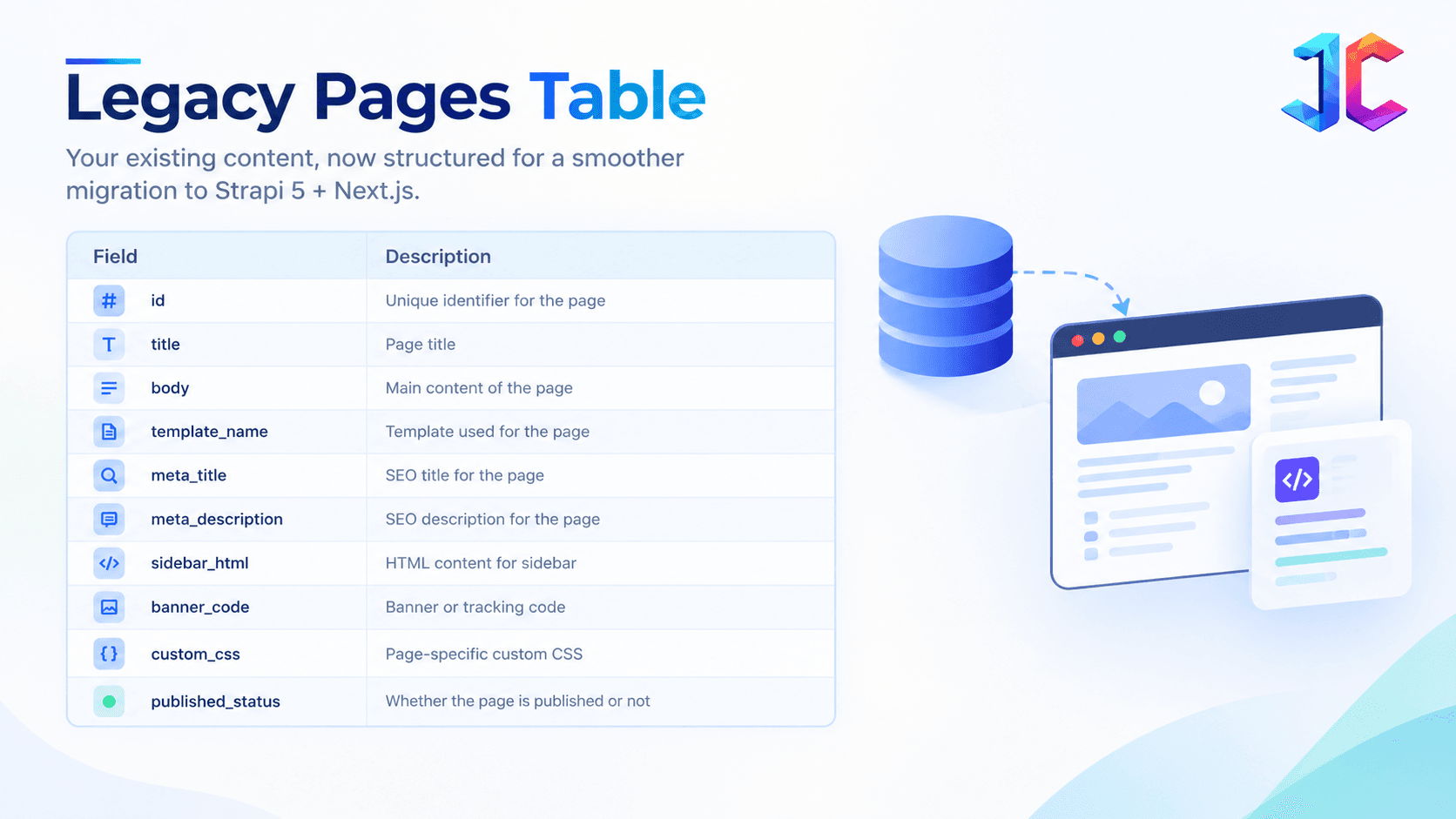
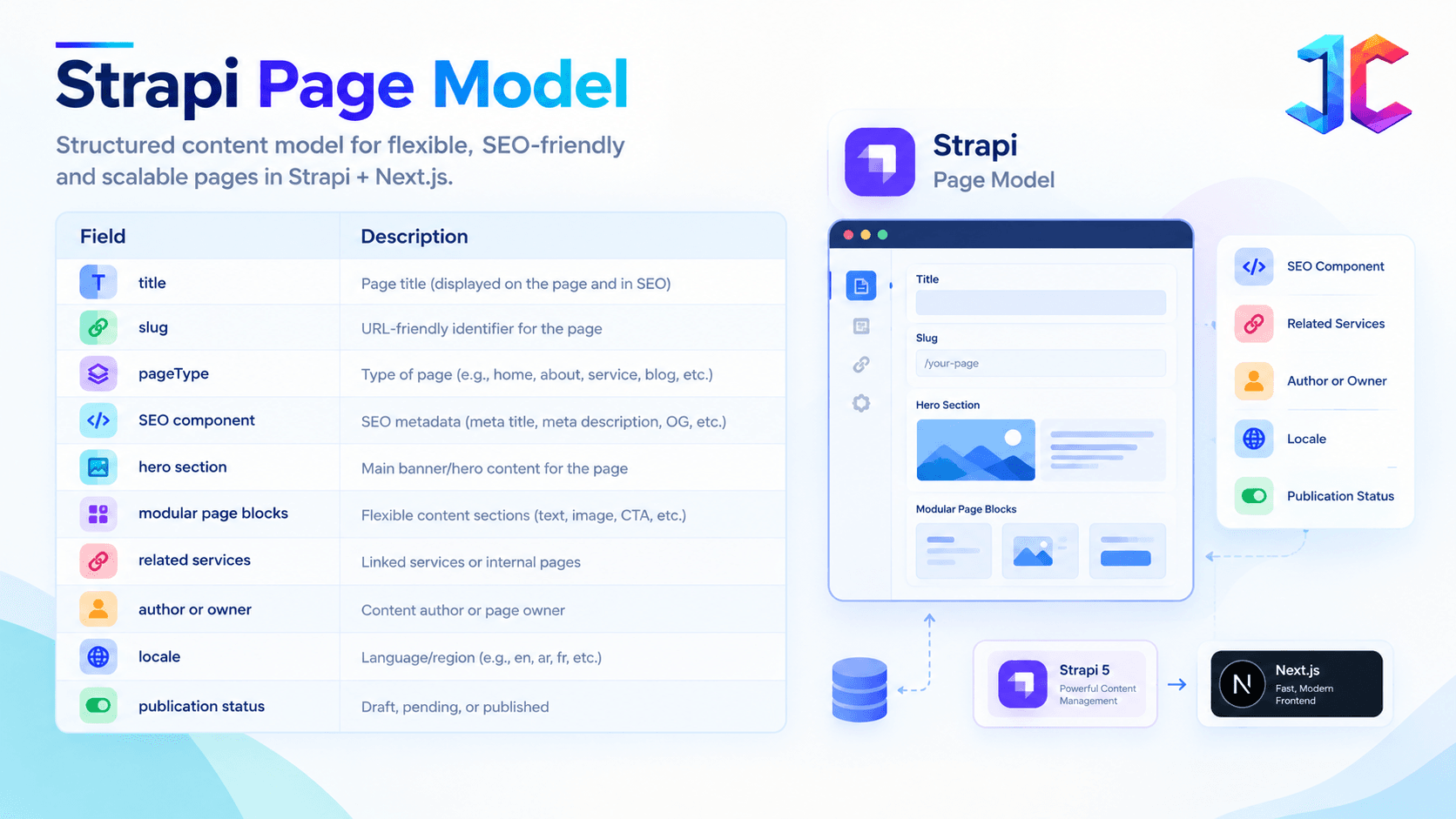
This structure creates reusable publishing controls without making every landing page a developer ticket.
Phase 3: Build a Repeatable ETL Migration Pipeline
A one-time manual import cannot be reliably repeated, validated, or audited. Build an ETL pipeline that can run in development, staging, and production with the same rules.
The pipeline should produce a report after every run so the team knows exactly what was imported, skipped, failed, or needs manual review.
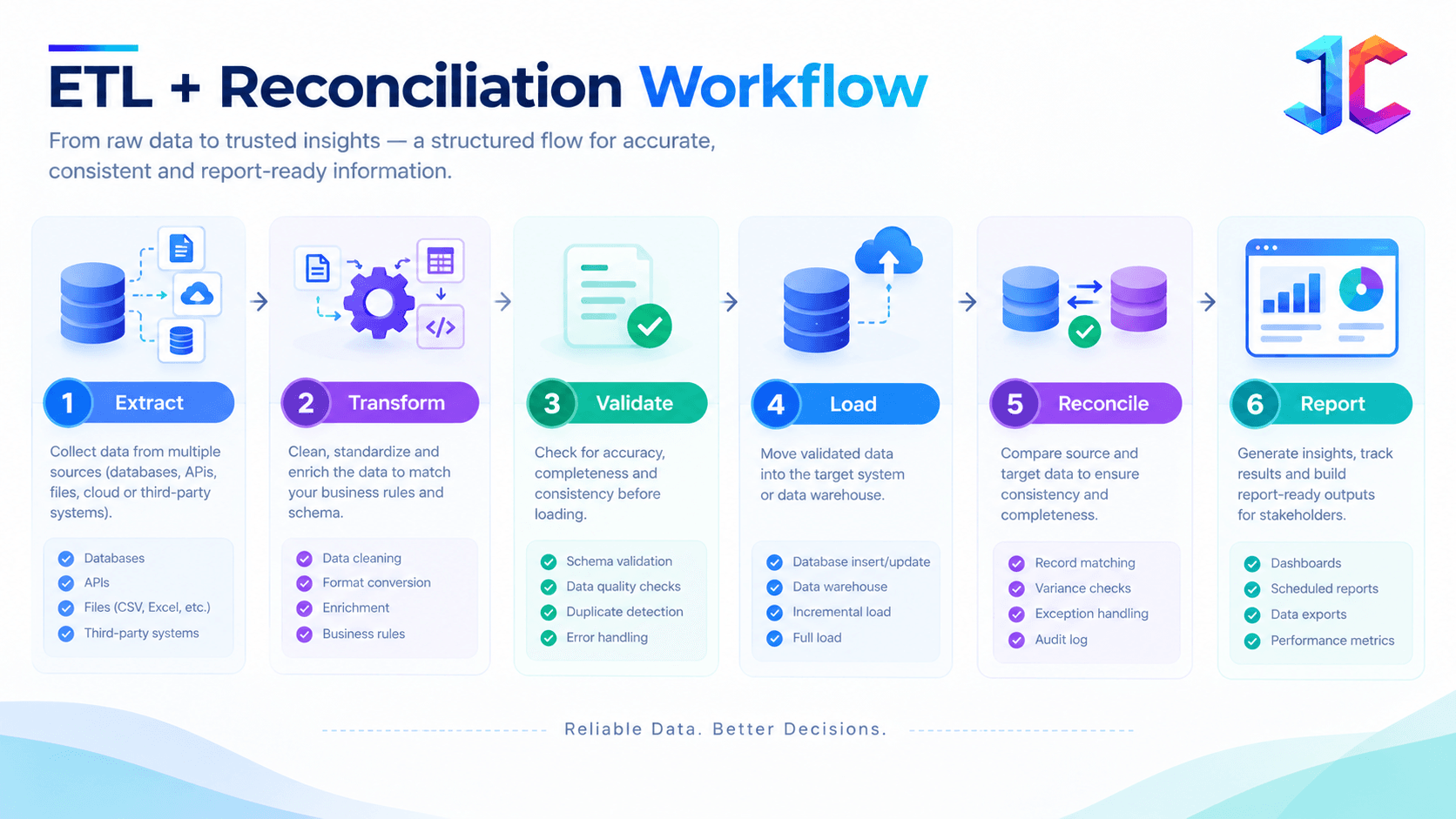
1. Extract
Export content, metadata, categories, tags, media paths, relationships, and redirects from the PHP database.
Include:
- Drafts and scheduled content
- Internal links
- Canonical URLs
- Image captions and alt text
- Redirect tables
- User roles
- PDF and downloadable asset URLs
- Legacy slugs
- Form destination settings
2. Transform
Clean legacy HTML, remove deprecated inline styles, standardize dates, fix broken media references, normalize categories, and convert inconsistent metadata into structured fields.
Convert inline PHP media paths into structured media relations. Map custom fields to appropriate Strapi data types instead of forcing everything into a rich-text field.
3. Validate
Validate required fields before import:
- Unique slug
- Title present
- Content present where required
- Valid media reference
- Valid relation IDs
- Valid publish status
- SEO fields within practical length ranges
- Locale and translation status
4. Load
Import entities in dependency order:
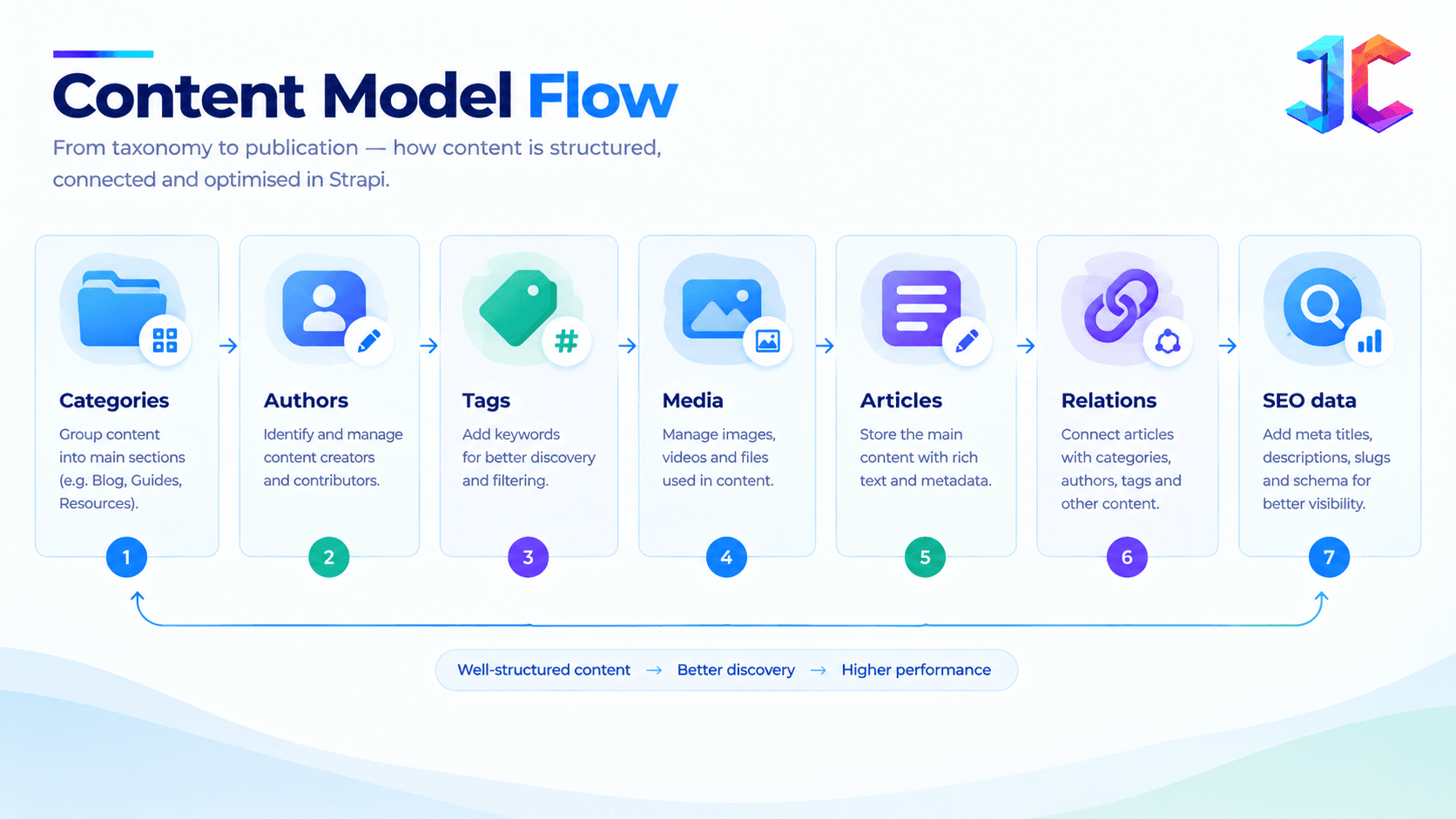
Use Strapi’s Content API, REST API, or a custom Node.js script using Strapi’s entity service layer. For Strapi 5, preserve a mapping table between legacy IDs and new documentId values because relationships, updates, and content operations use the stable document identifier.
5. Reconcile
Compare source and destination:
- Published page count
- Article count
- Media asset count
- Redirect count
- Missing metadata count
- Broken media count
- Failed relation count
- Duplicate slug count
6. Report
Generate a migration report after every run:
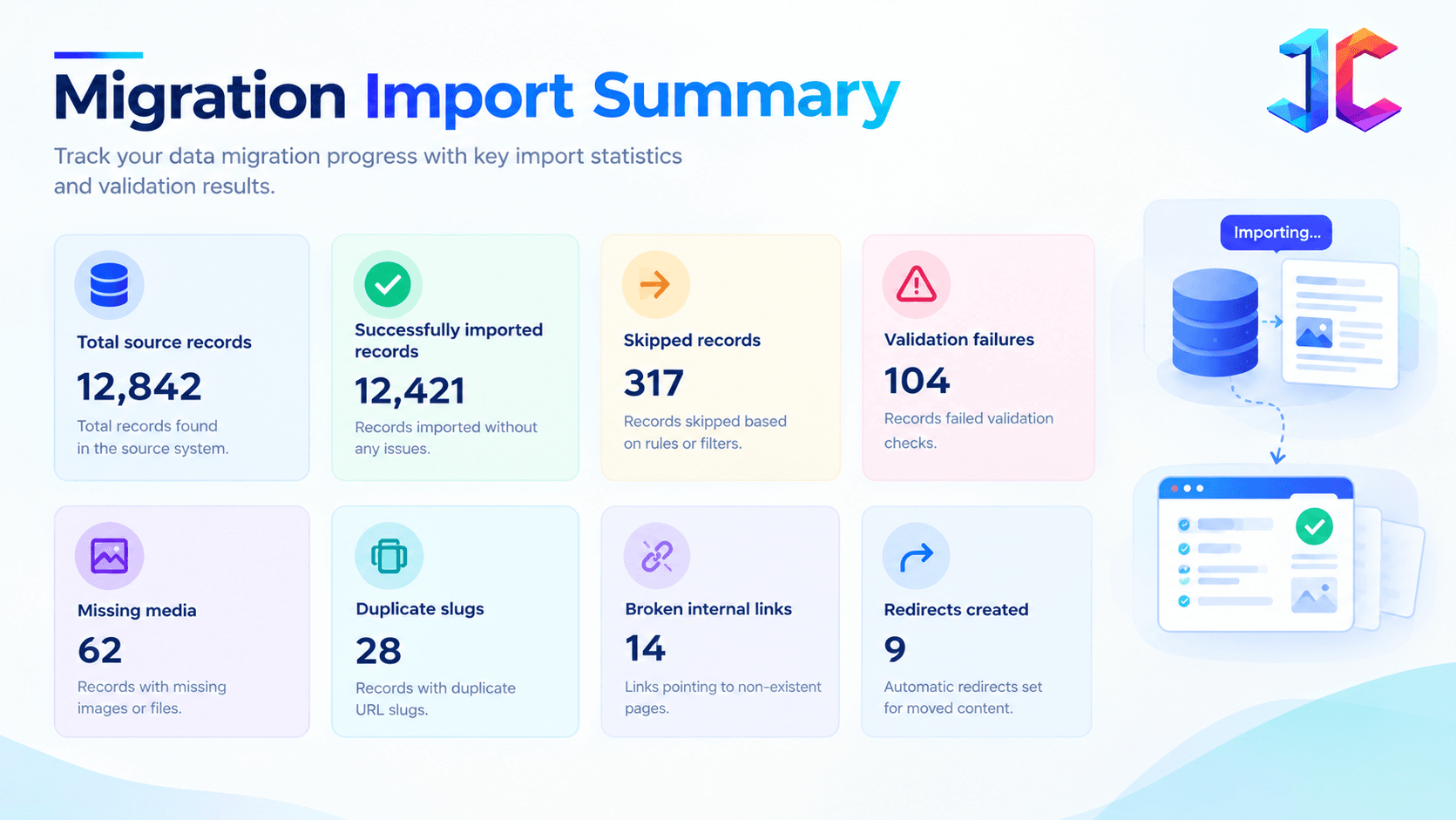
This report becomes evidence that the migration is controlled, repeatable, and auditable.
Media Migration and Asset Governance
Media migration is often underestimated, but images, PDFs, videos, and documents may carry SEO value, backlinks, and compliance risk. A missing file or broken download link can damage both user experience and search visibility.
Create a media inventory before transferring files, then preserve URLs, metadata, and access rules wherever possible.
Media migration checklist
- Identify duplicate, unused, and broken media files.
- Preserve original URLs or create permanent redirects.
- Migrate alt text, captions, titles, and file names.
- Optimize images for responsive delivery.
- Move uploads to Strapi Media Library or S3-compatible cloud storage.
- Apply access controls to confidential documents.
- Define CDN cache rules for updated assets.
- Test PDF, video, and downloadable asset URLs after launch.
Strapi supports media uploads through its API, and cloud storage providers such as S3-compatible services can be used for scalable media delivery.
Phase 4: Build the Next.js Frontend
Next.js should consume Strapi as a structured content source, not as a direct database replacement. Use the App Router and TypeScript to create a maintainable, component-driven frontend.
The frontend architecture should map Strapi content models and Dynamic Zones to reusable Next.js components.
Data fetching strategy
| Content type | Recommended strategy |
|---|---|
| Evergreen service page | Static generation or ISR |
| Blog article | ISR with webhook revalidation |
| Product pricing | Short cache window or dynamic rendering |
| Legal or compliance page | Immediate revalidation |
| Logged-in portal | Dynamic, protected rendering |
| Personalized recommendation | Dynamic or segmented cache |
| Use REST or GraphQL to connect Next.js with Strapi. Strapi 5 supports both natively without requiring additional plugins. |
Component mapping
Map Strapi Dynamic Zones directly to Next.js components:
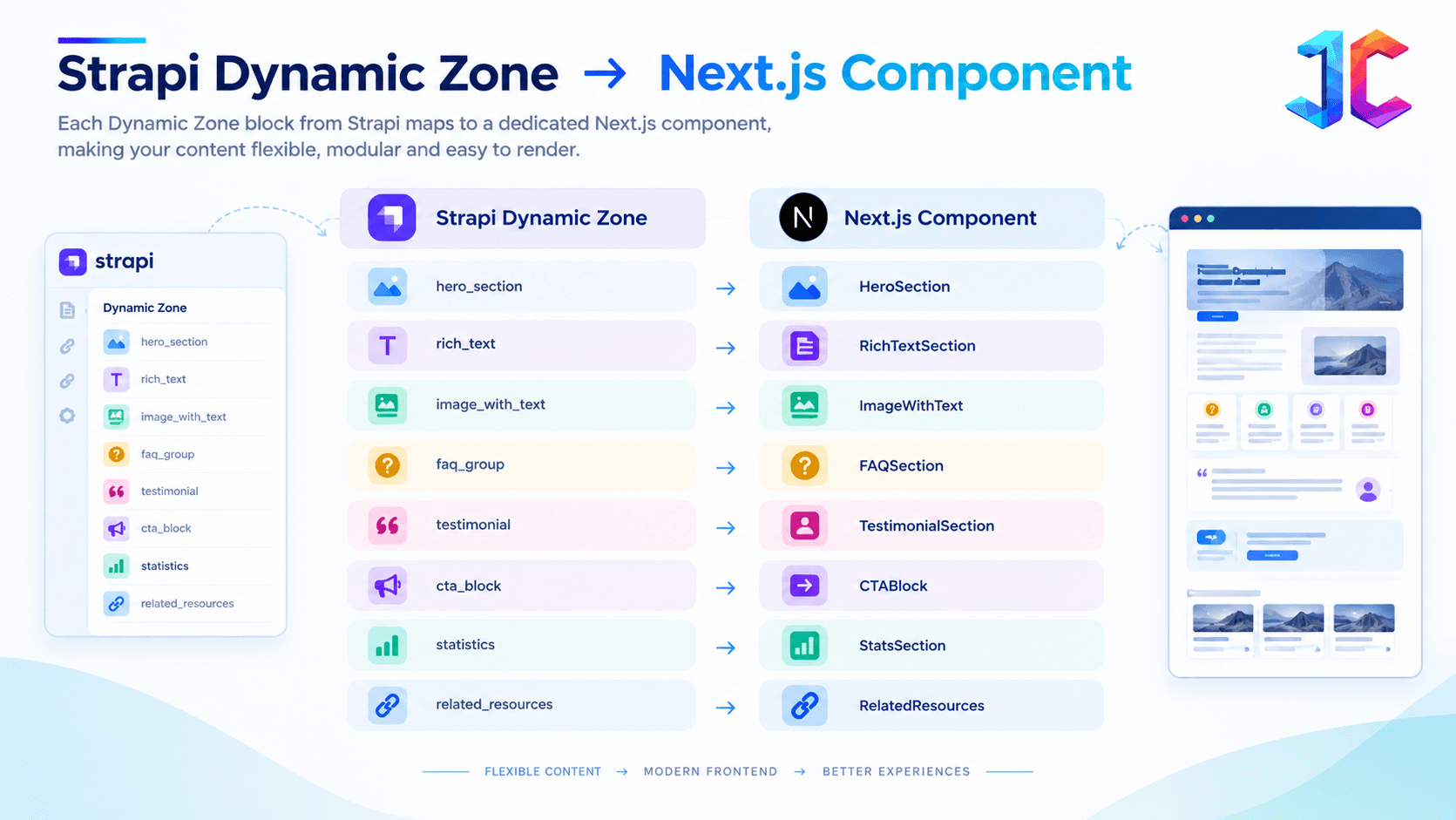
This gives editors flexibility while keeping the frontend consistent and maintainable.
SEO and metadata
Use Next.js generateMetadata to dynamically map migrated SEO fields:
- Title tags
- Meta descriptions
- Canonical URLs
- Open Graph tags
- Twitter cards
- JSON-LD structured data
- Hreflang annotations
- Robots directives
Do not simply copy legacy SEO plugin output. Validate that metadata is accurate, unique where appropriate, and aligned with the final URL structure.
Caching, ISR, and Revalidation
Caching improves performance, but incorrect caching creates publishing risk. The cache strategy should reflect how quickly each content type changes and how much business risk stale content creates.
For semi-static marketing content, ISR is usually ideal. For rapidly changing prices, availability, legal notices, or user-specific data, use dynamic rendering or a short cache window.
| Content type | Delivery approach |
|---|---|
| Evergreen service page | Cached and revalidated on publish |
| Blog article | ISR with on-demand revalidation |
| Product pricing | Short cache or dynamic rendering |
| Legal update | Immediate revalidation |
| User portal | Dynamic, protected rendering |
| Personalized content | Dynamic or segmented cache |
| Next.js supports time-based and on-demand revalidation. Time-based revalidation can serve cached content while generating an updated version in the background, while on-demand invalidation can refresh content after a CMS publish event. |
For self-hosted, multi-instance deployments, cache invalidation must be coordinated across instances. Next.js notes that invalidating a tag on one instance does not automatically update every instance unless tag state is synchronized through a shared cache mechanism.
Cache Invalidation Failure Modes
A common post-launch issue is that Strapi says content is published, but visitors still see the old version. This usually means the publishing workflow and cache invalidation workflow are not aligned.
Test not only whether pages load, but whether a content update reliably reaches the correct production URL across all environments and instances.
| Failure | What happens | Fix |
|---|---|---|
| Webhook not delivered | Next.js never receives the publish event | Add delivery logs, retries, and alerts |
| Wrong route or tag invalidated | The wrong page refreshes | Map content types to explicit Next.js tags |
| CDN TTL too long | Application refreshes but CDN serves old HTML | Align CDN and application cache rules |
| Multiple Next.js instances | One instance refreshes; others remain stale | Use a shared cache handler |
| Preview and production mismatch | Staging works, production does not | Test the exact production publish path |
| Related content changes | Parent page remains stale | Invalidate child and parent routes |
| This is especially important for self-hosted, multi-instance deployments, where tag invalidation must be coordinated across instances. |
Phase 5: Security and Hardening
Moving to headless does not automatically make a website secure. It changes the security model: more APIs, more integrations, more publishing roles, and more places where credentials or data can be exposed.
Security should be designed before launch, not added after the first incident or security review.
API security controls
- Use separate API tokens for development, staging, and production.
- Keep privileged Strapi tokens server-side only.
- Apply role-based access control to editors, publishers, and administrators.
- Restrict public API fields to only what the frontend requires.
- Add rate limiting and WAF rules for exposed APIs.
- Validate webhook signatures.
- Enable MFA for administrative accounts.
- Store secrets in a managed secret store or environment configuration.
- Back up the database and media separately.
- Scan dependencies in CI/CD.
- Log admin actions, webhook failures, authentication events, and publishing changes.
Strapi’s security guidance highlights RBAC, least privilege, API rate limiting, input validation, encryption, WAFs, audit logging, and incident response planning for headless CMS environments.
CORS and environment controls
Restrict public Strapi API access to trusted Next.js origins through CORS policies. Keep the Strapi admin and database outside the public attack surface where possible.
Use TLS for data in transit and enforce proper secret management for database credentials, API keys, and storage credentials.
Avoid this common mistake
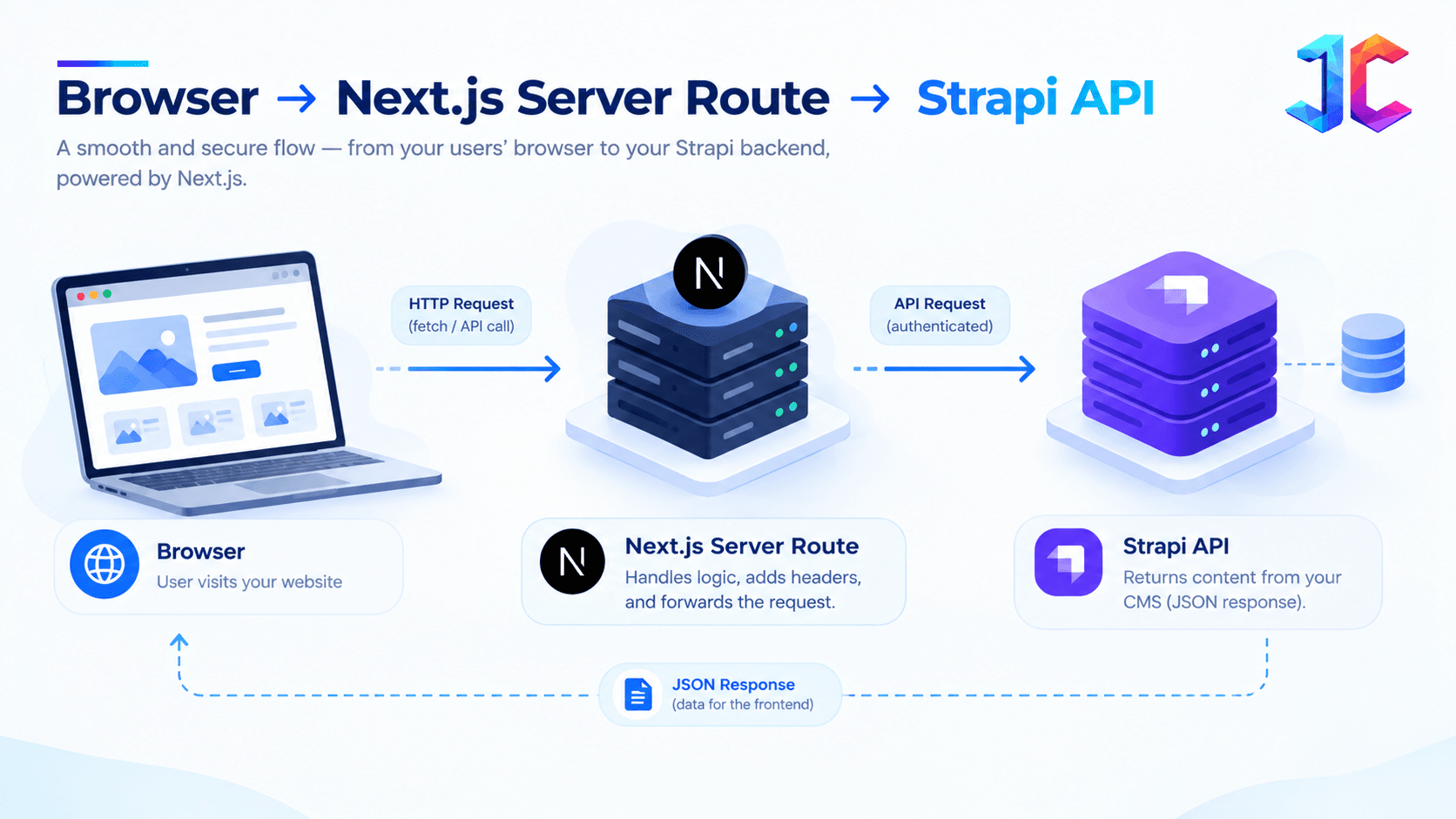
Do not expose a full-access Strapi API token in browser-side Next.js code.
Safe pattern:
Unsafe pattern:
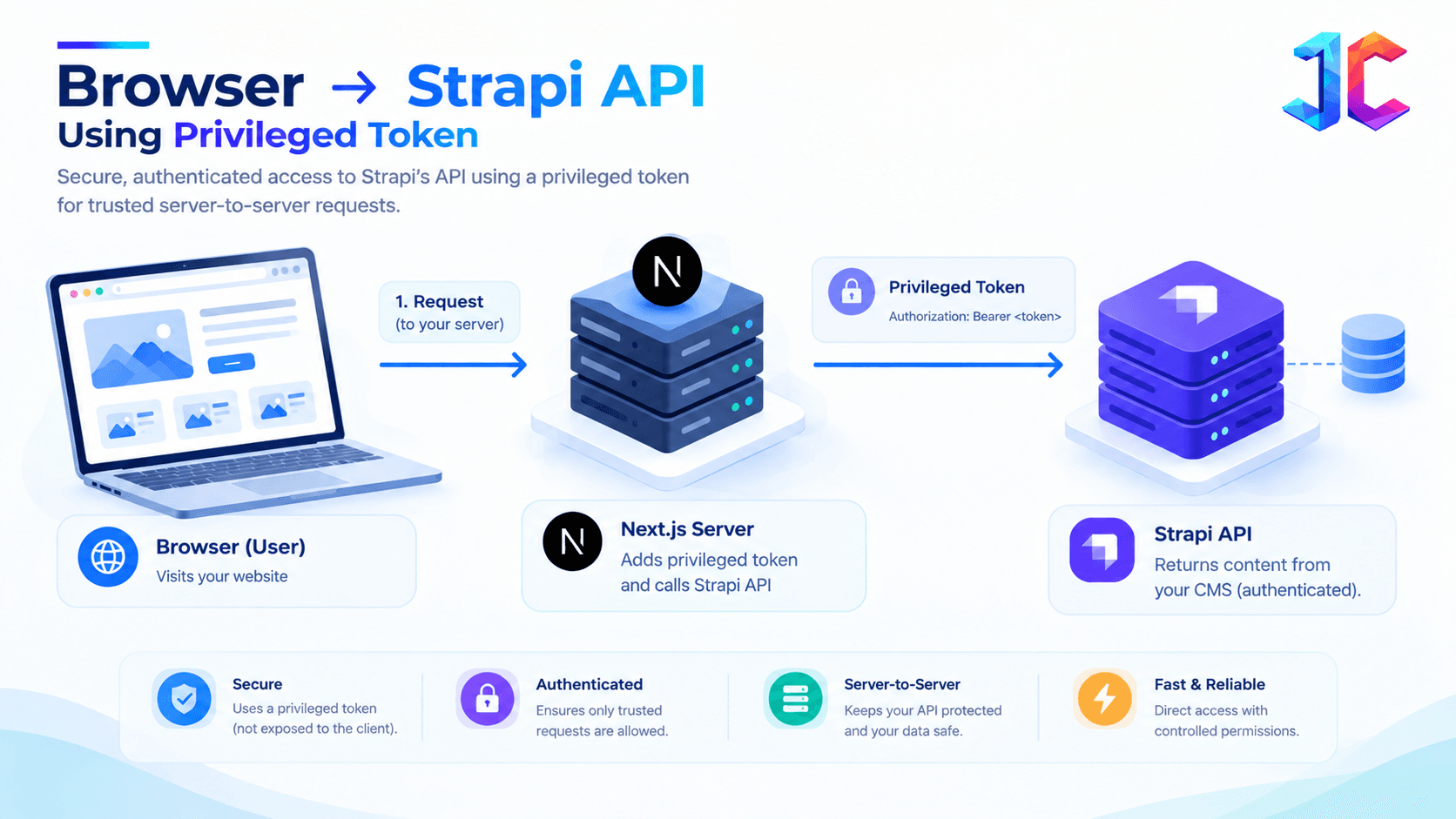
The browser should never receive credentials capable of creating, changing, or deleting CMS content.
API authorization
Every API request that accesses a content record, customer object, asset, or protected workflow should enforce authorization at the object level—not merely confirm that the requester is logged in.
OWASP identifies Broken Object Level Authorization as API1:2023 and warns that object identifiers can be manipulated when each request does not verify permission for the specific object.
Phase 6: SEO Preservation and Redirect Management
A broken migration can destroy search rankings even when the new website looks better. SEO must be treated as a dedicated workstream from the first audit through post-launch monitoring.
The team should preserve URL equity, metadata, structured data, internal links, and crawlability while ensuring every retired URL redirects to the closest equivalent destination.
URL-level migration inventory
Classify every URL before migration:
| URL type | Recommended action |
|---|---|
| High-traffic service page | Preserve URL or use a precise 301 redirect |
| Blog article with backlinks | Preserve URL and maintain metadata |
| Duplicate or thin page | Consolidate into a stronger canonical page |
| Retired product or campaign page | Redirect to closest relevant destination |
| Legacy PDF or asset | Preserve URL or redirect permanently |
| Query-parameter URL | Normalize, canonicalize, or block from indexing |
Redirect architecture
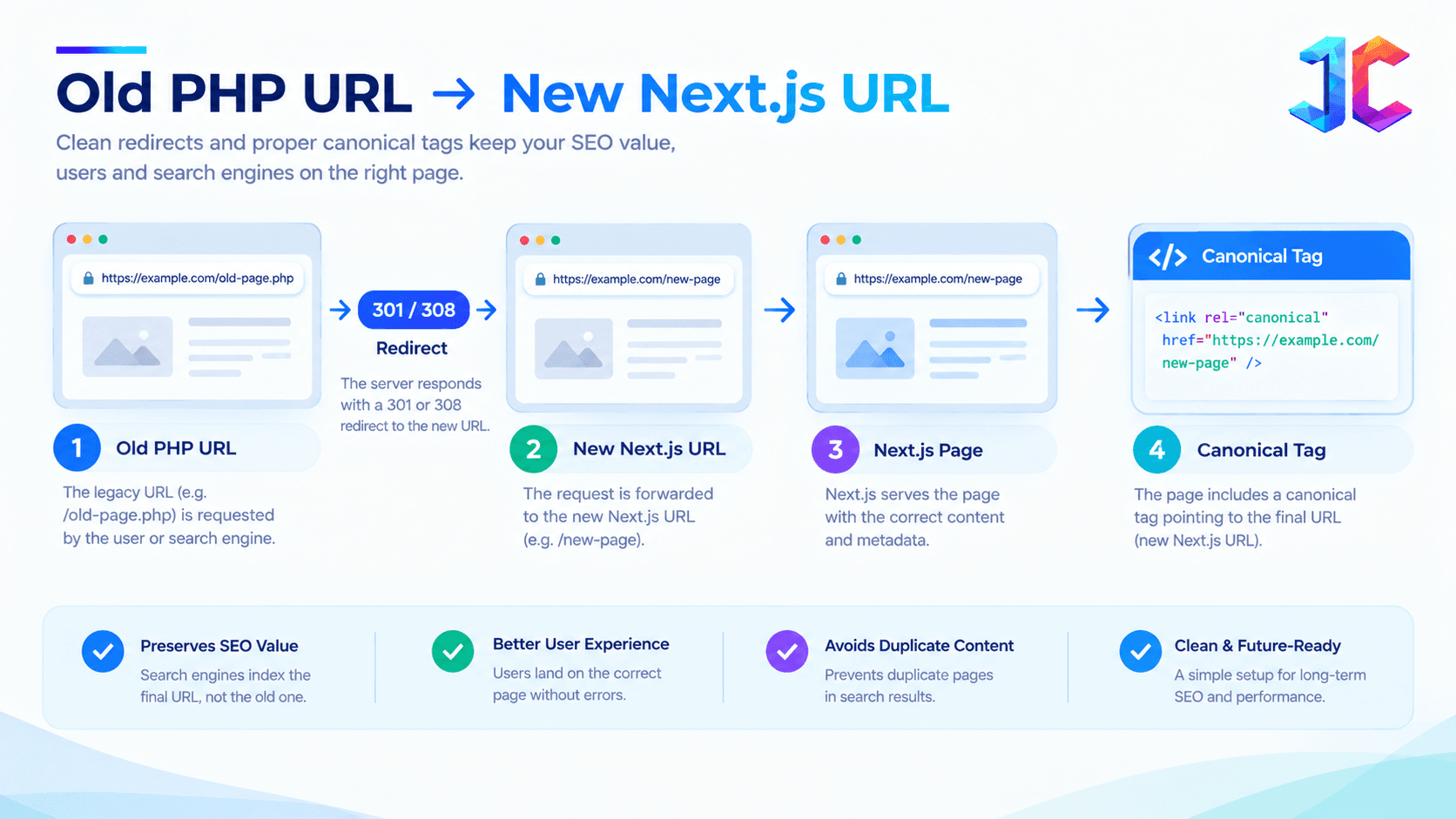 Maintain identical slugs where possible. If URLs must change, register 301 redirects in the reverse proxy, CDN, or next.config.js redirect configuration.
SEO acceptance criteria
Before launch, verify:
- No unintended noindex tags.
- Canonicals point to live final URLs.
- Priority pages return HTTP 200.
- Old priority URLs redirect correctly.
- XML sitemap contains only canonical production URLs.
- Robots.txt does not block important sections.
- Schema markup validates.
- Analytics and conversion tracking fire correctly.
- Internal links do not point to staging URLs or legacy domains.
Strapi’s migration documentation notes that URL management and redirects must be handled in the frontend or hosting layer, not inside the CMS.
Phase 7: Use the Strangler Fig Migration Strategy
Do not attempt a big-bang release for a complex PHP application. Use the strangler pattern to replace legacy routes gradually while both systems remain operational.
This approach reduces downtime, limits blast radius, and allows the team to validate content models, redirects, performance, and workflows in production.
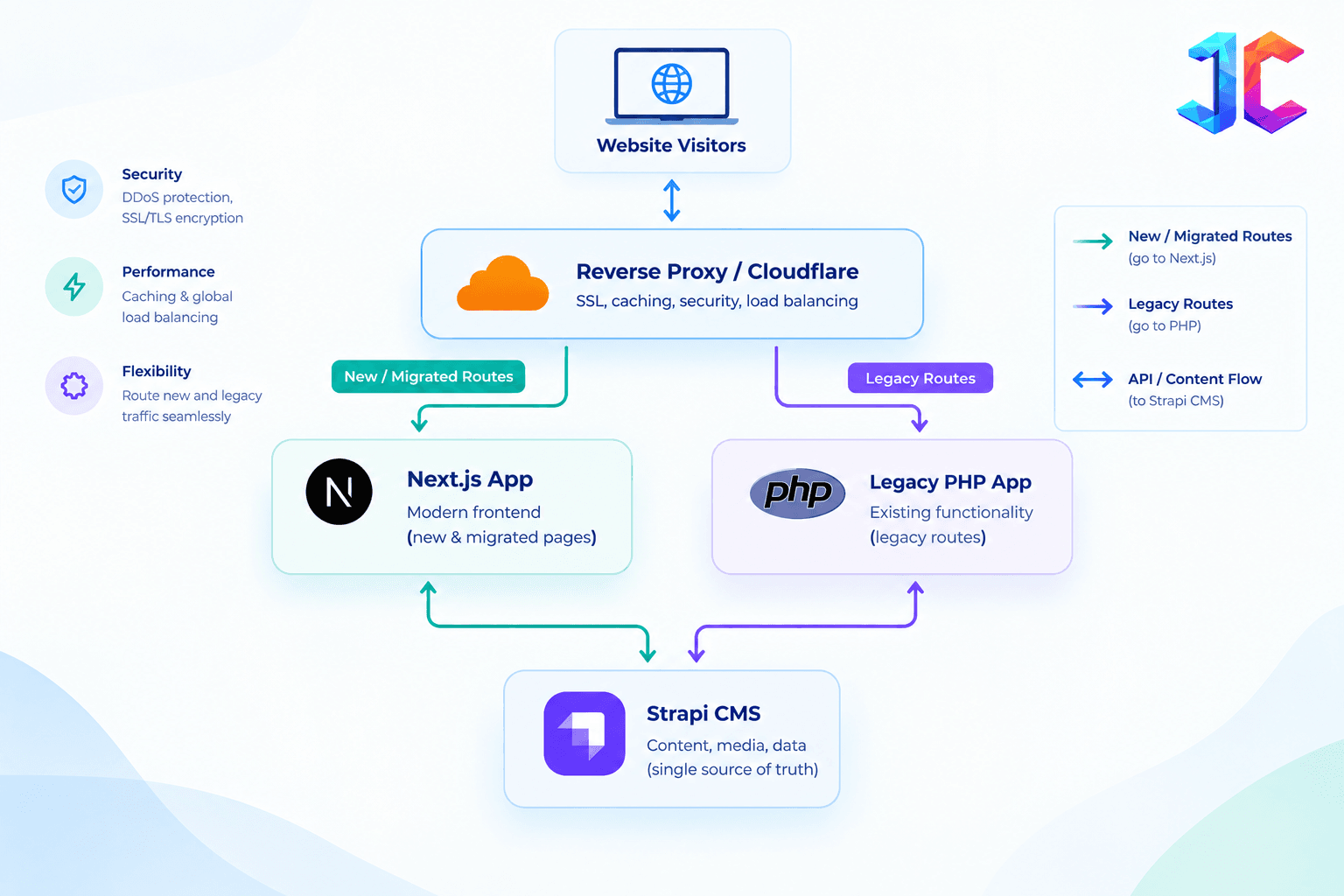
How to implement it
- Deploy a routing layer using Cloudflare, Nginx, AWS ALB, or another reverse proxy.
- Route a low-risk section, such as /blog, to Next.js.
- Keep /shop, dashboards, or complex PHP modules on the legacy system.
- Validate analytics, forms, redirects, and SEO signals.
- Move additional route groups after each successful release.
- Decommission legacy routes only when they receive zero production traffic.
Migration pattern comparison
| Pattern | Best for | Main risk |
|---|---|---|
| Big-bang migration | Small sites with few integrations | One missed dependency affects everything |
| Strangler migration | Enterprise and complex PHP systems | Requires routing and parallel operations |
| Backend-first modernization | Stable frontend, weak data/API layer | Temporary architectural complexity |
Content Governance After Go-Live
A headless CMS gives teams flexibility, but without governance it can create inconsistent pages, broken layouts, and publishing risk. Define not only what content can be created, but who can create it and when review is required.
Without clear rules, reusable components can change unexpectedly across hundreds of pages, making future updates expensive and risky.
Define editorial boundaries
- Which components editors can use without developer review.
- Which fields require approval: legal claims, pricing, compliance statements, redirects, schema, and technical specifications.
- Draft → review → scheduled release → publish workflow.
- Named ownership for each content type.
- Rules for reusable blocks and shared components.
- Approval requirements for publishing new page templates.
Strapi’s audit-log capability provides searchable activity records for user actions, releases, and webhook configuration changes; retention is configurable, with a 90-day default stated in its documentation.
Preview, Release, and Editorial Rollback
Migration content often says “test in staging,” but it rarely explains how editors safely publish after launch. A mature headless setup needs preview, release, and rollback workflows—not just a publish button.
This protects marketing velocity while reducing the risk of publishing incomplete pages, incorrect pricing, or compliance-sensitive content.
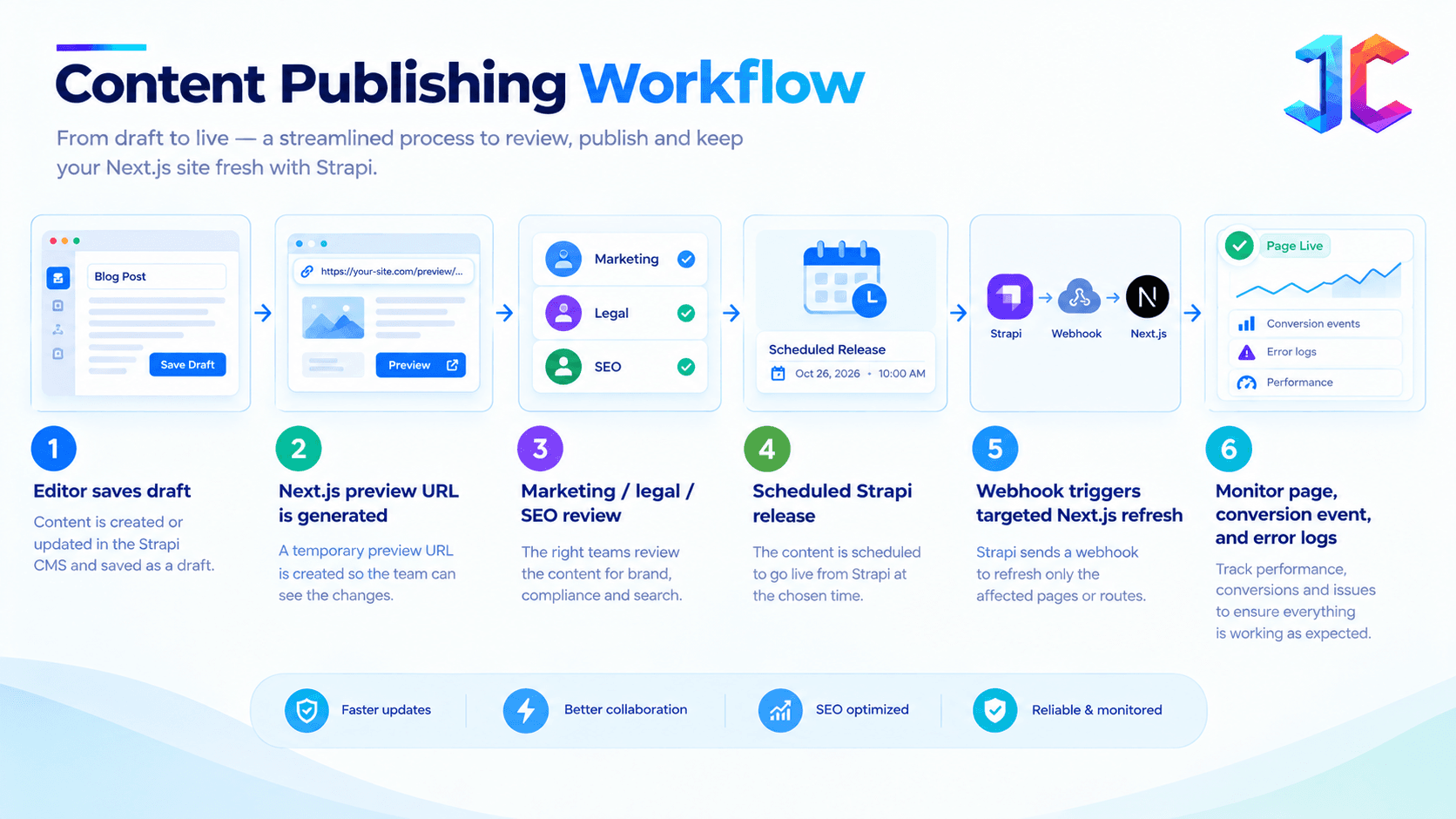
Questions to answer before launch
- Can editors preview unpublished content with the real page template?
- Can a bad release be reverted without engineering?
- What happens if Strapi publishes but the Next.js webhook fails?
- Is the deployment or cache refresh visible in monitoring?
- Who approves high-risk content?
A content platform is not production-ready until editors can safely preview, publish, monitor, and reverse changes.
Treat Content APIs as Products, Not Database Views
Once Next.js, mobile apps, partner portals, and AI systems consume Strapi data, changing a field is no longer “just a CMS edit.” It can break downstream consumers and create inconsistent experiences.
Treat content APIs as products with contracts, documentation, versioning, and testing. This separates a short-term website migration from a scalable composable architecture.
API governance checklist
- Define response contracts for each content type.
- Document required and optional fields.
- Use versioned content components where needed.
- Deprecate fields with a transition period.
- Run contract tests before schema changes are released.
- Maintain backward compatibility for mobile or third-party consumers.
- Restrict API responses to only the fields each consumer needs.
This is particularly important when APIs expose object-level data. OWASP identifies Broken Object Level Authorization as API1:2023 and warns that object identifiers can be manipulated when each request does not verify permission for the specific object.
Build a Content Model for Search and AI Systems
A headless migration is an opportunity to improve how content is structured—not just how it looks. Search engines and AI systems rely more on clear entity relationships, expert context, and unambiguous page purpose than on keyword repetition.
The content model should make it easy to identify the main topic, supporting entities, author expertise, related resources, and canonical source of truth.
Practical content structure
- One clear topic per page.
- Expert-reviewed definitions and comparison tables.
- Clear author and last-reviewed data.
- Structured FAQs only when the answer appears visibly on page.
- Descriptive headings rather than keyword-only headings.
- Explicit entity relationships: service, industry, location, technology, and case study.
- Canonical source pages for important topics to avoid conflicting answers across multiple URLs.
This supports AEO and GEO by making content easier to interpret, while also improving human usability and topical clarity.
Laravel Migration Considerations
A Laravel migration is different from moving a custom PHP CMS. Laravel already provides structured routing, validation, queues, ORM patterns, and schema migration conventions.
The goal should be to preserve valuable business logic while removing content and frontend bottlenecks, not automatically deleting Laravel.
| Current Laravel capability | Recommended future location |
|---|---|
| Marketing content | Strapi |
| Public content rendering | Next.js |
| Complex domain workflows | Keep in Laravel or move to dedicated APIs |
| Authentication | Existing identity provider, Laravel, or dedicated auth platform |
| Background jobs | Laravel queues, cloud queues, or event-driven services |
| Database changes | Laravel database migration files or managed schema tooling |
| Admin-only business operations | Laravel admin or separate internal application |
| A Laravel database migration is version-controlled code that changes a database schema, such as creating tables, adding columns, or modifying indexes. It is different from content migration, which moves business data and relationships between platforms. |
A practical target architecture may be:
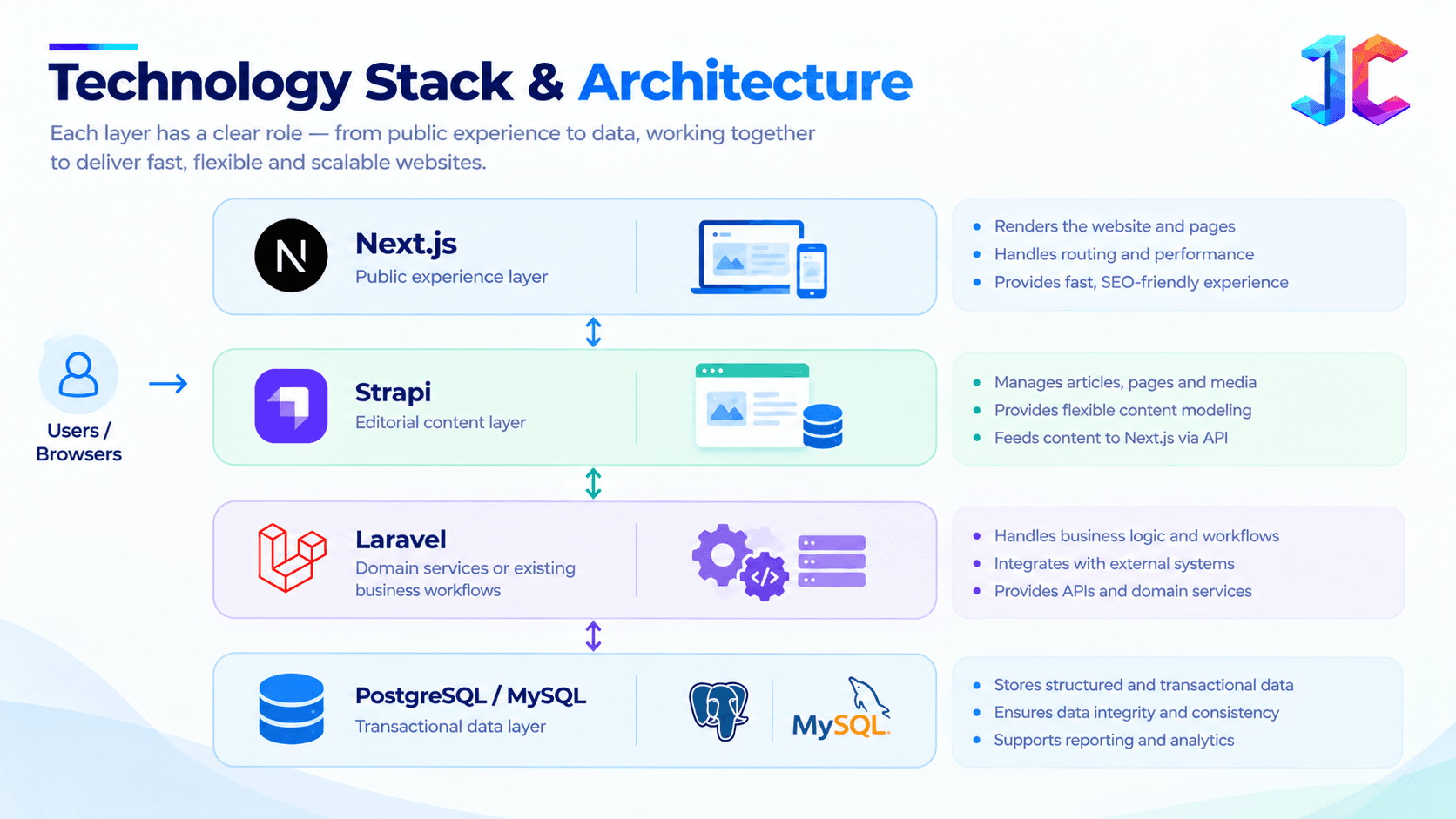
This protects valuable business logic while removing content and frontend bottlenecks.
PHP Migration Cost: What Actually Drives It
There is no reliable fixed PHP migration cost because cost depends more on hidden complexity than page count. A 200-page website with clean content and few integrations can be simpler than a 50-page website with custom workflows and legacy APIs.
The most reliable way to reduce cost is to discover complexity early and avoid rebuilding stable business logic unnecessarily.
| Cost driver | Why it increases effort |
|---|---|
| Custom PHP logic | Requires discovery, testing, and redesign |
| Number of content types | Expands modeling and import work |
| Media volume | Requires matching, optimization, and validation |
| Legacy URL complexity | Increases redirect mapping work |
| Multilingual content | Adds localization and hreflang testing |
| User accounts | Requires authentication and data privacy decisions |
| Third-party integrations | Needs API, webhook, and failure-path testing |
| Ecommerce or payments | Requires extensive security and regression testing |
| Compliance | Adds audit, retention, consent, and access-control work |
| Poor data quality | Creates cleanup and exception handling work |
| A lower-cost migration is not necessarily a cheaper rebuild. It is a migration that reduces rework through early discovery, repeatable ETL scripts, pilot testing, and rollback planning. |
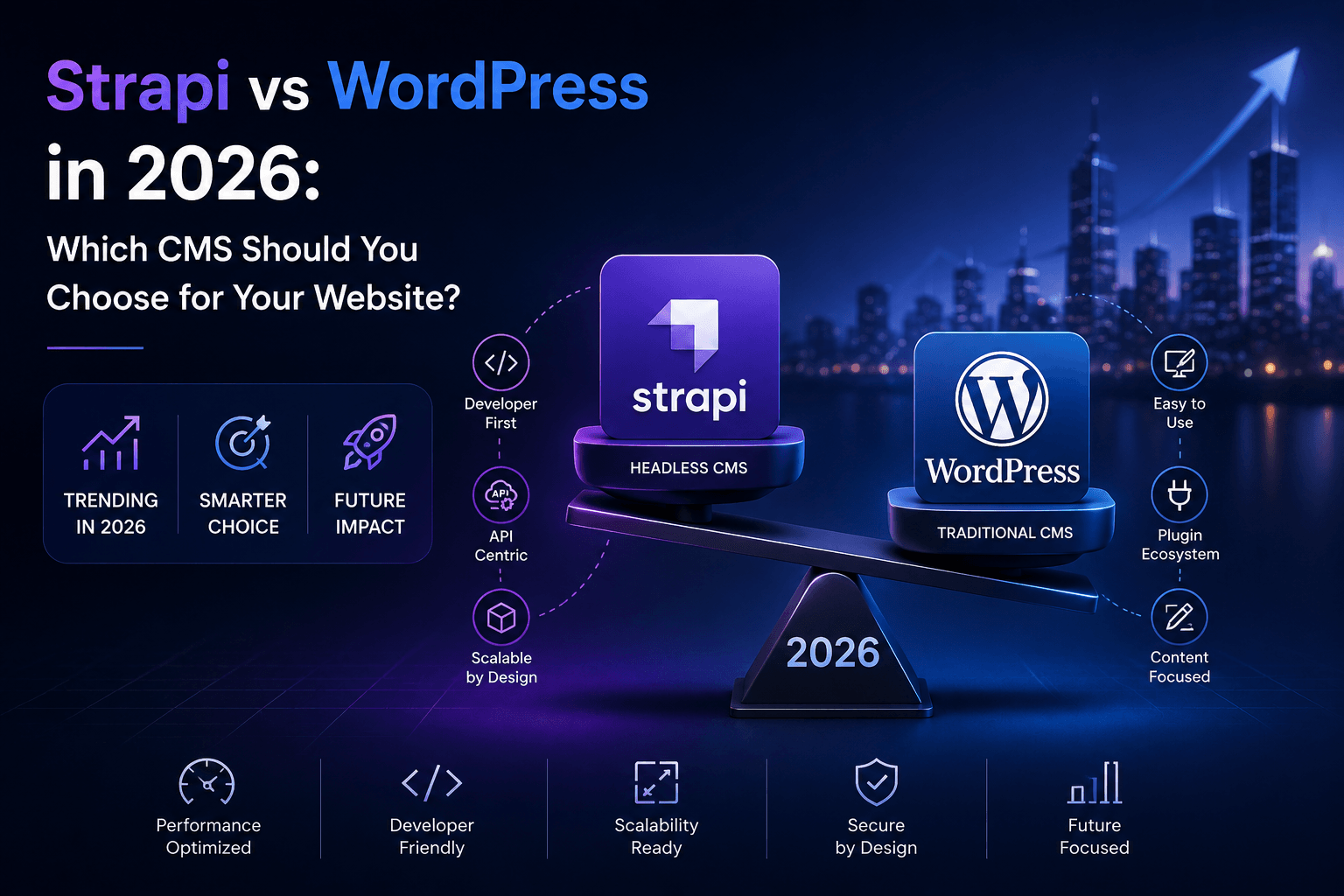
Strapi vs WordPress for Legacy PHP Modernization
Strapi and WordPress solve different problems. The right choice depends on the operating model, content structure, integration needs, and future product roadmap, not on which platform is more popular.
If the organization primarily needs a traditional marketing website with familiar publishing workflows, WordPress may still fit. If it needs structured content delivered to multiple applications, flexible frontend development, controlled APIs, and a composable architecture, Strapi is often stronger.
| Decision factor | Strapi | WordPress |
|---|---|---|
| Architecture | API-first headless CMS | Traditional CMS with headless options |
| Frontend flexibility | Built for decoupled frontends | Possible, but often plugin/theme-driven |
| Content modeling | Strong custom content types and relations | Flexible with plugins and custom fields |
| Editorial familiarity | Requires onboarding | Familiar to many content teams |
| Omnichannel delivery | Strong fit | Possible but less native |
| Plugin reliance | Lower for API architecture | Often higher, depending on implementation |
| Best fit | Custom products, composable architecture, structured content | Marketing websites needing faster conventional publishing |
| A Strapi guide should never treat it as a universal replacement for every CMS. Choose it when the content model, integration needs, development workflow, and future channels justify headless complexity. |
Phase 8: Testing, Staging, and Cutover
Run the Next.js + Strapi stack on a staging domain while the PHP monolith remains live. This allows the team to validate routes, redirects, forms, performance, and integrations without risking production traffic.
Testing should cover data integrity, frontend behavior, SEO, security, and business outcomes. A page can look correct in staging while still failing to generate leads, protect data, or preserve search visibility.
Data integrity
- Content counts match source records.
- Every published page has a valid slug.
- Categories, tags, authors, and related content resolve correctly.
- Media loads correctly and has usable alt text.
- No content is accidentally published or unpublished.
Frontend quality
- Page layouts match approved designs.
- Responsive behavior works across devices.
- Forms validate, submit, and trigger the correct CRM workflow.
- Error pages return correct status codes.
- Navigation and search work as expected.
SEO validation
- Top traffic URLs redirect correctly.
- Title tags, descriptions, canonicals, and schema are valid.
- Sitemap and robots rules are correct.
- No staging environment is indexable.
- Internal links resolve without loops or 404s.
Security validation
- No production secrets are exposed in client bundles.
- Admin access follows least privilege.
- API tokens have narrow scope and expiration controls.
- Webhooks verify signatures.
- Rate limits protect public endpoints.
- Backups can be restored.
Business validation
- Editorial teams can create and publish pages.
- Marketing can update SEO fields without developers.
- Analytics events report correctly.
- Sales forms reach the right systems.
- Stakeholders approve priority page output.
Cutover and Rollback Plan
A safe launch has a rollback plan before launch day. Define who makes the rollback decision, what triggers it, how traffic is restored, and how the team communicates during an incident.
Without this, teams often delay action because they cannot tell whether an issue is a content problem, cache problem, integration failure, or deployment error.
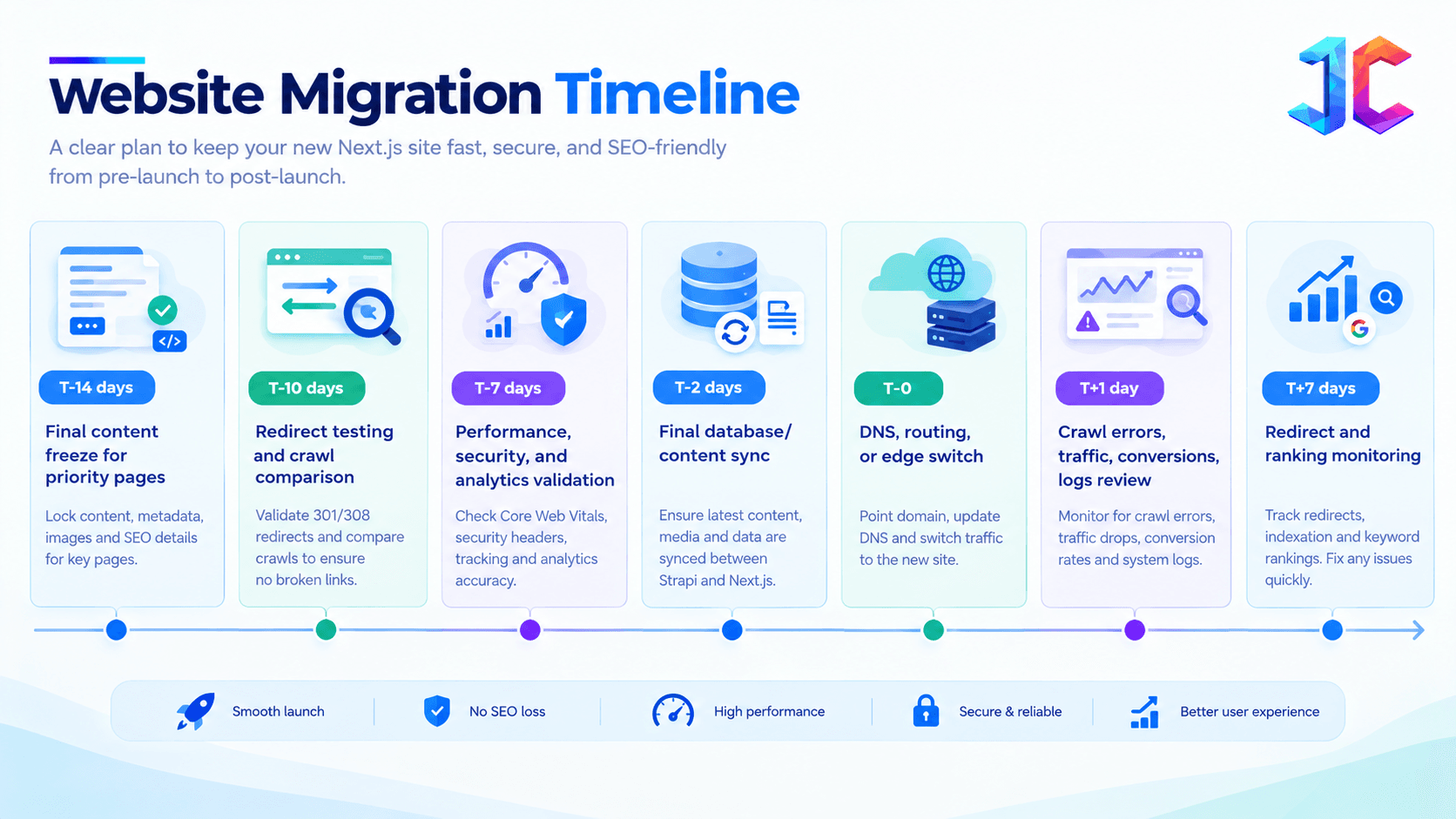
DNS and infrastructure cutover
Point the production domain to the Next.js hosting environment, such as Vercel, AWS, or a Dockerized Node server, and route Strapi to a protected API subdomain.
Keep the legacy PHP environment available during the transition period. This makes it possible to restore specific route groups quickly if a critical issue appears.
Rollback triggers
Consider rollback if:
- Key routes return large-scale 404 or 500 errors.
- Lead forms fail.
- Authentication or checkout fails.
- Severe SEO directives are incorrect.
- Content is missing or unpublished at scale.
- A security issue exposes admin or API credentials.
The rollback procedure may involve restoring previous routing, switching traffic at the CDN, or returning specific route groups to the PHP system while the issue is fixed.
What to Monitor After Launch
A successful launch is not the end of migration. The first 30 days determine whether the new platform is stable, searchable, measurable, and safe for editorial operations.
Monitor technical health, SEO signals, publishing reliability, and business outcomes together. A technically stable site can still fail if leads stop reaching the CRM or priority pages lose visibility.
| Area | What to monitor |
|---|---|
| Technical health | 404s, 500s, API errors, webhook failures, deployment errors |
| SEO health | Indexed pages, crawl errors, rankings, impressions, canonical issues |
| Performance | Core Web Vitals, API latency, cache hit rate, server response time |
| Publishing | Publish-to-live delay, failed revalidations, preview errors |
| Business outcomes | Organic sessions, leads, form submissions, conversions, revenue |
| Security | Failed logins, token misuse, permission changes, webhook anomalies |
| Set alerts for failed webhooks, rising 404 rates, form submission failures, and major drops in organic impressions. These signals often identify migration issues before stakeholders notice them. |
When to Hire a Strapi Developer
Consider hiring a Strapi developer when the migration involves custom content modeling, complex relationships, localization, role design, API restrictions, import scripts, media migration, workflow automation, or external integrations.
The right developer should understand both CMS architecture and production delivery—not only how to install Strapi.
What a capable Strapi developer should deliver
- Translate legacy PHP tables into maintainable content models.
- Build secure import and reconciliation scripts.
- Configure permissions without exposing sensitive content.
- Integrate Strapi webhooks with Next.js revalidation.
- Design reliable API queries and caching behavior.
- Support self-hosted deployment, backup, monitoring, and upgrades.
- Work with the frontend team to preserve SEO and editorial usability.
The best outcome is not simply “Strapi installed.” It is a content platform that editors can use, developers can maintain, search engines can crawl, and the business can extend.
FAQs
What is PHP migration?
PHP migration is the process of moving a PHP-based website or application to a newer PHP version, a new framework, a modern architecture, or a different technology stack. In a headless migration, the business may separate content into Strapi and rebuild the public frontend in Next.js.
Is Laravel migration the same as PHP migration?
No. Laravel migration can refer to moving an existing Laravel application, upgrading Laravel versions, or using Laravel’s schema migration system. PHP migration is broader and may involve custom PHP, CMS platforms, frameworks, databases, hosting, or frontend architecture.
What is a Laravel database migration?
A Laravel database migration is version-controlled code that changes a database schema, such as creating tables, adding columns, or modifying indexes. It is different from migrating content records between a legacy application and Strapi.
Can we keep Laravel while using Strapi and Next.js?
Yes. A practical architecture can use Next.js for the frontend, Strapi for editorial content, and Laravel for existing transactional workflows, internal business logic, or domain APIs. This reduces risk by avoiding unnecessary rewrites.
How long does a PHP application migration take?
A simple content-focused website may take weeks, while enterprise systems with integrations, custom workflows, multilingual content, ecommerce, or complex SEO dependencies can take several months. Discovery and pilot migration quality are better predictors than page count alone.
Will a PHP migration affect SEO?
It can, especially if URLs, redirects, metadata, canonicals, internal links, structured data, or crawl directives are mishandled. SEO should be managed as a dedicated workstream from the first audit through post-launch monitoring.
Is Strapi better than WordPress?
Neither is universally better. Strapi is often better for API-first, composable, multi-channel, and highly structured content use cases. WordPress can be a practical choice for conventional marketing sites that need familiar publishing workflows and less custom architecture.
How do Strapi and Next.js work together?
Strapi manages structured content and exposes it through REST or GraphQL APIs. Next.js fetches that content, renders the frontend, manages routes and metadata, and controls caching. On publish, Strapi can trigger a Next.js webhook so affected pages refresh.
What are common Laravel security vulnerabilities during migration?
Common risks include outdated dependencies, weak authorization checks, exposed environment variables, insecure file upload handling, insufficient validation, vulnerable third-party packages, poor session handling, and over-permissive API routes. Security testing should occur before and after the migration.
How can a company reduce PHP migration cost?
Reduce cost by auditing before rebuilding, prioritizing high-value route groups, creating reusable Strapi components, using repeatable ETL scripts, cleaning data before launch, preserving URLs where possible, and avoiding unnecessary rewrites of stable business logic.
Conclusion
A successful PHP migration is not measured by whether the new website uses Strapi 5 and Next.js. It is measured by whether the business retains organic traffic, protects content quality, improves publishing speed, reduces technical risk, and gains a platform that can support new products and channels.
Start with a full audit, classify what should be rebuilt, refactored, or retained, map hidden dependencies, design a clean Strapi schema, build a repeatable ETL pipeline, preserve SEO equity, secure APIs, run both systems in parallel, and launch with a tested rollback plan.
For organizations planning a phased transformation, the most valuable next step is a structured migration assessment that identifies dependencies, SEO risk, content-model gaps, integration requirements, and the safest rollout sequence.