Yes, vibe-coded mobile apps can scale, but not simply because the code works in a demo. AI-assisted development can accelerate MVP delivery, while production scalability depends on architecture, data access, reliability, security, observability, and the app’s ability to evolve safely.
The real question is not, “How many users can a vibe-coded app support?” It is:
“Can the application continue to perform reliably when users, transactions, data, integrations, and feature requests increase?”
- A vibe-coded app can be suitable for prototyping, early validation, internal tools, and low-risk workflows.
- User count alone does not determine scale readiness. A smaller app handling payments, real-time communication, media, or offline synchronization may be more demanding than a larger content-based app.
- The most common bottlenecks appear in database queries, API design, state management, caching, background processing, memory usage, and network handling.
- Mobile-specific concerns, including poor connectivity, device fragmentation, battery constraints, background execution, and push notifications, must be tested separately from backend capacity.
- Load testing should cover normal traffic, peak traffic, sudden spikes, sustained usage, dependency failures, and recovery behavior.
- Observability is essential because a team cannot reliably scale an application it cannot monitor across the mobile client, APIs, databases, queues, and third-party services.
- A rewrite should not be triggered merely because AI generated the code. The stronger trigger is an architecture that can no longer evolve safely, perform predictably, or operate economically.
- Production hardening should usually be staged: audit, secure, measure, optimize, refactor selectively, and rewrite only the boundaries that cannot support the roadmap.
- The cost of keeping a weak architecture includes cloud waste, slower releases, production incidents, security remediation, lost revenue, and delayed opportunities.
Vibe Coding Can Build the App. Can It Build the Architecture?
Vibe coding reduces the distance between a product idea and a working application. Tools such as Cursor, Claude Code, Bolt, Lovable, and similar AI coding platforms can generate interfaces, connect APIs, create database operations, and accelerate early feature development.
That speed is valuable, especially for founders and small teams. However, an AI coding tool generally responds to the immediate prompt rather than maintaining a complete understanding of the product’s future traffic patterns, data growth, failure modes, security requirements, and operational costs.
Each generated change may appear reasonable in isolation. The risk emerges when these decisions accumulate without a consistent architectural model.
A prototype can therefore work perfectly with one developer, a small database, and stable connectivity while struggling with:
- Thousands of concurrent users
- Large datasets
- Payment retries
- Unreliable networks
- Offline actions
- Background processing
- Push-notification failures
- Frequent releases
- Multiple device types
- Third-party service outages
The issue is not that AI-generated code is automatically unusable. The issue is that fast implementation can outpace architecture, testing, and operational discipline.
MVP Architecture vs. Production Architecture
An MVP architecture is designed to answer, “Does this product solve a real problem?” A production architecture must also answer, “Can this product keep working when real conditions become unpredictable?”
| Area | MVP Architecture | Production Architecture |
|---|---|---|
| Primary goal | Validate the product idea | Support reliable business operations |
| Users | Small and predictable | Concurrent, growing, and unpredictable |
| Data | Limited records | Large datasets, migrations, retention, and recovery |
| Backend | Simple APIs and direct functions | Versioned APIs, queues, caching, and clear service boundaries |
| Authentication | Basic sign-in | Secure sessions, token rotation, recovery, and role controls |
| Payments | Initial provider integration | Idempotency, verified webhooks, retries, and reconciliation |
| Mobile state | Local or basic global state | Defined ownership, caching, synchronization, and conflict handling |
| Network | Assumes connectivity | Handles timeouts, retries, offline actions, and reconnection |
| Testing | Manual checks | Automated, device, integration, load, and regression testing |
| Monitoring | Basic logs | Crash analytics, metrics, traces, alerts, and cost visibility |
| Deployment | Direct or manual releases | Staging, controlled rollout, feature flags, and rollback |
An MVP does not need unnecessary enterprise complexity. It does need a clear path for introducing stronger architecture before the application becomes difficult or expensive to change.
Where Vibe-Coded Mobile Apps Hit Architectural Limits
Screen-level feature accumulation
AI-generated mobile features often begin inside a screen because that is the fastest way to make a workflow visible. As the app grows, the same screen may become responsible for:
- Rendering the interface
- Calling APIs
- Validating forms
- Applying business rules
- Updating local storage
- Handling payments
- Tracking analytics
- Managing navigation
- Displaying errors
This creates tightly coupled components that are difficult to test and risky to modify. A change to a payment state may affect navigation. A change to a data request may alter loading behavior across unrelated screens.
The long-term problem is not file size alone. It is the absence of clear boundaries between presentation, business logic, data access, and infrastructure.
Inconsistent state management
The same data may be stored in several places:
- Component state
- Global state
- Device storage
- API cache
- Backend database
- Notification payloads
If ownership is unclear, the app can show different versions of the same information. Common symptoms include stale profiles, duplicate requests, failed refreshes, inconsistent lists, and offline actions that appear successful but were never accepted by the server.
A scalable app should define:
- Which data belongs to the server.
- Which data can be cached locally.
- Which actions can be performed offline.
- How conflicts are resolved.
- Which system is authoritative after reconnection.
Fragmented implementation patterns
One prompt may produce REST-style data access. Another may introduce a different state library. A later change may add direct database access or a new error-handling pattern.
Each feature can function independently while the application becomes increasingly difficult to reason about. The result is architectural inconsistency, not necessarily one obvious defect.
The central issue is:
AI can accelerate implementation, but it does not automatically preserve architectural consistency across hundreds of future decisions.
How Database Growth Changes Mobile App Performance
A query that performs well against a few thousand records may become a serious bottleneck when the same table contains millions of rows. The problem is often not the database technology itself, but how the application accesses it.
Common warning signs
- Filtering or sorting without appropriate indexes
- N+1 query patterns
- Large collections returned to the mobile device
- Expensive offset-based pagination
- Repeated queries for identical information
- Search operations scanning unnecessarily large datasets
- Reports generated synchronously during user requests
- New database connections created for individual requests
- Historical data stored indefinitely in active transactional tables
- No caching for frequently requested data
These problems affect both performance and cost. A mobile user may experience a slow screen, while the business experiences higher database utilization, more server execution, increased bandwidth, and greater infrastructure spending.
Production systems should monitor:
- Query execution time
- Slow-query frequency
- Database CPU and memory
- Connection saturation
- Cache hit rates
- Read and write volume
- Queue processing time
- Storage growth
- Backup and recovery performance
The goal is not simply to make today’s query fast. It is to keep data access predictable as users, records, and transaction volume grow.
API Bottlenecks and Backend Workloads
Mobile applications are especially sensitive to inefficient APIs because every unnecessary request consumes time, bandwidth, battery, and memory.
Typical API problems
- Returning entire objects when only a few fields are required
- Fetching all records instead of using pagination
- Making duplicate requests during screen transitions
- Performing expensive work inside the request path
- Missing request timeouts
- Retrying non-idempotent operations
- No response caching
- Inconsistent error formats
- Unversioned API contracts
- Weak authorization at endpoint level
Heavy tasks such as report generation, media processing, email delivery, search indexing, and notification fan-out should usually be moved to background jobs.
A request should complete quickly when it can safely acknowledge the user’s action and process the expensive work asynchronously. Otherwise, users wait longer and the system becomes vulnerable to timeouts and traffic spikes.
Mobile Performance Bottlenecks
Mobile performance is not the same as server performance. A fast API cannot compensate for an application that blocks the UI thread, renders too much content, leaks memory, or repeatedly downloads the same data.
| Performance Area | Common Cause | Business Impact |
|---|---|---|
| Startup | Oversized bundles and excessive initialization | Users abandon before activation |
| Rendering | Inefficient lists and unnecessary re-renders | Poor scrolling and lower engagement |
| Memory | Unreleased listeners, images, timers, or sockets | Crashes during longer sessions |
| Network | Duplicate requests and oversized responses | Slow screens and high data usage |
| Battery | Excessive polling or background processing | Uninstalls and reduced retention |
| Storage | Uncontrolled cache and temporary files | Failed downloads and storage pressure |
| Media | Uncompressed images and video | Slow feeds and higher bandwidth costs |
| Background tasks | Long work tied to foreground requests | Timeouts and frozen workflows |
These issues should be measured on representative real devices, not only simulators. Device memory, operating-system behavior, network quality, and hardware capabilities can materially change the result.
Offline Mode Is a Data-Consistency Problem
Offline support is not just a matter of caching screens. It requires a synchronization model.
The application should define:
- Which screens remain useful without a connection
- Which actions can be saved locally
- How pending actions are queued
- How duplicate actions are prevented
- How conflicts are resolved
- How stale data is identified
- What happens when the server rejects a local change
- How the user sees pending, failed, and confirmed states
Consider an order placed during poor connectivity. The app should distinguish between:
- Action saved locally
- Request waiting to be sent
- Request received by the server
- Payment authorized
- Order confirmed
- Fulfillment started
If all these states are reduced to a local “success” value, users may see false confirmations or create duplicate transactions.
Offline-first design must therefore be based on business state transitions, not only local storage.
Payment and Authentication Reliability
Authentication
A functioning login screen does not prove that the authentication architecture is secure.
Review:
- Secure token storage
- Token expiration and refresh
- Session revocation
- Password recovery
- Multi-factor authentication
- Login rate limits
- Role-based authorization
- Server-side ownership checks
- Account deletion
- Protection against credential abuse
Authorization must be enforced on the backend. Hiding a button in the mobile interface does not prevent a user from directly calling the API.
Payments
Payment flows must handle interruption and repetition safely.
A production payment workflow should address:
- Double taps
- Network loss after submission
- App termination during checkout
- Delayed provider responses
- Duplicate webhooks
- Forged webhook requests
- Refunds and partial refunds
- Reconciliation differences
- Provider outages
- Currency and tax changes
Idempotency is essential. Repeating the same payment request should not create multiple charges.
The mobile client should also not be the only authority for payment confirmation. The backend should verify the trusted provider event and maintain a reliable transaction state.
Push Notifications at Scale
Push notifications often work during development because there are few devices, users, and events. Production introduces expired device tokens, permission changes, multiple devices, provider failures, and notification preferences.
A reliable notification system should include:
- Device-token registration and cleanup
- Invalid-token handling
- Multiple-device support
- User preference management
- Queue-based processing
- Controlled retries
- Duplicate prevention
- Time-zone handling
- Deep-link validation
- Delivery monitoring
Notifications should not be the only source of truth. If a notification fails, the app should still display the correct status when the user opens it.
For example, a missed shipment notification should not prevent the order screen from showing the latest delivery state.
Device Fragmentation and Platform Behavior
A cross-platform framework can reduce duplicated development effort, but it does not remove operating-system differences.
Test across:
- Low-memory Android devices
- Different screen sizes
- Multiple supported OS versions
- Slow and unstable networks
- App backgrounding and resuming
- Permission denial
- Expired push tokens
- Interrupted uploads
- Camera and Bluetooth permissions
- Background execution limits
- Older supported devices
Some capabilities may require native or platform-specific implementations:
- Background location
- Bluetooth
- Camera processing
- Secure storage
- Health and sensor data
- Background uploads
- Advanced media
- Push notification extensions
The relevant question is not whether React Native or Flutter can scale in general. It is whether this particular app has been designed around the framework’s actual lifecycle, rendering, networking, and native-integration behavior.
How to Know If a Vibe-Coded App Is Actually Ready to Scale
User count alone does not determine readiness. A 10,000-user app handling payments, real-time communication, media processing, or complex offline workflows may be more difficult to operate than a 100,000-user content application.
A practical scale-readiness assessment should examine five areas.
Performance
Measure:
- Startup time
- Screen transition latency
- API latency
- Rendering performance
- Memory consumption
- Battery usage
- Network efficiency
- Image and media performance
Measurements should be collected on real devices and realistic networks.
Reliability
Test:
- Retries
- Timeouts
- Background jobs
- Crash recovery
- Offline actions
- Notification failures
- Dependency outages
- Interrupted uploads
- App backgrounding and resuming
- Duplicate user actions
Data architecture
Review:
- Database indexing
- Pagination
- Caching
- Query performance
- Connection pooling
- Data consistency
- Backups
- Disaster recovery
- Data retention
- Migration procedures
Security
Verify:
- Authentication
- Authorization
- Secure token storage
- Secrets management
- API protection
- Input validation
- Payment integrity
- Sensitive-data handling
- Dependency vulnerabilities
- Audit logging
Maintainability
Evaluate:
- Architecture boundaries
- Test coverage
- Observability
- Deployment processes
- Dependency management
- Documentation
- Ownership
- Release safety
- Ability to introduce new features without regressions
A production-ready app should be able to answer:
- What happens when the API is unavailable?
- What happens when a user taps the payment button twice?
- What happens when the device goes offline halfway through an action?
- What happens when the database grows 100 times?
- What happens when a release introduces a regression?
- Can the team identify the cause of a production failure quickly?
If these questions cannot be answered confidently, the application may be functional, but it has not demonstrated production scalability.
Load Testing Before Launch
Development environments rarely reproduce real traffic. Load testing answers a different question:
What happens when the application receives the workload it is expected to handle?
Types of testing
- Load testing: Measures behavior under expected concurrent traffic.
- Stress testing: Pushes the system beyond expected capacity.
- Spike testing: Simulates sudden traffic increases from campaigns, launches, or viral activity.
- Soak testing: Maintains traffic over an extended period to expose memory leaks, connection exhaustion, queue buildup, and gradual degradation.
Mobile applications should be tested beyond the backend
Include:
- Slow networks
- Interrupted requests
- Backgrounding and resuming
- Low-memory devices
- Battery restrictions
- Large uploads
- Repeated payment attempts
- Push-notification bursts
Metrics to monitor
- API p95 and p99 latency
- Requests per second
- Error rate
- Database response time
- Connection utilization
- Queue depth
- CPU and memory usage
- Crash-free sessions
- Mobile startup time
- Payment success rate
- Cloud infrastructure cost under load
A system surviving one load test does not prove permanent readiness. The objective is to understand capacity, failure modes, recovery behavior, and the engineering work required before the application reaches its limits.
Observability: The Missing Production Layer
An application cannot be reliably scaled if the team cannot see what is happening inside it.
Many early-stage apps have basic logs but lack the visibility required to diagnose production behavior across the full request path:
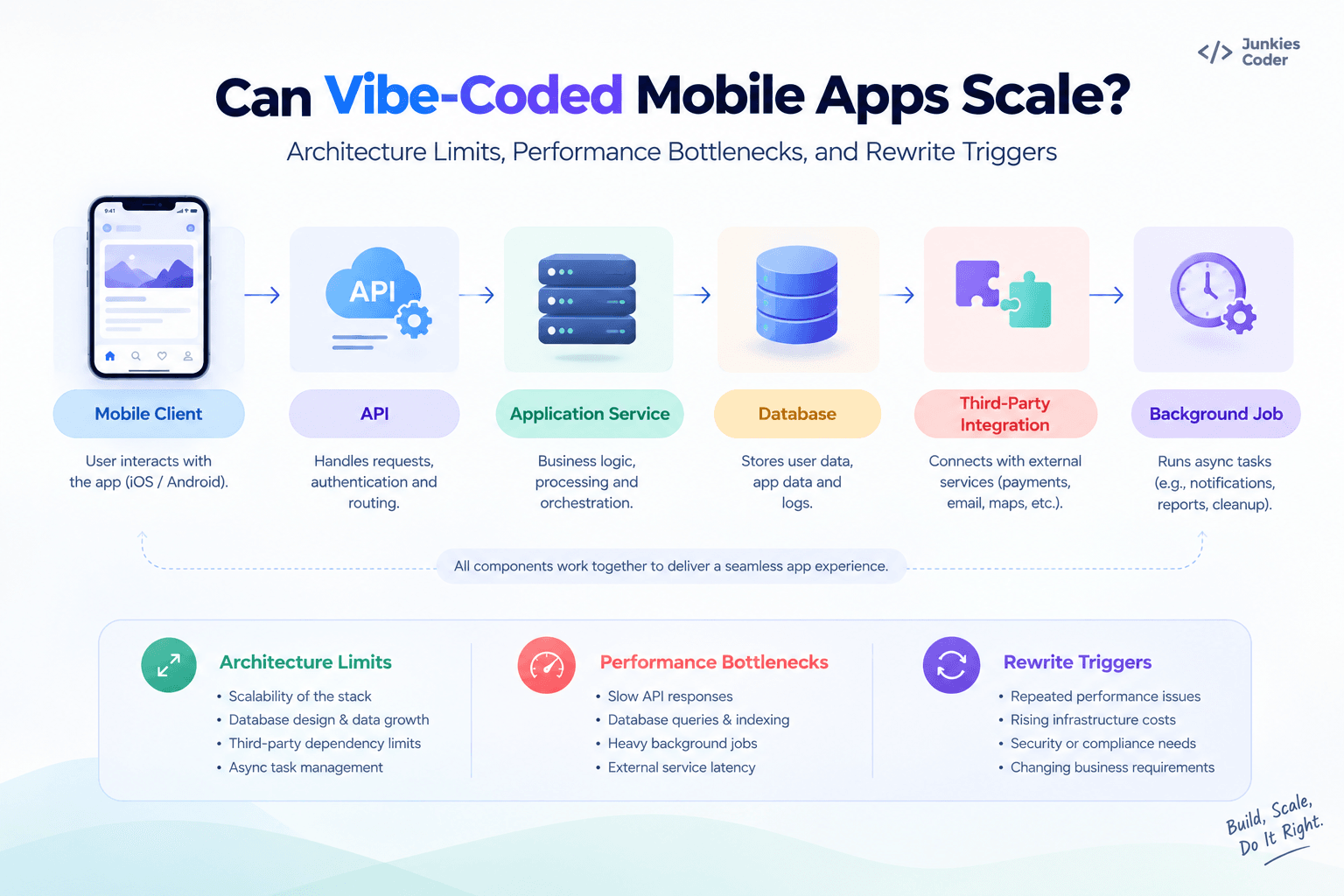
Useful observability should cover:
- Crash frequency
- Crash-free sessions
- API response times
- p95 and p99 latency
- HTTP error rates
- Database slow queries
- Queue depth
- Background-job failures
- Push-notification failures
- Payment failures
- Authentication errors
- Third-party API failures
- Infrastructure utilization
- Cloud-cost trends
Distributed tracing is especially useful when one mobile action triggers several backend services. Instead of seeing only that the request failed, the team can identify which dependency introduced the delay or error.
Observability also improves AI-generated code maintenance. If an AI-assisted change introduces a regression, telemetry can help identify whether the problem is in the mobile client, API, database, third-party integration, or a specific workflow.
Without observability, teams discover technical problems through user complaints. With observability, they can detect abnormal behavior before it becomes a widespread business problem.
The Developer Velocity Trigger
A codebase does not need to be completely broken before refactoring becomes economically justified.
One of the strongest warning signs is declining developer velocity.
Typical indicators include:
- Developers are afraid to modify core modules.
- Small changes repeatedly cause unrelated regressions.
- Every feature requires edits across tightly coupled files.
- AI-generated changes conflict with existing implementation patterns.
- Developers spend more time understanding behavior than building functionality.
- Tests are unreliable or difficult to maintain.
- New engineers require excessive time to understand the codebase.
- Releases are becoming slower and riskier.
- Technical debt is delaying revenue-generating features.
This is a business problem, not only a code-quality problem. If engineering capacity is increasingly consumed by stabilizing existing behavior, the company is paying an ongoing tax for technical debt.
A targeted refactor may restore velocity. If the architecture prevents predictable change across multiple domains, a staged rewrite may become more economical.
What Does It Cost to Keep a Weak Architecture?
The cost of an architecture problem is rarely limited to developer time.
Higher cloud costs
Inefficient queries, duplicate requests, unnecessary processing, oversized infrastructure, unused resources, and missing caching can increase operating costs as usage grows.
Slower releases
Tightly coupled code requires broader regression testing and makes every deployment riskier.
Production incidents
Weak error handling, unreliable integrations, missing monitoring, and single points of failure can turn small technical problems into outages.
Lost revenue
Payment failures, checkout problems, broken onboarding, slow loading, and crashes directly affect conversion and retention.
Security remediation
Weak authentication, exposed secrets, poor access controls, or unsafe payment flows are more expensive to fix after launch than during architecture design.
Opportunity cost
When engineers spend weeks stabilizing the current system, they are not building new features, entering new markets, or improving customer experience.
The right financial question is not only:
How much would a rewrite cost?
It is:
What will the current architecture cost the business over the next 12–24 months if nothing changes?
In some cases, optimization is enough. In others, targeted refactoring or replacing one architectural boundary is more appropriate. A full rewrite should remain the final option, not the default response to technical debt.
Optimize, Refactor, or Rewrite?
A rewrite should be based on evidence rather than frustration.
| Situation | Recommended Action |
|---|---|
| One slow screen | Profile and optimize the screen |
| One inefficient API endpoint | Tune the query or redesign the response |
| Duplicate requests | Fix caching and data ownership |
| Repeated UI logic | Refactor into reusable components |
| Conflicting state patterns | Establish a consistent state architecture |
| Missing database indexes | Optimize schema and queries |
| Slow background operations | Introduce queues or workers |
| Weak monitoring | Add observability before larger changes |
| Several tightly coupled modules | Perform a partial architectural rewrite |
| Data model blocks the roadmap | Redesign the affected domain |
| Unsafe payment or authentication flow | Rebuild the affected security boundary |
| The system is broadly untestable | Consider a staged full rewrite |
The decisive question is:
Can the current system be changed safely enough to support the next stage of the business?
If yes, optimize or refactor. If only one area fails, replace that boundary. If the architecture prevents safe evolution across the product, a wider rewrite may be justified.
The fact that an app was vibe-coded is not itself a rewrite trigger.
The real rewrite trigger is the inability to evolve the app safely, predictably, or economically.
Production Hardening: From Prototype to Scalable Product
Moving an AI-assisted mobile app into production should be treated as a staged engineering process.
Stage 1: Architecture audit
Review:
- Mobile architecture
- State management
- API boundaries
- Database design
- Authentication
- Payments
- Integrations
- Offline behavior
- Deployment process
Stage 2: Critical workflow assessment
Prioritize workflows where failure creates direct business impact:
- Authentication
- Payments
- Account management
- Orders and transactions
- Permissions
- Data synchronization
- File and media uploads
- Public APIs
Stage 3: Security hardening
Review:
- Token storage
- Authorization
- API access controls
- Secrets
- Input validation
- Dependency vulnerabilities
- Payment webhooks
- Logging
- Sensitive-data handling
Security should be enforced at the backend, not through mobile-interface restrictions alone.
Stage 4: Database and API optimization
Identify:
- Slow queries
- Missing indexes
- Inefficient responses
- Unbounded requests
- Excessive API calls
- Connection-management problems
- Synchronous work that belongs in background processing
Stage 5: Mobile performance optimization
Profile:
- Startup
- Rendering
- Memory
- Networking
- Image handling
- Background tasks
- Battery consumption
- Device-specific behavior
Stage 6: Observability
Introduce:
- Crash reporting
- Structured logs
- API metrics
- Database visibility
- Traces
- Alerts
- Transaction-level telemetry
- Cost monitoring
Stage 7: Load and failure testing
Test:
- Expected traffic
- Traffic spikes
- Dependency failures
- Network interruptions
- Database pressure
- Queue buildup
- Recovery behavior
- Duplicate actions
Stage 8: Targeted refactoring
Refactor the boundaries creating measurable risk. Do not rewrite stable components merely because AI generated them.
Stage 9: Controlled production deployment
Use:
- Environment separation
- Automated checks
- Staging
- Feature flags
- Rollback capability
- Database migration procedures
- Release monitoring
Stage 10: Continuous optimization
Production hardening does not end at launch. Continue monitoring:
- Crash rates
- API performance
- Infrastructure costs
- Dependency health
- Database growth
- Payment success
- User-impacting workflows
What a Vibe-Coded App Audit Should Deliver
A professional audit should produce more than a list of code-quality issues. It should connect technical findings to business risk and provide a prioritized remediation roadmap.
A comprehensive audit can include:
- Architecture risk assessment
- Mobile performance assessment
- Database and API assessment
- Security assessment
- Offline and synchronization assessment
- Payment workflow assessment
- Observability assessment
- Technical-debt assessment
- Scalability assessment
- Refactor-versus-rewrite recommendation
- Prioritized remediation roadmap
The most valuable outcome is not automatically a recommendation to rebuild the application. It is a clear answer to four questions:
- What is working?
- What is likely to fail?
- What should be fixed first?
- Does the business actually need a rewrite?
This lets teams preserve working functionality while strengthening the architectural boundaries that could restrict future growth.
The Future of AI-Built Mobile Apps
AI will continue to reduce the time and cost required to create the first version of a mobile product. More founders and smaller teams will be able to validate ideas without building large engineering organizations upfront.
That will also increase the importance of production engineering. As code generation becomes easier, the differentiator will move toward:
- Architecture
- Data modeling
- Mobile performance
- Security
- Observability
- Testing
- Infrastructure judgment
- Platform expertise
- Safe modernization
The future is not AI instead of engineering.
It is AI for implementation speed, combined with engineering discipline for reliability and scale.
Vibe-Coded App Audit and Production Hardening
A vibe-coded mobile app should not be judged solely by how it was created. It should be judged by whether it can handle real users, real transactions, real data, and continuous change.
A structured audit can identify:
- Architectural constraints
- Mobile performance bottlenecks
- Database and API inefficiencies
- Offline synchronization risks
- Authentication and payment weaknesses
- Notification reliability gaps
- Device-specific failures
- Missing observability
- Technical-debt hotspots
- Refactor and rewrite priorities
The right outcome is not always a new codebase. In many cases, it is a focused plan that preserves what works, fixes the boundaries that do not, and delays a rewrite until evidence justifies it.
Start with a Vibe-Coded App Audit and Production Hardening assessment to understand what should be optimized, refactored, replaced, or rebuilt before growth turns technical debt into a business problem.
FAQs
How can I tell whether my vibe-coded app is ready for real users?
Do not judge readiness by the number of registered users or screens in the app. Check whether the application can handle failed API requests, duplicate actions, database growth, offline usage, payment retries, device differences, and production incidents.
A scale-ready app should have measurable performance, tested recovery workflows, secure authentication, reliable data access, crash monitoring, rollback capability, and a clear owner for production issues.
Is supporting 10,000 users proof that my app can scale?
No. User count is only one part of the equation.
A content app with 100,000 mostly read-only users may be easier to operate than a 10,000-user marketplace handling payments, messaging, media uploads, real-time updates, and offline actions. Traffic shape, transaction complexity, data volume, and third-party dependencies matter more than a single user-number milestone.
What should I test before launching a vibe-coded mobile app?
Test the workflows where failure can directly affect users or revenue:
- Sign-up and login
- Password recovery
- Payments and refunds
- Orders or transactions
- File and media uploads
- Offline actions
- Push notifications
- Permissions and role controls
- App backgrounding and resuming
- Network interruption and retry behavior
Testing only the happy path is not enough. The app should also be tested on real devices, slow networks, low-memory devices, and during interrupted requests.
How do I know whether a slow mobile app has a frontend or backend problem?
Trace the complete user action instead of measuring only one API request.
For example, a slow checkout may involve mobile rendering, local validation, network latency, authentication, database queries, payment-provider response time, webhook processing, and UI state updates. Profiling the complete request path helps identify whether the bottleneck is in the device, API, database, third-party service, or the way the app handles the response.
Can a database become a mobile performance problem?
Yes. Poor database design often appears to users as slow screens, failed searches, delayed scrolling, or timeout errors.
Missing indexes, unbounded queries, N+1 requests, oversized responses, repeated data fetching, and inefficient pagination can increase both response time and mobile data consumption. As the dataset grows, the same query may become significantly more expensive even if the application code has not changed.
Should I use offset pagination in a growing mobile app?
Offset pagination can work for smaller datasets, but it may become inefficient when users browse deep into a large or frequently changing collection. The database may repeatedly scan and skip large numbers of records.
For high-volume feeds, messages, transactions, or activity logs, cursor-based pagination is often more predictable. The correct approach depends on the database, sort order, consistency requirements, and user experience.
What happens when a user goes offline halfway through an important action?
The application should know whether the action was:
- Saved locally
- Waiting for synchronization
- Sent to the server
- Accepted by the server
- Rejected
- Completed by a third-party service
This is especially important for payments, orders, bookings, inventory, and account changes. A local “success” message should not be treated as proof that the server completed the action.
How should a vibe-coded app handle a user tapping the payment button twice?
The backend should use idempotency so that repeated requests produce one transaction rather than multiple charges.
The payment flow should also have a server-controlled transaction state, verified webhooks, safe retry behavior, and reconciliation for cases where the mobile app loses connectivity after the payment provider has already accepted the transaction.
Why do push notifications work in testing but fail after launch?
Testing usually involves a few devices and controlled conditions. Production introduces expired device tokens, notification permissions, multiple devices per user, provider failures, high event volume, time-zone differences, and background restrictions.
A reliable notification system needs token lifecycle management, queues, retries, deduplication, user preferences, delivery monitoring, and a fallback in-app state. Important events should not depend entirely on notification delivery.
What is a realistic sign that my architecture is becoming unsafe?
A strong warning sign is not simply messy code. It is unpredictable change.
Look for patterns such as:
- A small feature requires changes in many unrelated files.
- Fixing one issue creates another regression.
- Developers avoid core modules.
- Releases require increasingly broad manual testing.
- Nobody can explain who owns a piece of data or business logic.
- AI-generated changes repeatedly conflict with existing patterns.
- Production failures cannot be traced quickly.
- New engineers take an unusually long time to understand the system.
These symptoms indicate that the architecture is becoming a barrier to product development.
When should I stop adding features and perform an architecture audit?
Consider an audit before a major marketing campaign, payment launch, enterprise onboarding, offline-mode release, or rapid platform expansion.
An audit is also justified when crash rates increase, cloud costs grow faster than usage, releases become risky, or the team is spending more time stabilizing existing functionality than delivering new features.
Does a vibe-coded app need load testing if current traffic is low?
Yes, particularly before a public launch, paid acquisition campaign, viral feature, or high-volume transaction event.
Low current traffic does not reveal how the system behaves under concurrency. Load testing can expose database connection exhaustion, queue buildup, slow queries, memory leaks, third-party limits, and failure-recovery problems before users encounter them.
What is the difference between load testing and stress testing?
Load testing measures whether the application can handle expected traffic and maintain acceptable performance.
Stress testing pushes the application beyond expected capacity to identify where it degrades, which component fails first, whether data remains safe, and how the system recovers. Both are useful because production incidents rarely occur only at average traffic levels.
What metrics should I monitor after launch?
Monitor both technical and business signals:
- Crash-free sessions
- App startup time
- API p95 and p99 latency
- HTTP error rates
- Database slow queries
- Queue depth
- Memory and CPU usage
- Push-notification failures
- Payment failure rate
- Authentication errors
- Third-party API failures
- Cloud cost per active user
- Checkout conversion
- Retention after performance incidents
A technically healthy system can still have a business problem if payments fail or onboarding becomes slow.
Why is observability especially important for AI-generated code?
AI-generated code can introduce a regression in an unexpected part of the application because the change may interact with dependencies, state, or workflows that were not obvious from the prompt.
Observability helps locate the source of the failure across the mobile client, API, database, queue, and third-party services. Without it, teams often discover problems only through complaints, poor reviews, or failed transactions.
Is declining developer velocity a valid reason to refactor?
Yes. Developer velocity is an economic signal of architecture quality.
If a feature that previously took hours now takes days because developers must investigate regressions, understand duplicated logic, or modify tightly coupled modules, the business is paying a recurring technical-debt cost. A targeted refactor can restore delivery speed before a larger rewrite becomes necessary.
How do I decide between optimization, refactoring, and rewriting?
Use the scope of the problem:
- Optimization: One screen, query, API, or dependency is slow.
- Refactoring: The feature works, but structure, state ownership, or duplicated logic makes changes risky.
- Partial rewrite: One domain, such as payments, authentication, synchronization, or the data layer—cannot safely support requirements.
- Full rewrite: Multiple core domains are coupled, untestable, insecure, and unable to support the product roadmap.
The fact that AI created the original code is not enough to justify a rewrite. The decision should be based on measurable risk, cost, and future requirements.
Can an architecture audit tell me whether I need a complete rewrite?
A useful audit should separate problems that can be fixed from problems that require replacement.
It should identify:
- What is working reliably
- Which components are likely to fail under growth
- Which risks affect revenue or user safety
- Which issues can be optimized
- Which boundaries need refactoring
- Whether a partial or full rewrite is economically justified
The outcome should be a prioritized remediation roadmap, not an automatic recommendation to rebuild everything.
What does production hardening include?
Production hardening typically includes:
- Architecture and dependency review
- Authentication and authorization assessment
- Payment and webhook testing
- Database and API optimization
- Mobile performance profiling
- Offline and synchronization review
- Real-device testing
- Load and failure testing
- Crash monitoring and distributed tracing
- Secure deployment and rollback procedures
- Dependency and vulnerability scanning
The objective is to make the application measurable, recoverable, secure, and predictable, not merely to make the code look cleaner.
How much technical debt is acceptable in a vibe-coded MVP?
Some technical debt is reasonable in an experiment, especially when the goal is to validate demand quickly. The problem begins when temporary shortcuts enter payment flows, authentication, sensitive data, core business logic, or heavily used modules without a plan to replace them.
An MVP should have an intentional transition point: once usage, revenue, risk, or roadmap complexity reaches a defined threshold, the team should audit and harden the foundations.
What is the strongest reason to invest in a vibe-coded app audit?
The strongest reason is uncertainty.
If the team cannot confidently explain how the app behaves during API failure, duplicate payment attempts, database growth, offline actions, traffic spikes, or a bad release, the application may be functional but operationally unproven.
A professional audit converts that uncertainty into a prioritized decision: optimize, refactor, partially rewrite, or rebuild.