Company
About Us
Our Vision, Mission & Culture
Our Portfolio
Work That Shipped, then Scaled
Contact us
We're a one step away from you.
Our Partner Program
We ensure Win-Win for both Parties.
Industries
Automotive
We Serve to Vehicles, EV, Fleet & CKD.
Lifestyle
Apps for social, music, fitness & on-demand platforms.
Media & Entertainment
Explore top media and entertainment companies shaping the future of content and digital entertainment.
Manufacturing
Produces goods from raw materials or components.
Adult Entertainment
Digital platforms powering streaming, subscriptions, and modern entertainment experiences.
Real Estate
Smart real estate apps that simplify property discovery, virtual tours, lead management, and seamless transactions.
Healthcare
System improves physical and mental well-being.
Agriculture
The tech, science, and practice cultivate AgriTech.
FinTech
For digital banking, payments, compliance, and embedded finance Apps.
Retail & E-Commerce
Sells products to customers through physical stores and online platforms.
Logistics
AI-powered logistics app development focused on smarter routing, real-time visibility, automation, and future-ready supply chains.
Travel
A travel app for trip planning, destination discovery, and easy bookings.
Service
AI Development
AI Development Services
Enterprise AI solutions that enhance efficiency and data-driven growth.
Enterprise AI Product Deployment
Move AI models from prototype to production with scalable deployment.
Agentic AI Engineering Services
Production-ready AI agents built for real business needs.
Generative AI Development
Enterprise GenAI solutions using LLMs, RAG, fine-tuning, and AI agents.
AI Agent Development
Custom AI agents for intelligent automation.
AI Chatbot Development Services
Build secure, scalable AI chatbots with RAG and smart integrations.
RAG Development Services
Advanced RAG with hybrid retrieval, reranking, and agentic AI.
Mobile App Development
Mobile App Development Services
Trusted mobile app development company building custom Android and iOS apps.
iOS App Development
A results-driven iOS app development company building secure, scalable apps.
Android App Development
Innovative, scalable Android applications tailored to your business requirements.
Cross-Platform App Development
High-performance apps that run across iOS, Android, and web platforms.
Progressive Web App Development
Custom PWA development company engineering app-grade performance across all browsers.
MVP Development Services
Build faster, validate smarter, and scale with confidence.
AI-Ready Application Modernization
Headless CMS Development Company
Custom Strapi and Next.js headless CMS solutions with streamlined publishing workflows.
Custom Software Development
Enterprise-grade custom software for seamless integration and sustainable growth.
Legacy Application Modernization
Cloud migration, microservices, and secure refactoring to modernize legacy systems.
SaaS Application Development
Full-stack SaaS with multi-tenant architecture, AI integration, and cloud-native deployment.
Business Automation
Social Media Automation
Ship lifecycle campaigns, recover abandoned carts, and personalize every send with AI.
Email Automation Services
Ship lifecycle campaigns, recover abandoned carts, and personalize every send with AI.
Whatsapp CRM Software
Route leads, control vendor access, and close every deal on WhatsApp CRM software.
Software Development
Software Integration Development
Real-time integration of enterprise apps, data systems, and 3rd-party services.
Software Development Outsourcing
Full-cycle engineering partnership from ideation to deployment and AMC.
Enterprise Software Development
MACH platforms engineered for enterprise growth and operational efficiency.
Cross Platform App Development
Flutter App Development Company
Single Dart codebase for iOS, Android, and web for Enterprise-grade.
React Native App Development
Robust mobile apps with native performance using React Native technology.
Hire
Full Stack
Hire React.js Developer
Hire WordPress Developer
Hire Shopify Developer
Hire MERN Stack Developer
Hire Golang Developer
Hire Rust Developer
Hire Angular Developer
Hire Strapi Developer
Mobile
Hire iOS Developer
Hire React Native Developer
Hire Xamarin Mobile App Developer
Hire Flutter Developer
Cloud & DevOps
Hire DevOps Developer
AI & Data
Hire LLM Developer
Hire NPL Developer
Hire Power BI Developer
Hire AI Developer
Blockchain
Hire Solana Developer
Hire Solidity Developer
Hire NFT Developer
Hire Web3 Developer
Insights
Blog
Trends, Technology, AI, and Industry Insights.
Listicles
Curated lists of top Apps companies in 2026
Press Releases
Latest Market News and Updates!
Junkies Coder provides WordPress migration services for startups, SMEs, and enterprises moving websites to WordPress, upgrading existing WordPress installations, or transferring websites to a new hosting environment. We plan each migration around your current website structure, content, functionality, integrations, and business requirements.
Our migration process covers content and media transfer, database mapping, theme and plugin compatibility, custom functionality, URL handling, and technical SEO checks. Depending on your source platform and project scope, we also recreate selected layouts, adapt features to WordPress, and configure the destination environment.
WordPress Website Migration
SEO and Data Preservation
WordPress Migration Services for Business Websites
Empowering awards, featured in news, and recognition to Drive Innovation and Success with
our unparalleled expertise and commitment to excellence.
10+
Years of experience
15+
Countries Served
25$
Average cost P/H
95%
Positive Feedbacks
500+
Projects delivered
50+
Experts & Engineers
CMS to WordPress Migration
WordPress Hosting and Server Migration
WordPress Content and Database Migration
Theme, Plugin, and Functionality Migration
SEO and URL Migration
Migration Testing and Launch Support
We follow a structured migration process covering discovery, content mapping, implementation, testing, launch preparation, and post-migration validation.
Review the current CMS or WordPress setup, hosting environment, URL structure, content volume, custom features, plugins, integrations, and business-critical workflows.
Define the destination architecture, content field mapping, media transfer approach, URL mapping, redirect requirements, dependencies, backup strategy, and testing criteria.
Transfer the agreed content, media, database records, and configurations. Adapt templates and rebuild required functionality based on the destination WordPress setup.
Validate themes, plugins, forms, APIs, analytics, payment systems, and other connected services. Resolve migration issues identified during implementation.
Check content accuracy, navigation, responsive layouts, critical workflows, redirects, metadata, indexing settings, and performance. Review backup and rollback readiness before launch.
Deploy the migrated website, verify the production environment, check important URLs and integrations, monitor for migration-related errors, and provide the agreed handover or support.
Explore mobile application projects covering different business models, platforms, user workflows, integrations, and technical requirements.

Industry
Social Media
Platform
Cross-Platform - Flutter & iOS
Location
Mumbai, India
Outcomes
Creator Economy
DeepStory wanted to solve the one problem every short video platform ignores. We built a gesture-first iOS and Android app where a single swipe delivers related content instantly, with no ads and no manual searching.

Industry
Retail & E-Commerce
Platform
Android (Native)
Location
Saudi Arabia
Outcomes
Live on Google Play
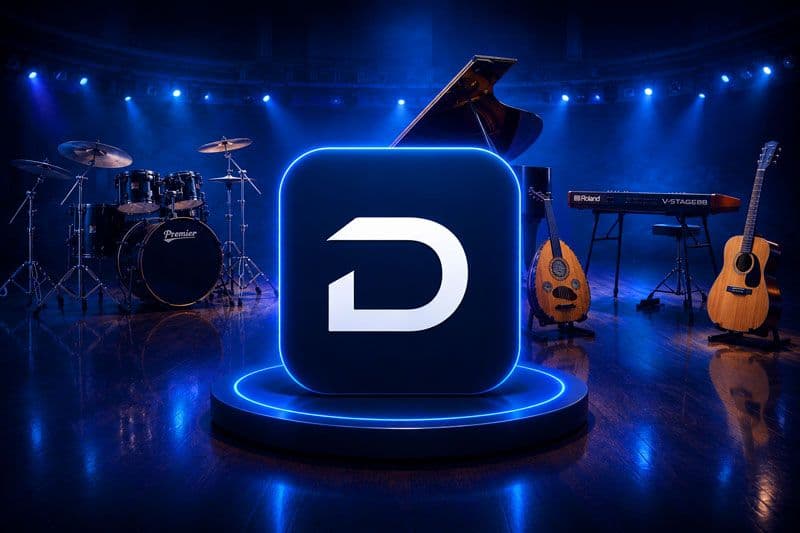
aDawliah Electronic Appliances is one of Saudi Arabia's largest specialty retailers, stocking over 6,000 products across musical instruments, professional audio, and consumer electronics. Despite strong brand recognition, the company had no dedicated mobile channel. Junkies Coder designed and engineered a full-featured Android app, bringing their entire catalog to the Saudi mobile-first consumer.

Industry
Artificial Intelligence
Platform
Web & Enterprise API
Location
New York, USA
Outcomes
Production Ready Runtime
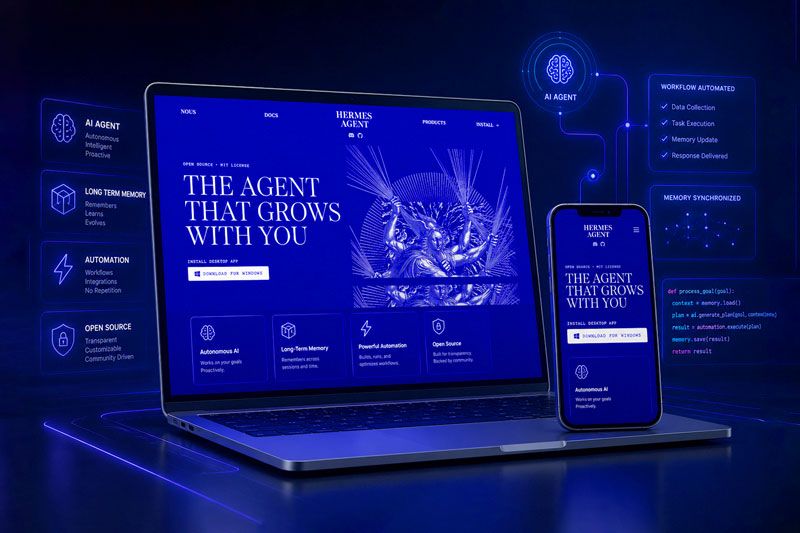
Nous Research developed the Hermes model family, featuring advanced agentic reasoning and complex function calling capabilities. Junkies Coder engineered the enterprise integration runtime and secure sandbox environment for Hermes, enabling businesses to deploy autonomous software agents within secure, production ready workflows.
Whether you're looking to develop a digital solution from scratch, scale your current offerings, or fully modernize your system, we are here to help.
Tell us about your current platform, website size, integrations, and migration goals. We will review your requirements and help define an appropriate WordPress migration scope.
Smart solutions designed to adapt across industries effortlessly, helping businesses streamline operations, enhance performance, and drive sustainable growth.
We follow a transparent, collaborative process, from discovery to deployment. Designed to help founders move fast, stay lean, and build reliable, scalable products.
We explore your vision, goals, and market to create a strategic roadmap through meetings, assessments, and planning.
Wireframes and mockups bring your product to life with intuitive, user-focused design ready for seamless implementation.
We build clean, scalable code supported by testing plans and bug fixing to ensure stability, performance, and reliability.
Agile sprints drive continuous improvement. We support product launch, PR, investor readiness, and long-term growth strategies.
Shalehin Modasia
Marketing DirectorENGAGEMENT MODELS
We adapt to the way your business operates. Whether you need end-to-end ownership of an engagement, additional senior engineering capacity, or a long-term dedicated team aligned to your goals, our engagement models give you the flexibility to scale delivery at the pace your business demands.
When your in-house team needs specialized engineering capacity without the overhead of long-term hiring, our team augmentation model fills that gap immediately. Our engineers integrate directly with your existing workflows, bring the technical depth required to maintain delivery quality and adapt to your tools, processes and communication standards from day one. You retain full control over direction while we provide the execution capacity your roadmap requires.
Get a free consultationFor engagements that require sustained focus and long-term commitment, our dedicated team model delivers the consistency and accountability that project-based arrangements cannot. We assemble a cross-functional team of engineers, designers and QA specialists built exclusively around your engagement, operating within your delivery cadence with full sprint ownership, direct stakeholder communication and complete accountability from initiation through post-launch evolution.
Get a free consultationWhen you need a single partner to manage a complex engagement end to end while your own teams stay focused on core business operations, we assume complete ownership. From discovery and architecture through design, engineering, testing and deployment, every technical decision and every delivery milestone sits with our team. You define the business objectives. We translate them into production ready outcomes with full transparency at every stage.
Get a free consultationUpgrade your existing WordPress installation, modernize its themes, plugins, content structure, and functionality, or migrate your website from another CMS to WordPress. Each approach has different requirements for compatibility, content transfer, SEO preservation, integrations, cost, and technical implementation.
| Comparison Factor | PATH A: Upgrade WordPress | PATH B: Modernize WordPress | PATH C: Migrate to WordPress |
|---|---|---|---|
| What It Involves | Update WordPress core to a supported version, review PHP and database compatibility, update themes and plugins, address deprecated functionality, and validate the existing website after the upgrade. | Improve the existing WordPress website by refactoring custom code, replacing outdated plugins, updating themes, restructuring content, optimizing performance, and improving integrations or editorial workflows. | Transfer a website from another CMS or platform to WordPress, including agreed pages, posts, media, taxonomies, metadata, URL structures, and required functionality. Adapt the design, content models, and integrations to the destination WordPress environment. |
| Best Suited For | Websites that already use WordPress and meet current business needs but require core updates, compatibility fixes, or security maintenance. | WordPress websites with difficult-to-maintain themes, excessive plugins, outdated custom code, performance issues, or content workflows that need improvement. | Businesses moving from platforms such as Wix, Joomla, Drupal, Squarespace, Webflow, or another CMS because they need WordPress capabilities, greater control, or a different content management workflow. |
| Keeps the Existing WordPress Installation | Yes. The current WordPress installation remains in place while its core version and compatible components are updated. | Usually. The website remains on WordPress while its architecture, design, functionality, content organization, or integrations are improved. | No, when migrating from another CMS. The website is transferred to a new WordPress installation. When migrating an existing WordPress website between hosts, the destination is also WordPress. |
| WordPress Version Considerations | Review the current and target WordPress versions, supported upgrade path, deprecated APIs, theme and plugin requirements, PHP compatibility, and database requirements before updating. | Select a supported WordPress version that works with the planned architecture, themes, plugins, custom code, and hosting environment. Refactor or replace incompatible components where required. | Set up a supported WordPress version in the destination environment and verify its compatibility with the selected theme, plugins, PHP runtime, database, and migration tools. |
| Scale of Change | Usually limited to core, theme, plugin, and compatibility updates, although major version changes can require significant remediation and regression testing. | Moderate to substantial change, depending on redesign requirements, custom development, plugin replacement, content restructuring, and performance improvements. | Often the broadest content and implementation change because the source platform's data structures, templates, features, and integrations may not map directly to WordPress. |
| Security and Maintenance | Apply supported WordPress core updates, review plugin and theme vulnerabilities, verify file permissions, maintain backups, and address compatibility issues. Continued security updates remain necessary. | Reduce avoidable plugin complexity, improve access controls, review custom code, and strengthen configuration while maintaining updates for WordPress, plugins, themes, and server components. | Establish secure WordPress configuration, user roles, update procedures, backup and recovery plans, and appropriate plugin and hosting controls in the destination environment. Migration alone does not guarantee security. |
| Themes, Plugins, and Custom Functionality | Check theme and plugin compatibility with the target WordPress version. Update or replace incompatible extensions and test custom functionality, hooks, shortcodes, widgets, and templates. | Audit redundant or unsupported plugins, replace unsuitable components, simplify custom code, improve theme architecture, and use native WordPress functionality where appropriate. | Map source-platform features to WordPress themes, plugins, blocks, custom post types, custom fields, or bespoke development. Rebuild features that cannot be transferred directly. |
| Content Structure and Taxonomies | Preserve existing posts, pages, categories, tags, custom post types, custom fields, and relationships while checking that updates do not affect content rendering. | Improve content types, taxonomies, reusable blocks, custom fields, menus, and editorial structures to support content consistency and easier management. | Map source content types, fields, categories, tags, authors, relationships, and other metadata to suitable WordPress structures. Define transformation rules for content that does not have a direct equivalent. |
| Content and Media Transfer | Existing content usually remains in place, but validate media attachments, embedded content, image sizes, links, formatting, and database integrity after updates. | Reorganize media libraries, review duplicate assets, improve content formatting, and update media handling where required by the redesigned website. | Export, transform, and import agreed pages, posts, images, documents, and other supported content. Validate record counts, media references, embedded assets, formatting, and content completeness after migration. |
| SEO and URL Preservation | Check existing URLs, canonical tags, metadata, structured data, internal links, XML sitemaps, robots directives, and indexability after the upgrade. Avoid unnecessary URL changes. | Improve metadata management, internal linking, structured data, page templates, redirects, and content organization while preserving valuable existing URLs wherever practical. | Map source URLs to destination WordPress URLs, configure relevant redirects, preserve available metadata, update internal links and canonical tags, and validate XML sitemaps and indexing directives. Rankings cannot be guaranteed to remain unchanged. |
| Database and Data Integrity | Verify database compatibility, backups, table integrity, plugin-specific data, and any database changes required by the WordPress update. | Review database structure, custom tables, queries, transients, stored options, and unnecessary data. Optimize or restructure components when justified by the project scope. | Map source database fields and records to WordPress tables, metadata, custom post types, taxonomies, or appropriate plugin structures. Validate transformed records, relationships, and imported content. |
| Hosting and Server Compatibility | Confirm that the existing hosting environment supports the target WordPress version, PHP version, database requirements, extensions, memory needs, and relevant server configuration. | Improve hosting configuration, caching, resource allocation, deployment practices, and server-side performance based on identified technical requirements. | Configure the destination hosting environment, domain, SSL certificate, PHP runtime, database, file permissions, caching, and other server requirements before launch. |
| Integrations and APIs | Test existing CRM, analytics, forms, payment gateways, marketing tools, authentication, and API integrations against the updated WordPress installation and extensions. | Improve integration reliability, replace outdated connectors, refine API usage, and simplify data flows between WordPress and connected business systems. | Reconnect or rebuild required integrations using WordPress plugins, REST APIs, webhooks, middleware, or custom development. Validate authentication, data mapping, synchronization, and error handling. |
| Performance and Scalability | Test page loading, caching, database queries, image handling, plugin overhead, and server resource usage after updating WordPress and its components. | Address performance bottlenecks through code improvements, plugin reduction, caching, media optimization, database tuning, and suitable architecture changes. | Evaluate the destination WordPress architecture, hosting resources, caching, CDN configuration, media delivery, and plugin requirements against expected traffic and content growth. |
| Testing Requirements | Perform WordPress core compatibility checks, theme and plugin testing, content rendering checks, permission validation, integration testing, and regression tests for critical workflows. | Test redesigned templates, custom functionality, content structures, forms, integrations, responsive layouts, accessibility requirements, and performance changes. | Test imported content, media links, templates, forms, search, user permissions, integrations, redirects, metadata, responsive layouts, and important business workflows. |
| Deployment, Backup, and Rollback | Back up files, databases, and configuration; test updates in staging; prepare rollback procedures; and validate the live website after deployment. | Deploy improvements in controlled stages, maintain recoverable backups, validate affected functionality, and prepare recovery steps for changes to the live website. | Rehearse the migration, back up the source and destination, plan content synchronization and cutover, define rollback criteria, and validate production URLs, content, integrations, and database integrity after launch. |
| Downtime and Business Continuity | Schedule higher-risk updates appropriately, test them before production deployment, and prepare a recovery plan in case compatibility problems affect the live website. | Use staging and phased implementation where practical to limit disruption while introducing design, functionality, or infrastructure changes. | Plan the migration window, final content synchronization, domain or DNS changes, and production checks to minimize disruption. Actual downtime depends on the source platform, website complexity, and cutover approach. |
| Business Impact | Typically involves less structural change and helps maintain the existing website, though major updates can require temporary maintenance windows or technical remediation. | Can improve maintainability, content operations, user experience, and performance while retaining WordPress as the platform. It may require changes to design and editorial workflows. | Provides a WordPress-based content management environment but may require redesign, staff training, workflow adaptation, integration redevelopment, and a coordinated transition. |
| Cost and Timeline Factors | Depend on the current WordPress version, number of plugins, theme and custom-code compatibility, hosting requirements, and testing scope. | Depend on redesign complexity, custom development, plugin replacement, content restructuring, integration improvements, and performance requirements. | Depend on the source platform, content volume, media assets, custom functionality, content mapping, design recreation, integrations, SEO requirements, and migration validation. |
| Recommended Next Step | Audit the current WordPress version, PHP and database compatibility, plugins, theme, custom code, hosting environment, and backup arrangements before planning the upgrade. | Assess technical debt, theme architecture, plugin usage, content structure, performance bottlenecks, and integration requirements to create a prioritized modernization plan. | Audit the source website, identify migration requirements, map content and URLs, assess feature compatibility, select the destination WordPress architecture, and prepare a migration, testing, and launch plan. |
Real stories from real partners who experienced clarity, accountability, and measurable business growth.
By combining innovation, strategy, and modern technologies, we help businesses improve efficiency, scale faster, and achieve sustainable growth.
Featured Technologies
OpenAi
Claude
Falcon
Gemini
Mistral
Grok
Meta
Each migration requires checks for source-platform compatibility, database integrity, plugin and theme dependencies, user permissions, and server configuration. We assess relevant risks, plan backups, validate transferred content, and account for applicable privacy or security requirements within the agreed project scope.

Source Website and Platform Audit
Content and Database Validation

Access and Permission Review
Backup and Recovery Planning
HIPAA

GDPR

WordPress migration services help businesses move a website from another CMS to WordPress, transfer an existing WordPress website to new hosting, or upgrade an existing installation. The work may include content and database transfer, functionality adaptation, URL redirects, testing, and launch support.
Migration may be possible from platforms such as Wix, Joomla, Drupal, Squarespace, Webflow, Shopify, or other CMSs. The exact scope depends on the source platform, available export options, content structure, integrations, and custom functionality.
Yes. A hosting migration can include WordPress files, the database, configuration, media assets, and domain or DNS changes where required. The destination environment should be checked for compatibility before the website is switched over.
The existing design can often be preserved or recreated, depending on the source platform, theme, and custom features. Some layouts and interactions may need adaptation because different platforms use different templates, components, and rendering systems.
We plan URL mapping, relevant redirects, metadata transfer, canonical tags, internal links, XML sitemap updates, and indexing checks. These measures help reduce avoidable SEO issues, although search rankings cannot be guaranteed to remain unchanged after a migration.
The migration scope can include pages, posts, images, documents, categories, tags, and supported custom fields. We map the source content to the destination structure and validate representative records, media links, and content completeness.
The timeline depends on website size, source platform, content volume, custom functionality, integrations, URL changes, and testing requirements. A small website may need substantially less work than a large, highly customized website with complex data relationships.
Pricing depends on the source platform, number and complexity of pages, database structure, design requirements, integrations, SEO needs, and deployment plan. A scope assessment helps establish realistic deliverables, costs, and milestones.
Migration can be planned to minimize downtime through staging, backups, pre-launch testing, and a controlled cutover. The achievable downtime depends on the hosting setup, data synchronization requirements, DNS behavior, and website complexity.
Post-migration support can include production checks, broken-link investigation, compatibility fixes, integration troubleshooting, and agreed technical improvements. The availability and duration of support should be defined in the project scope.
Share your current website URL, source platform, approximate content volume, hosting requirements, key integrations, SEO concerns, and desired outcome. These details help establish the migration approach and identify potential technical dependencies.