SaaS application development is the process of building cloud-based software that users access via an internet browser or API, typically delivered through a subscription-based or usage-based commercial model. Unlike traditional software, the provider hosts the infrastructure, manages security, and delivers continuous updates without requiring local installation from the user.
SaaS has evolved from a software delivery model into a dominant approach for delivering business and consumer applications. Cloud infrastructure, subscription billing, self-service onboarding, APIs, and usage analytics have made it possible for software companies to serve customers globally without requiring traditional on-premise deployment. The opportunity now extends from horizontal platforms to highly specialized vertical SaaS products serving individual industries and workflows.
What Is SaaS Application Development?
SaaS application development is the process of designing, building, testing, deploying, and continuously improving software that is hosted and managed by a provider and accessed by customers over the internet, typically through a web browser or API. SaaS products commonly use subscription or usage-based pricing and are designed to serve multiple customers securely. While many SaaS products are web applications, not every web application is SaaS. The key differences are the delivery model, ongoing provider-managed updates, customer or account management, billing, scalability, and, often, multi-tenant architecture.
SaaS Application vs Traditional Web Application
| Aspect | SaaS Application | Traditional Web Application |
|---|---|---|
| Delivery | Hosted and continuously managed by the provider | Can be hosted and maintained in different ways |
| Customers | Usually designed to serve multiple customers or organizations | May be built for one organization, project, or specific audience |
| Billing | Commonly subscription, usage-based, or tiered pricing | May have no recurring billing model |
| Updates | Provider manages centralized updates and releases | Update process depends on the application and ownership model |
| Data Architecture | Often uses multi-tenant or customer-isolated architecture | May use single-tenant or application-specific data architecture |
| Scalability | Designed to scale as customers and usage grow | Scaling requirements vary significantly |
| Integrations | APIs, webhooks, SSO, and third-party integrations are often important | Integration requirements depend on the use case |
Most commercial SaaS products need customer and account management, secure data isolation, scalable infrastructure, and a pricing and billing model that can evolve with the product. Multi-tenancy is a common approach, but the right architecture depends on the product's customers, compliance requirements, and isolation needs.
Core Pillars of SaaS Architecture
To build a viable SaaS product, the underlying system should be designed around secure customer isolation, scalable infrastructure, identity management, billing, integrations, and ongoing operations from the earliest architecture decisions:
- Multi-Tenancy. A single application instance serves multiple customers ("tenants") while keeping each tenant's data strictly isolated and secure. This decision has significant implications for security, database design, testing, infrastructure, and long-term scalability.
- Subscription & Billing Engine. Integrations with billing and payment platforms such as Stripe can support subscriptions, payments, invoices, trials, usage limits, and billing webhooks. Authentication platforms such as Clerk can complement this layer with identity and access management.
- Identity & Access Management (IAM). Centralized user authentication, social logins, and Role-Based Access Control (RBAC) become essential when different user types, such as admins, members, and viewers, need different permissions within a tenant.
- API-First Design. Ensuring the application can easily connect through API development and integration with external software tools, workflows, and marketplaces, since most enterprise buyers now expect a SaaS product to plug into their existing stack, not replace it entirely.
Multi-Tenant Development: Why This Decision Shapes Everything Else
Multi-tenancy is an architectural concern, not simply a feature. It influences data modeling, authorization, infrastructure, testing, monitoring, and security throughout the product.
Three common patterns range from lower operational overhead to stronger tenant isolation:
- Shared database, shared schema. Every tenant's data lives in the same tables, separated by a tenant ID column on every row. It is usually the cheapest to operate, but it requires strong query discipline and authorization controls. A single missing tenant filter or authorization check can potentially expose one customer's data to another customer.
- Shared database, separate schema. Each tenant gets its own schema within one database. Better isolation than the shared-schema model, moderate operational overhead.
- Separate database per tenant. The strongest isolation, often required for enterprise or regulated clients (healthcare, finance) with strict data residency requirements, at the cost of significantly higher infrastructure management overhead.
Shared-schema multi-tenant SaaS architecture is often appropriate for early-stage products because it minimizes infrastructure and operational overhead. However, the architecture should be designed with clear tenant boundaries, centralized authorization, automated testing, and database-level safeguards where appropriate. Separate schemas or databases can be introduced when enterprise isolation, compliance, contractual requirements, or customer-specific infrastructure demands justify the additional complexity.
SaaS Features That Actually Matter to Buyers
The most valuable SaaS features are not simply those that make the product look complete. They reduce adoption friction, improve security, support administrators, and make the platform easier to integrate into an existing technology stack.
- Workspace and tenant management. Organizations should be able to manage their teams, workspaces, users, and account settings independently.
- Role-Based Access Control. Admin, manager, member, and viewer permissions help organizations control who can access specific data and functionality.
- Subscription and billing management. Customers should be able to view plans, upgrade or downgrade subscriptions, manage payment details, and access invoices.
- Usage metering and limits. Usage-based products need reliable tracking of seats, storage, API calls, transactions, or other billable units.
- Audit logs. Enterprise customers often need visibility into important account, permission, and data-related activities.
- Analytics and reporting. Product and account-level analytics help customers measure outcomes while helping SaaS teams understand adoption and retention.
- API and webhooks. Integrations allow customers to connect the platform with their existing CRM, ERP, communication, accounting, and automation tools.
- Enterprise authentication. SSO, SAML, SCIM, and advanced access controls can become important requirements as the product moves upmarket.
- Data export and portability. Customers should have practical ways to export their data, particularly in B2B and enterprise environments.
- Fast onboarding. Guided setup, templates, sample data, and contextual help can reduce the time between signup and the first meaningful outcome.
The 7-Step SaaS Development Lifecycle
Building a successful SaaS application requires a continuous loop of planning, execution, and optimization:
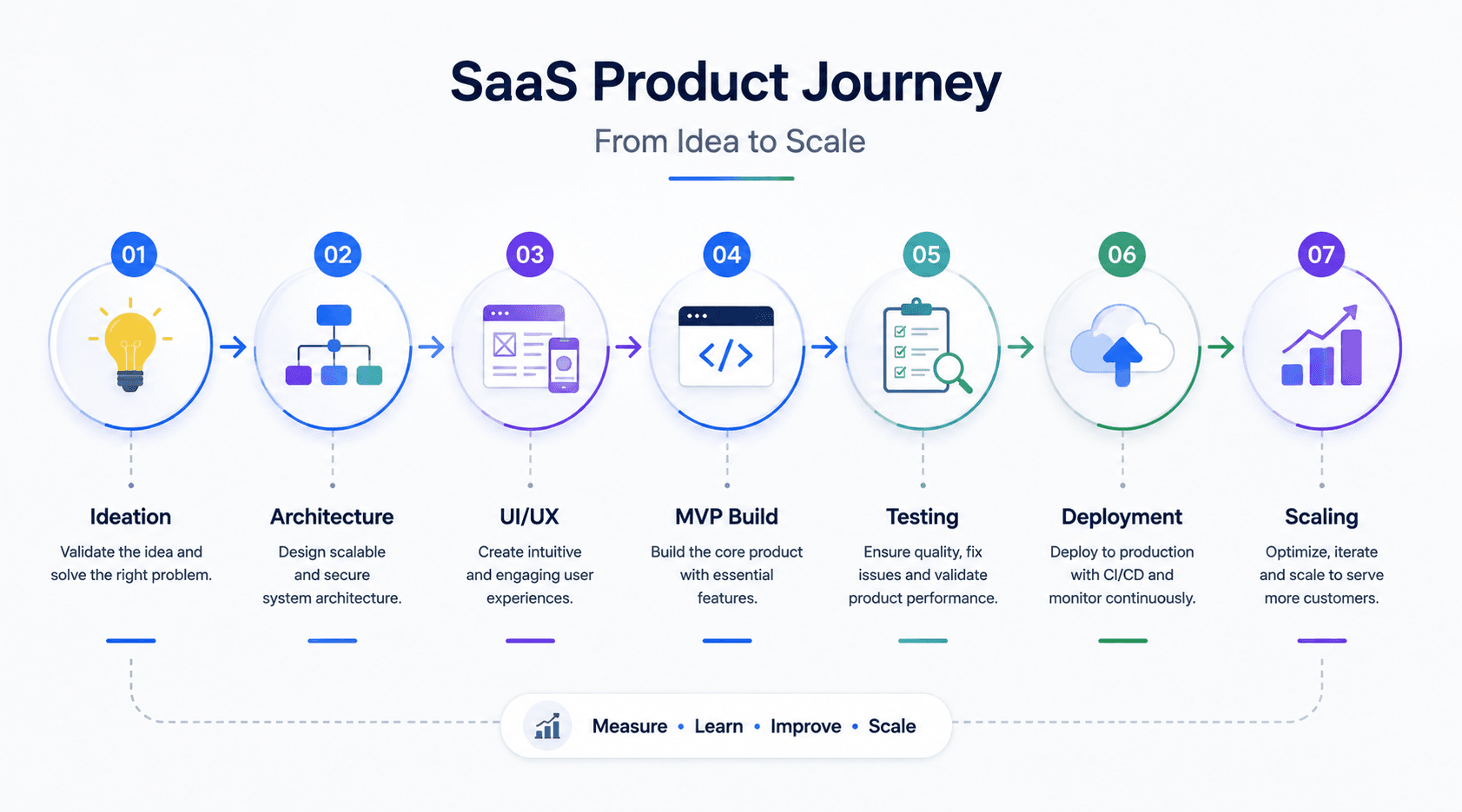
- Market Validation. Identify a specific target audience pain point and analyze competitors to determine your unique selling proposition, skipping this step can lead to significant wasted development effort and make it harder to achieve product-market fit after launch.
- Define Pricing Strategy. Choose a monetization model, flat-rate subscription, tiered structures, freemium, or usage-based pricing, since this decision shapes the billing architecture built in the next phase.
- Architectural Design. Plan out database schemas (such as PostgreSQL multi-tenant isolation) and cloud infrastructure requirements before writing a single line of feature code.
- UI/UX Prototyping. Map out user journeys, wireframes, and high-fidelity mockups optimized specifically for onboarding and retention, not just visual polish.
- MVP Development. SaaS MVP development involves building a Minimum Viable Product containing only core features to validate the software with real users quickly, resisting the urge to build every planned feature before launch.
- QA & Security Compliance. Conduct performance and security testing and identify the regulatory, privacy, and security requirements that apply to the product, customer base, data types, and target markets. Depending on the use case, these may include frameworks or requirements such as SOC 2, GDPR, HIPAA, PCI DSS, or industry-specific regulations.
- CI/CD Deployment. Launch the product via automated pipelines to cloud environments, followed by iterative feature rollouts based on real analytics, not internal assumptions about what users want next.
Popular SaaS Technology Stack Choices in 2026
Choosing the right technical foundation accelerates development velocity and ensures the product can scale without a costly rewrite:
| Layer | Popular Technology Choices | Primary Purpose |
|---|---|---|
| Frontend | React, Next.js, Vue.js, Tailwind CSS | Application UI, routing, rendering, and responsive design |
| Backend | Node.js, Python/FastAPI, Go | APIs, business logic, background processing |
| Database | PostgreSQL, MySQL, MongoDB | Transactional and application data storage |
| Backend Platforms | Supabase, Firebase | Managed backend capabilities, authentication, storage, and related services |
| Authentication | Clerk, Auth0, Amazon Cognito, custom IAM | Authentication, sessions, identity, and access management |
| Infrastructure | AWS, Google Cloud, Azure, Vercel | Hosting, compute, storage, networking, and deployment |
| Payments & Billing | Stripe and regional payment providers | Subscriptions, payments, invoices, and billing workflows |
| Monitoring | Datadog, Sentry, Grafana, cloud-native monitoring | Error tracking, observability, performance monitoring |
Cost Factors: What SaaS Development Actually Costs
SaaS development costs can range from tens of thousands of dollars for a focused MVP to several hundred thousand dollars or more for complex, enterprise-grade platforms. The final budget depends on product scope, UX complexity, integrations, infrastructure, security requirements, compliance obligations, team composition, and development timeline.
| Type of SaaS | Indicative Starting Development Budget | Examples of SaaS Products |
|---|---|---|
| Project Management | $75,000+ | Trello, Basecamp |
| Email Marketing | $60,000+ | Mailchimp, Campaign Monitor |
| CRM | $60,000+ | Salesforce, HubSpot |
| ERP | $110,000+ | NetSuite, SAP |
| Marketing Platform | $90,000+ | HubSpot, Hootsuite |
| Accounting | $70,000+ | Sage Intacct, Zoho Books |
| DIY Website Builder | $130,000+ | Wix, Squarespace |
Important: These figures are directional development benchmarks based on published industry estimates, including cost benchmarks reported by TechAhead. Actual project costs vary based on application scope, technical complexity, team composition, integrations, infrastructure, and compliance requirements.
Several factors can push development costs significantly above these baseline estimates, particularly third-party integrations, compliance and security requirements, and complex subscription or usage-based billing logic.
Industries and Use Cases Where SaaS Delivers the Clearest Value
SaaS's recurring commercial models and relatively low upfront deployment costs make it particularly effective in industries with recurring operational needs:
- Healthcare. EHR, patient engagement, scheduling, and telehealth platforms can benefit from SaaS delivery, but products handling regulated health information need appropriate privacy, security, access-control, and compliance controls based on the markets they serve.
- Finance. Accounting, expense management, lending, and financial operations platforms can benefit from centralized infrastructure, automation, audit trails, and role-based access. Security, regulatory, and data-protection requirements vary by product and jurisdiction.
- E-commerce. Inventory, order, customer, and analytics platforms can benefit from cloud infrastructure that scales with seasonal demand and changing transaction volumes.
- Education. Online learning platforms and administrative tools can serve institutions with widely varying budgets, while tiered pricing allows a single product to support both smaller organizations and larger institutions.
- Marketing and Sales. CRM and campaign management tools can use usage-based or seat-based pricing to align costs with the value growing teams derive from the platform.
Case Studies: What Real SaaS Companies Prove About the Model
- Slack originated from an internal communication system developed during the creation of another product and was subsequently developed into a standalone communication platform. Its story illustrates how an internal tool can become a commercial SaaS product when it solves a broader and clearly defined customer problem.
- Dropbox demonstrated the value of making file synchronization simple and accessible to a broad audience. Its growth also illustrates how low-friction onboarding and product-led adoption can support SaaS expansion.
- Canva showed how a complex professional capability can be packaged into an accessible SaaS experience for non-specialist users. Its product strategy highlights the importance of usability and reducing the learning curve, rather than competing solely through technical feature depth.
The common thread is a focus on making a core workflow accessible and valuable before expanding the product's capabilities. Their examples illustrate why SaaS companies often benefit from strong product usability, frictionless onboarding, and a clear path from initial adoption to broader usage.
SaaS Application Development Services
SaaS development services cover the complete product lifecycle, from discovery and architecture to SaaS MVP development, cloud deployment, custom web application development, API development and integration, multi-tenant architecture, cloud migration, subscription and billing integration, third-party integrations, quality assurance, DevOps, security testing, and post-launch support.
Common Development Pitfalls to Avoid
- Over-engineering the MVP. Do not build advanced secondary features before validating that core functionality solves the primary user issue, a longer build timeline without validated demand is pure downside risk.
- Ignoring Data Isolation. Poorly structured queries can bleed data from one corporate tenant into another, creating serious security, privacy, and contractual risks and, for enterprise buyers specifically, an immediate deal-breaker if discovered during a security review.
- Underestimating Churn. Focus heavily on intuitive onboarding workflows; if users cannot find value within their first session, customer acquisition costs can outweigh customer lifetime value. Poor onboarding and weak retention can therefore undermine an otherwise technically strong SaaS product.
Frequently Asked Questions
What is SaaS application development?
SaaS application development is the process of building cloud-based software that users access through a browser, mobile application, or API, typically using subscription, usage-based, or another recurring commercial model. The development process can include market validation, architecture, MVP development, testing, deployment, and ongoing scaling.
How is SaaS different from a regular web application?
A SaaS application is typically designed for provider-managed delivery to multiple customers and often includes customer isolation, account management, scalable infrastructure, and subscription or usage-based billing. A web application may use some or all of these characteristics, but it does not necessarily operate as a commercial SaaS product.
How much does it cost to build a SaaS application?
SaaS development costs can range from tens of thousands of dollars for a focused MVP to several hundred thousand dollars or more for complex, enterprise-grade platforms. The final budget depends on product scope, UX complexity, integrations, infrastructure, security requirements, compliance obligations, team composition, and development timeline.
How long does SaaS development typically take?
A focused MVP can often be developed within roughly 8 to 16 weeks, depending on scope, team size, integrations, and technical complexity. A production-ready platform with advanced integrations, enterprise features, security requirements, and compliance work can take several additional months. These ranges are planning estimates rather than fixed delivery commitments.
What is the difference between shared-schema and separate-database multi-tenancy?
Shared-schema multi-tenancy keeps all tenants in one database and typically separates records using a tenant ID. It is generally cheaper to operate but requires strong authorization and query controls. Separate-database-per-tenant architecture provides stronger isolation but introduces higher infrastructure and operational costs.
Should a SaaS startup build a monolith or microservices architecture first?
For most early-stage products, a modular monolith is the more practical starting point, faster to build, simpler to test, and easier to deploy than a distributed microservices architecture. Microservices tend to make more sense once real scale demands that added complexity, not before.
What compliance standards should a SaaS product plan for?
Compliance depends on the product, customer base, geographic markets, and types of data being processed. Depending on those factors, a SaaS company may need to address requirements or frameworks such as SOC 2, GDPR, HIPAA, PCI DSS, or industry-specific regulations. The appropriate requirements should be identified during architecture and product planning rather than retrofitted after launch.
What's one of the biggest reasons SaaS products fail even after a technically solid build?
A technically strong product can still struggle if users do not reach meaningful value quickly enough. Poor onboarding, weak product-market fit, unclear positioning, complicated workflows, and high customer acquisition costs can all contribute to churn. Development quality is only one part of SaaS success; retention and customer value must be validated alongside the technology.
Conclusion
SaaS application development succeeds or fails on a combination of product, architecture, and commercial decisions. The most important early questions are which customer problem the product solves, how customer data will be isolated, which pricing model the platform must support, what integrations are required, and what security or compliance obligations apply. Getting these decisions right early can reduce expensive architectural changes later.
If you are planning to build a SaaS application, it helps to define your target audience, the specific problem you are solving, and your preferred technology approach. From there, a tailored development strategy or sample database architecture can be scoped against your actual requirements rather than a generic template.