- Plan engaging micro-drama content: Create 9:16 vertical episodes of 1–2 minutes, featuring strong opening hooks and cliffhanger endings to encourage continuous viewing.
- Build a binge-watching experience: Implement a full-screen vertical swipe feed, instant playback, background preloading, an episode drawer, and subtitle controls.
- Implement episode-based monetization: Offer the first 5–10 episodes free, followed by coin-based unlocks, rewarded ads, and optional VIP subscriptions.
- Add user engagement features: Include daily check-in rewards, watch history, Continue Watching, personalized recommendations, and new-episode notifications.
- Develop a creator and admin CMS: Provide tools for uploading episodes, configuring paywalls, managing coin packages, scheduling releases, and monitoring viewer engagement.
- Choose the right technology stack: Use Flutter or React Native for mobile development, Node.js or Go for backend services, and native video players such as AVPlayer and ExoPlayer.
- Build scalable video infrastructure: Use AWS MediaConvert, Cloudflare Stream, or Mux for video transcoding, HLS packaging, adaptive bitrate streaming, and CDN delivery.
- Protect premium video content: Implement signed URLs, Widevine and FairPlay DRM, and dynamic watermarking to reduce unauthorized distribution.
- Create a secure entitlement and wallet system: Maintain a centralized ledger for coin balances, episode unlocks, and cross-device access.
- Integrate secure payment solutions: Support Apple StoreKit and Google Play Billing with server-side receipt validation. RevenueCat can simplify subscription and purchase management.
- Choose between white-label and custom development: Consider platforms such as Muvi One, Webnexs, and Flicknexs for faster deployment, or choose custom development for greater flexibility and control.
- Validate content before development: Secure or produce 1–2 complete drama series with 30–60 episodes each to establish a viable launch catalog.
- Track episode-level analytics: Monitor second-by-second viewer drop-offs, episode completion, cliffhanger engagement, and free-to-paid conversion rates.
- Plan ongoing business expenses: Account for content licensing, original production, user acquisition, CDN bandwidth, hosting, and app-store commissions.
- Prioritize scalability and profitability: Optimize video compression, streaming costs, monetization strategies, and content performance as the platform grows.
Build a vertical, serialized micro-drama platform, not a generic short-video feed. The product must combine a 9:16 player, episode-level entitlements, AI-led discovery, creator/studio workflows, and streaming infrastructure that keeps viewers moving from one cliffhanger to the next. PineDrama is TikTok’s standalone short-drama app, positioned around free episodes, ads, optional in-app purchases, and a no-subscription-required experience.
A media entertainment app development company should deliver more than a video player: it must own streaming quality, content operations, monetization, creator tooling, and compliance.
What Makes PineDrama Different
PineDrama separates scripted micro-dramas from TikTok’s general short-video feed. Its core experience is a continuous story: each vertical episode advances the plot, ends on tension, and encourages viewers to watch the next episode. Similarly, a Soulipie dating community platform focuses on meaningful connections and continuous user engagement through personalized discovery and interactive experiences.
Platform comparison
| Platform | Content format | Discovery model | Episode access | Primary monetization | Viewing experience |
|---|---|---|---|---|---|
| PineDrama | TikTok’s standalone vertical micro-drama app; short, serialized episodes. | TikTok-style feed, Drama tab, trending placements, and ad inventory. | Free episodes; Google Play lists in-app purchases and describes the app as “Start Free, No Subscription Needed.” | Advertising across the For You feed, Drama tab, and between episodes; optional in-app purchases. | Fast, ad-supported vertical viewing with TikTok distribution advantages. |
| ReelShort | Original vertical dramas, commonly romance, revenge, billionaire, and thriller formats. | Genre rails, rankings, recommendations, and series pages. | First 5–15 episodes of premium series are free; later episodes require coins or VIP access. | Coin packs, rewarded ads/tasks, and weekly, monthly, or yearly VIP plans. | Episode-by-episode progression with paywalls after free previews. |
| DramaBox | Large library of localized vertical dramas, often translated or adapted across markets. | Categories, rankings, recommendations, and localized discovery. | A typical series offers the first episodes free; later episodes use coins or membership. | Purchased coins, reward coins from ads/tasks, and memberships. | Vertical binge model with coin-based access and membership offers. |
| ShortMax | Vertical short dramas with app and web access. | Web catalog plus app recommendations and rankings. | Free content where available, coin packs, and Weekly Pass Pro. | One-time coin purchases and weekly passes. | App-first experience with an additional web discovery layer. |
Practical product lesson
PineDrama’s advantage is distribution and ad monetization; ReelShort, DramaBox, and ShortMax lean more heavily on episode unlocks, coins, rewarded ads, and passes. A new entrant should choose a clear model: ad-led scale, coin-led revenue per viewer, or a hybrid with explicit entitlement rules.
Example: A revenge-romance series can release episodes 1–8 free, place its first paywall after a betrayal reveal in episode 9, then offer a rewarded ad, a coin unlock, or a 7-day pass.
PineDrama’s Business Model
PineDrama’s publicly described model is free access supported by advertising, with optional in-app purchases. TikTok’s ads documentation states that PineDrama supports ad placements in the For You feed, Drama tab, and between episodes in eligible markets. Its Google Play listing also promotes free episodes and states that no subscription is needed.
Revenue levers
| Revenue stream | How it works | Example |
|---|---|---|
| In-feed ads | Sponsored vertical videos appear in discovery feeds. | A skincare brand sponsors a placement between romance-drama recommendations. |
| Mid-episode ads | Ads run between episodes or at natural story breaks. | After a cliffhanger, the viewer watches a 15-second ad before episode 11. |
| Drama-tab ads | Ads appear within the dedicated drama discovery area. | A streaming service promotes a new thriller beside trending micro-dramas. |
| Performance advertising | Advertisers bid for placements through TikTok’s performance-auction system. | An app-install campaign targets viewers who completed thriller episodes. |
| Optional purchases | Google Play lists in-app purchases, though the app is positioned as free with no subscription required. | A viewer may purchase a coin or pass product where available. |
How to differentiate
Do not simply clone the ad model. Build a hybrid revenue engine:
- Keep the first several episodes free to reduce acquisition friction.
- Use rewarded ads for users who will not pay.
- Use coins for impulse unlocks.
- Use a season pass for binge viewers.
- Use creator-specific subscriptions for fans who want early access or behind-the-scenes content.
Short-Drama App User Journey
The user journey should move from low-friction discovery to narrative investment, then to a clearly explained unlock decision.
First install to paid unlock
| Stage | Product experience | Design goal |
|---|---|---|
| Onboarding | Ask for age, language, content preferences, and notification permission; avoid demanding full profile creation immediately | Reduce drop-off before first playback |
| Genre selection | Let users choose 3–5 preferences, such as revenge, romance, thriller, comedy, or family drama | Create an initial recommendation signal |
| First drama discovery | Show a curated “Start Watching” rail, trending series, and a free-episode filter | Get the user to episode 1 quickly |
| Autoplay and binge flow | Automatically play the next entitled episode after a short countdown; show episode number, title, and time remaining | Preserve narrative momentum |
| First paywall | Trigger after a major emotional reveal or cliffhanger, not at a fixed episode number | Increase willingness to unlock |
| Purchase completion | Show coin cost, episode entitlement, price, tax where applicable, and restore-purchase option | Build trust and reduce failed purchases |
| Post-purchase experience | Immediately unlock the episode, resume playback, confirm the entitlement, and suggest the next episode | Convert payment into immediate value |
Example journey
A new user selects “revenge,” “romance,” and “thriller.” The home screen shows a 52-episode revenge drama with episodes 1–8 free. At the end of episode 8, the female lead discovers the betrayal. The app shows: “Episode 9 is locked. Watch an ad to unlock one episode, use 60 coins, or start a 7-day pass.” The user chooses the rewarded ad, watches it, and resumes episode 9 without leaving the player.
How PineDrama Structures Its Episode Unlocking System
PineDrama’s public positioning emphasizes free viewing, ads, and optional purchases rather than a universal paid-episode model. For a new platform, design the entitlement system to support both ad-supported and paid access from day one.
Free vs. premium configuration
| Access type | Rule | Example |
|---|---|---|
| Free episode | Available to every eligible user without payment | Episodes 1–8 of a new series |
| Premium episode | Requires coins, pass, subscription, or ad reward | Episode 9 onward |
| VIP episode | Included in an active pass or subscription | All episodes during an active 7-day pass |
| Promotional episode | Temporarily free through a campaign | “Episode 10 free until midnight” |
| Regional restricted episode | Available only in selected countries or languages | A localized version available in India and Indonesia |
Episode and season access rules
- Configure access at series, season, episode, language, country, and user-segment levels.
- Support a free preview window, such as episodes 1–8, followed by premium episodes.
- Allow a season pass to cover all current and future episodes in one season.
- Let admins schedule a “free access window” for a limited period.
- Keep entitlements separate from watch progress: a user may have watched 12 minutes of a premium episode without owning permanent access.
Rewarded ad unlocking
Rewarded ads should unlock a specific entitlement, not merely “remove” a paywall.
- Grant one episode for one completed ad view.
- Set a daily cap, such as two rewarded unlocks per user per day.
- Validate the ad callback server-side before issuing the entitlement.
- Prevent repeat rewards through transaction IDs, device fingerprints, and abuse rules.
- Clearly state what the user receives before the ad starts.
Automatic unlock timers and daily limits
- Use a countdown timer for temporary access, such as “Episode 12 unlocked for 24 hours.”
- Set daily viewing limits for ad-supported users, such as two premium episodes per day.
- Reset limits at a consistent local-time boundary.
- Show the next available reward time rather than hiding the rule.
- Separate promotional entitlements from purchased entitlements so a campaign does not accidentally grant permanent access.
Failed transactions and interrupted purchases
A robust purchase flow must handle incomplete payments.
- Create a pending transaction record before opening the store payment sheet.
- Verify the receipt or purchase token server-side after the store confirms payment.
- Grant entitlement only after verification succeeds.
- If the app closes during verification, resume verification on next launch.
- If verification fails, show a clear retry path and do not deduct coins.
- Log every state: initiated, pending, verified, failed, refunded, reversed, and consumed.
Episode Entitlement Engine
The entitlement engine is the system that decides whether a user can watch a specific episode, in a specific language, in a specific country, at a specific time.
Access rules
| Entitlement type | Source | Expiry | Priority |
|---|---|---|---|
| Free | Platform policy | None, unless regionally restricted | Baseline |
| Ad-rewarded | Verified ad completion | Usually 24–48 hours | High for one episode |
| Coin unlock | Coin deduction | Permanent or series-lifetime | High |
| Season pass | One-time purchase | Season end date | Highest within season |
| VIP subscription | Recurring purchase | Active billing period | Highest within catalog scope |
| Promotional grant | Campaign | Campaign end time | Time-bound |
| Admin grant | Support or partnership | Configurable | Audit-required |
Validation flow
- User requests episode 14.
- The app sends user ID, episode ID, language, country, device ID, and current time.
- The entitlement service checks free eligibility, geographic rules, age rating, and content availability.
- It checks active passes, subscriptions, coin balance, ad rewards, and promotional grants.
- It returns ALLOW, ALLOW_WITH_AD, REQUIRES_COINS, REQUIRES_PASS, or BLOCKED_REGION.
- The media service issues a short-lived, signed playback URL only after access is approved.
Example: A user in India has 20 coins, an active 7-day pass, and a promotional grant for episode 20. The engine should prioritize the active pass, preserve the coins, and log that the pass entitlement was used.
Coin Wallet and In-App Purchase Management
Coins should function as a controlled virtual currency with a complete audit trail, not as a simple counter in the user profile.
Coin package configuration
- Offer small, medium, and large coin packs.
- Show bonus coins separately from purchased coins.
- Make promotional bundles time-bound and clearly labeled.
- Support market-specific pricing and currencies.
- Avoid making free reward coins expire without clear disclosure.
Apple and Google integration
| Requirement | Implementation |
|---|---|
| In-app purchase | Use Apple In-App Purchase for iOS and Google Play Billing for Android |
| Product catalog | Configure coin packs, passes, and subscriptions in App Store Connect and Google Play Console |
| Purchase verification | Verify receipts, JWS transactions, or purchase tokens server-side |
| Entitlement grant | Issue entitlement only after successful verification |
| Restore purchases | Let users restore eligible prior purchases on a new device |
| Refunds | Revoke or adjust entitlements when a store refund is processed |
| Receipts | Store transaction ID, product ID, purchase date, environment, and entitlement mapping |
Preventing duplicate transactions
- Generate a unique client purchase intent ID before opening the payment sheet.
- Treat the store transaction ID as the source of truth.
- Use idempotent verification: repeated verification of the same transaction must not grant coins twice.
- Lock the wallet operation during processing.
- Reconcile pending transactions on app launch and payment-webhook receipt.
Wallet reconciliation
Maintain a ledger with every coin movement:
| Event | Wallet impact | Example |
|---|---|---|
| Coin purchase | +500 coins | User buys a coin pack |
| Promotional bonus | +150 coins | Launch-week bonus |
| Episode unlock | -60 coins | User unlocks episode 14 |
| Refund reversal | -500 coins | Store refunds a coin purchase |
| Expiry | -100 reward coins | Free reward coins expire after disclosure |
| Admin adjustment | +50 coins | Support corrects a failed transaction |
Important: Refund and reversal rules differ by transaction type, store policy, and local law. A coin-pack refund may require wallet reversal, while a subscription refund may require entitlement revocation; implement both paths separately and audit every change.
Subscription Lifecycle and Refund Management
Subscriptions need a lifecycle system that handles renewal, payment failure, cancellation, refunds, chargebacks, and entitlement changes without giving users unintended access.
Subscription states
| State | What it means | User access |
|---|---|---|
| Active | Subscription is paid and valid | Full entitled access |
| Grace period | Renewal payment failed but the store allows a recovery window | Access may continue, subject to store status |
| Account hold | Grace period has ended and payment remains unresolved | Access paused |
| Canceled | User canceled but current period has not ended | Access continues until period end |
| Expired | Billing period ended without renewal | Access ends |
| Refunded | Store or platform refunded the purchase | Entitlement revoked or adjusted |
| Charged back | Payment dispute is opened | Access paused pending investigation |
Google Play states that a canceled auto-renewing subscription generally retains access until the end of the current billing cycle, and that users may resubscribe before that period ends. Google also requires an easy, online method for subscribers to cancel. During an account hold after the grace period, users should not have subscription entitlements.
Billing retries and recovery
- Detect failed renewals through store server notifications.
- Show a non-intrusive “Update payment method” prompt.
- Preserve watch history, coins, and preferences during a grace period.
- Restore access automatically when the store confirms successful recovery.
- Never grant new entitlements manually while a billing dispute is unresolved.
Refunds and chargebacks
- Process store refund notifications in near real time.
- Revoke subscription access, remove coin entitlements, or reverse wallet balances according to the refund type.
- Keep a complete refund ledger: original transaction, refund amount, reason, entitlement impact, and reconciliation status.
- For chargebacks, pause entitlements, preserve evidence, and follow the payment processor’s dispute process.
- Distinguish between a user-initiated cancellation, a store refund, and a fraud-related revocation.
Apple requires apps that support account creation to offer in-app account deletion, and notes that users with auto-renewable subscriptions must be informed that billing continues through Apple unless they cancel it.
Privacy, Age Verification, and Content Compliance
Compliance should be built into onboarding, content delivery, payments, and moderation, not added after launch.
Age eligibility and age assurance
- Set a minimum age based on target market and content rating.
- Use age signals available from the platform where appropriate; Apple notes that age-confirmation information may include date, method, and country or region where legally required.
- Apply additional verification for mature romance, violence, gambling-like mechanics, or regionally restricted content.
- Do not position an app as ‘adult-only’ unless its product features, content catalog, age-verification mechanisms, and compliance workflows genuinely support it. An experienced adult app development company should ensure these safeguards are built into the platform from the initial development stage.
Regional content restrictions
- Maintain a content-rights and availability matrix by country, language, age rating, and license window.
- Geo-restrict episodes whose distribution rights do not cover a market.
- Apply local content standards, censorship rules, and advertising restrictions.
- Log every restriction change with an approval trail.
Consent and personalization
- Obtain separate, clear consent for personalized recommendations, advertising, analytics, and marketing messages where required.
- Let users change preferences or withdraw consent without losing basic access.
- Explain what data powers recommendations and ads in plain language.
- Provide a privacy dashboard with data access, correction, deletion, and communication-preference controls.
Data retention and deletion
Apple requires apps that support account creation to let users initiate account deletion within the app and delete the account record along with associated personal data; temporary deactivation alone is insufficient.
| Data type | Deletion approach |
|---|---|
| Profile and preferences | Delete or anonymize after retention requirements are met |
| Watch history | Delete or de-identify on request |
| Wallet and transactions | Retain legally required financial records; restrict access to personal identifiers |
| Support tickets | Retain per legal/compliance policy, with access controls |
| Marketing consents | Remove or update immediately upon withdrawal |
Copyright and takedown process
- Provide a public copyright-policy page and an in-app reporting form.
- Require claimant details, content URL, ownership evidence, and a good-faith declaration.
- Review claims promptly and remove or geo-restrict content where necessary.
- Maintain a repeat-infringer policy and an appeal workflow.
- Keep audit logs for takedown requests, decisions, reinstatements, and counter-notices.
Trust, Safety, and Moderation Operations
A short-drama platform needs moderation even if most content is studio-produced. Comments, creator uploads, live events, AI-generated assets, and user reports can introduce safety, copyright, and app-store risks.
Consolidated moderation workflow
| Stage | Action | Owner |
|---|---|---|
| Pre-publish review | Check script, footage, music, captions, thumbnails, and metadata | Editorial, legal, and trust-and-safety teams |
| Automated screening | Detect nudity, violence, hate speech, minors, piracy signals, and policy violations | AI moderation system |
| Human escalation | Review high-risk or uncertain cases | Moderation team |
| User reporting | Let users report content, comments, accounts, and ads | Trust-and-safety team |
| Enforcement | Remove content, restrict region, warn creator, suspend account, or escalate to legal | Operations team |
| Appeals | Allow creators and users to contest decisions | Trust-and-safety team |
| Audit trail | Record evidence, decisions, reviewer, timestamp, and policy version | Compliance team |
Google Play requires UGC apps to provide clear terms, ongoing moderation, in-app reporting, and user-blocking functionality. Apple similarly requires filtering objectionable material, reporting mechanisms, timely responses, and the ability to block abusive users.
Safety rules to implement
- Prohibit sexual content involving minors, non-consensual content, harassment, threats, impersonation, fraud, and illegal activity.
- Apply content warnings for violence, self-harm, substance abuse, and mature themes.
- Restrict explicit romance or sexual content by age rating and geography.
- Provide a report button on every episode, comment, profile, and ad.
- Let users block accounts and hide comments.
- Maintain a repeat-infringer policy and escalation path.
- Review AI-generated assets with the same standards as human-made content; Google Play holds developers responsible for ensuring generative-AI features do not create prohibited or deceptive content.
Example: If a user reports a comment containing harassment, the app should immediately hide it pending review, allow the user to block the commenter, and route the case to a moderation queue with severity scoring.
Expanding a Short-Drama Platform with AI and Interactive Features
A short-drama platform can grow beyond passive viewing through AI-assisted discovery, interactive storytelling, and creator-fan engagement. These features should strengthen the core viewing loop rather than distract from it.
AI and interactive roadmap
| Capability | Product use case | Primary benefit |
|---|---|---|
| AI characters | Let viewers chat with a fictional character from a series after watching an episode | Extends engagement beyond playback |
| Interactive storytelling | Add limited viewer choices that affect a later scene | Increases replay value and emotional investment |
| Personalized recommendations | Recommend series using genre, completion, drop-off, and viewing-time signals | Improves continuation and retention |
| Creator-fan engagement | Offer polls, AMAs, early access, behind-the-scenes clips, and fan communities | Builds creator loyalty |
| AI-assisted localization | Draft subtitles, prepare dubbing, and adapt metadata; human teams review final output | Speeds international releases |
| AI content intelligence | Analyze completion, drop-off, and cliffhanger performance | Helps studios improve pacing and monetization |
AI characters must be clearly labeled as fictional and AI-generated. The FTC has examined AI companion products for safety, disclosure of capabilities and risks, protections for children and teens, and data handling. Do not present an AI character as a real person or imply that it can form a genuine romantic relationship.
Example: After episode 12 of a revenge drama, a viewer can join a poll asking which character they suspect, unlock a 10-second behind-the-scenes clip, or receive a recommendation for a similar revenge series. The AI character chat, if offered, should be separately labeled and age-gated.
Retention, Notifications, and Re-engagement
Retention should be designed around story momentum, not aggressive notifications.
Retention system
| Retention lever | Implementation | Example |
|---|---|---|
| Continue Watching | Show unfinished series at the top of home | “Continue Episode 14 — 38 seconds left” |
| New-episode alerts | Notify users when a followed series releases an episode | “Episode 15 of your series is live” |
| Daily rewards | Offer one free episode or coins for daily return | “Your daily episode is ready” |
| Watch streaks | Reward consistent viewing with coins or ad-free episodes | 7-day streak unlocks a bonus coin pack |
| Win-back campaigns | Target inactive users with relevant free access | “Episode 20 is free for 24 hours” |
| Session-depth prompts | Suggest the next episode before the current one ends | “Next episode starts in 5 seconds” |
| Personalized collections | Curate feeds by mood, trope, or completion behavior | “Revenge dramas you may finish” |
Notification rules
- Ask for notification permission after users have experienced value, not immediately after install.
- Let users choose notification categories: new episodes, rewards, recommendations, and promotions.
- Use local-time delivery and frequency caps.
- Never send sensitive personal or payment information through notifications.
- Make promotional notifications opt-in and provide an easy opt-out.
Apple states that push notifications must not be required for app functionality and that promotional or direct-marketing notifications require explicit consent plus an opt-out method.
Example: A user who abandons a series after a paywall receives one notification after 48 hours: “Episode 12 is free for the next 24 hours.” If they do not return, the system sends a different series recommendation rather than repeating the same offer.
Creator Economy and Talent Management
The creator economy turns a content library into a scalable supply chain. Build creator onboarding, agreements, performance incentives, and dispute systems before opening uploads to external creators.
Creator onboarding
| Stage | Requirement |
|---|---|
| Registration | Creator profile, business entity details, tax information, and payout method |
| Verification | Identity, business, bank, and tax verification |
| Portfolio review | Past work, genre expertise, production quality, and audience fit |
| Agreement acceptance | Content policy, revenue-share terms, IP terms, and moderation rules |
| Onboarding training | Format standards, episode structure, localization, and delivery workflow |
| First commission | Pilot series, limited episode count, and performance-based renewal |
Talent and IP agreements
Define rights clearly before production begins:
- Script, screenplay, and adaptation rights
- Actor, voice, likeness, and performance rights
- Music, sound effects, and stock-footage licenses
- Translation, dubbing, and derivative-work rights
- Territory, duration, exclusivity, and renewal terms
- Revenue share, minimum guarantee, advance, and recoupment
- Credit, publicity, takedown, and dispute-resolution terms
Example: A platform may own worldwide distribution rights for an original series while the writer retains underlying IP rights. The agreement should specify whether the platform can create sequels, translations, dubbing, merchandise, or interactive versions.
Creator tiers and incentives
| Creator tier | Access and incentives |
|---|---|
| Emerging creator | Standard revenue share, basic analytics, and pilot budget |
| Verified studio | Higher revenue share, priority review, and co-production opportunities |
| Premium partner | Advance funding, exclusive rights, and early access to new formats |
| Top performer | Renewal bonus, localization budget, and franchise-development support |
Creator payouts
Payout functionality should live in one system, not be duplicated across admin and creator portals:
- Calculate net eligible revenue by series, episode, country, and language.
- Deduct refunds, chargebacks, payment fees, taxes, and recoupment according to the agreement.
- Generate creator statements and payout schedules.
- Provide a dispute window and immutable audit logs.
- Restrict admin payout adjustments with approval workflows.
Example: For a series with $20,000 net eligible revenue, a contract may allocate 60% to the studio, 25% to the platform, and 15% to the creator pool, subject to the actual agreement, taxes, refunds, and payment fees.
Video Upload, Encoding, and Publishing Workflow
The production workflow should make it easy for studios to deliver a season while giving your operations team control over quality, rights, and release timing.
Upload to publish workflow
- Raw upload: Studio uploads a vertical master file, poster image, metadata, cast details, and script/reference documents.
- Format validation: The system verifies 9:16 aspect ratio, resolution, duration, audio channels, file integrity, and safe-area margins.
- Compression and encoding: The platform creates multiple renditions, such as 360p, 480p, 720p, and 1080p.
- HLS packaging: The encoder creates segmented HLS playlists and media files for adaptive streaming.
- Subtitle and audio sync: Teams upload SRT/VTT subtitles and alternate audio tracks; the system validates timing and language metadata.
- Preview generation: The platform creates a short vertical preview, thumbnail candidates, and episode-level metadata.
- Quality review: Editorial, localization, legal, moderation, and trust-and-safety teams review the episode.
- Approval and scheduling: Admins approve the episode and schedule release by country, language, and audience segment.
- Publish and monitor: The episode goes live and performance data flows back to the studio dashboard.
Required CMS controls
- Bulk upload for a full season
- Episode reorder and dependency checks
- Master-file versioning
- Thumbnail and title testing
- Subtitle and dubbing-track management
- Age rating and sensitive-content flags
- Territory, language, and device availability
- Scheduled publishing and rollback
- Creator performance dashboard
Example: A studio uploads 70 episodes of a revenge drama. The CMS development rejects two files because they are 16:9 rather than 9:16, flags one episode for missing Spanish subtitles, schedules five episodes daily, and restricts explicit scenes in a market with stricter content rules.
Micro-Drama Content Licensing and Revenue Sharing
Content is the largest long-term cost and the main source of differentiation. Build licensing and revenue-sharing rules into the platform from the beginning.
Licensing models
| Model | How it works | Best use case |
|---|---|---|
| Non-exclusive license | Multiple platforms may distribute the same series | Lower-cost catalog expansion |
| Exclusive license | One platform has distribution rights in a territory or period | Differentiation and premium positioning |
| Revenue-share license | Studio receives a share of revenue generated by its series | Aligning incentives without large upfront payments |
| Original production | Platform funds or co-produces a series and typically owns or controls distribution rights | Building a proprietary library |
| Co-production | Platform and studio share investment, rights, and revenue | Higher-quality exclusive content with shared risk |
Territory-based licensing
- Configure rights at the country, region, language, and time-window level.
- Define distribution territories, such as India, Southeast Asia, LATAM, or MENA.
- Set license start and end dates.
- Specify exclusivity: worldwide, regional, language-specific, or platform-specific.
- Track music, talent, footage, translation, and dubbing rights separately.
- Automatically remove or geo-restrict content when a license expires.
Content expiration and renewal
- Send renewal alerts 60, 30, and 7 days before license expiry.
- Show expected revenue, completion rate, and retention before renewal decisions.
- Allow automatic takedown or geo-restriction at expiry.
- Preserve user watch history but prevent playback of unlicensed episodes.
- Maintain an auditable record of every rights change.
Production Analytics and Studio Performance Dashboard
“A studio dashboard should connect content spend to viewer behavior and revenue, helping the platform decide which series to renew, localize, promote, or discontinue. A dating app development company can apply similar analytics to track user engagement, feature performance, retention, and monetization across its platform.”
Dashboard metrics
| Metric | Formula | Decision it supports |
|---|---|---|
| Production cost per series | Total production cost / number of series | Portfolio planning |
| Cost per completed view | Total series cost / completed episode views | Content efficiency |
| Revenue per series | Net eligible revenue / number of series | Renewal and investment decisions |
| Revenue per language | Net revenue / localized language version | Localization priorities |
| Royalty payable | Net eligible revenue x contractual share | Creator and studio payouts |
| Contribution margin | Net revenue - content cost - delivery cost | Profitability |
| Renewal score | Completion, retention, revenue, and cost combined | Continue, renew, revise, or cancel |
Renewal decisions
Use a simple decision framework:
- Renew: High completion, strong retention, positive contribution margin, and available rights.
- Localize: Strong performance in one market with evidence of demand in another.
- Revise: Good discovery but weak mid-series retention; test pacing, thumbnails, or paywall placement.
- Cancel: Low completion, high cost per completed view, and weak monetization.
- Archive: Rights expired or content no longer meets quality, legal, or brand standards.
Content Recommendation Algorithm
Recommendations should optimize story continuation, not merely clicks.
Recommendation signals
| Signal | Use |
|---|---|
| Genre and trope affinity | Identify interest in revenge, romance, thriller, comedy, or family drama |
| Completion rate | Prioritize series that users actually finish |
| Drop-off timestamp | Detect weak hooks, pacing issues, or paywall friction |
| Similar-drama behavior | Recommend series watched by users with similar patterns |
| Continue Watching | Keep unfinished series highly visible |
| Recency and release schedule | Surface newly released episodes |
| Cold-start data | Use onboarding preferences, popular series, and editorial curation |
| Monetization compatibility | Avoid aggressively promoting paywalled series to low-intent users |
Home-screen ranking
A practical home feed can blend:
- Continue Watching, ranked by narrative progress and time since last view
- New episodes from followed creators or genres
- Trending series within the user’s preferred genres
- Personalized recommendations based on completion behavior
- Free-to-watch or ad-reward-eligible series for new users
- Editorial collections, such as “Revenge Dramas,” “Weekend Binge,” or “New This Week”
Example: If a user completes 80% of thriller episodes but abandons romance at episode 3, the system should prioritize thriller releases and reduce romance recommendations until behavior changes.
Technology Stack and System Architecture
A scalable short-drama platform needs a modular architecture: separate the viewer experience, content catalog, entitlements, payments, streaming, and analytics.
Recommended technology stack
| Layer | Recommended stack | Purpose |
|---|---|---|
| Mobile apps | Flutter or React Native; Swift/Kotlin native modules where needed | Cross-platform delivery with native player and DRM control |
| Web viewer | Next.js or React | SEO-friendly series pages, web playback, and acquisition |
| API layer | Node.js/NestJS, Python/FastAPI, or Java/Spring Boot | Catalog, users, entitlements, payments, and creator services |
| Primary database | PostgreSQL | Users, series, episodes, transactions, entitlements, and watch history |
| Cache and queues | Redis, Kafka or RabbitMQ | Sessions, rate limits, recommendations, and asynchronous jobs |
| Cloud infrastructure | AWS, Google Cloud, or Azure | Compute, storage, databases, monitoring, and scaling |
| CDN | Amazon CloudFront, Cloudflare, Akamai, or Fastly | Low-latency global video delivery |
| Video encoding | AWS Elemental MediaConvert, Mux, Cloudflare Stream, or FFmpeg-based pipeline | Multi-bitrate renditions and HLS packaging |
| Analytics | Firebase, Mixpanel, Amplitude, or a data warehouse | Product, revenue, playback, and content analytics |
| AI infrastructure | Vector database, feature store, model-serving service | Recommendations, tagging, localization, and content intelligence |
System architecture
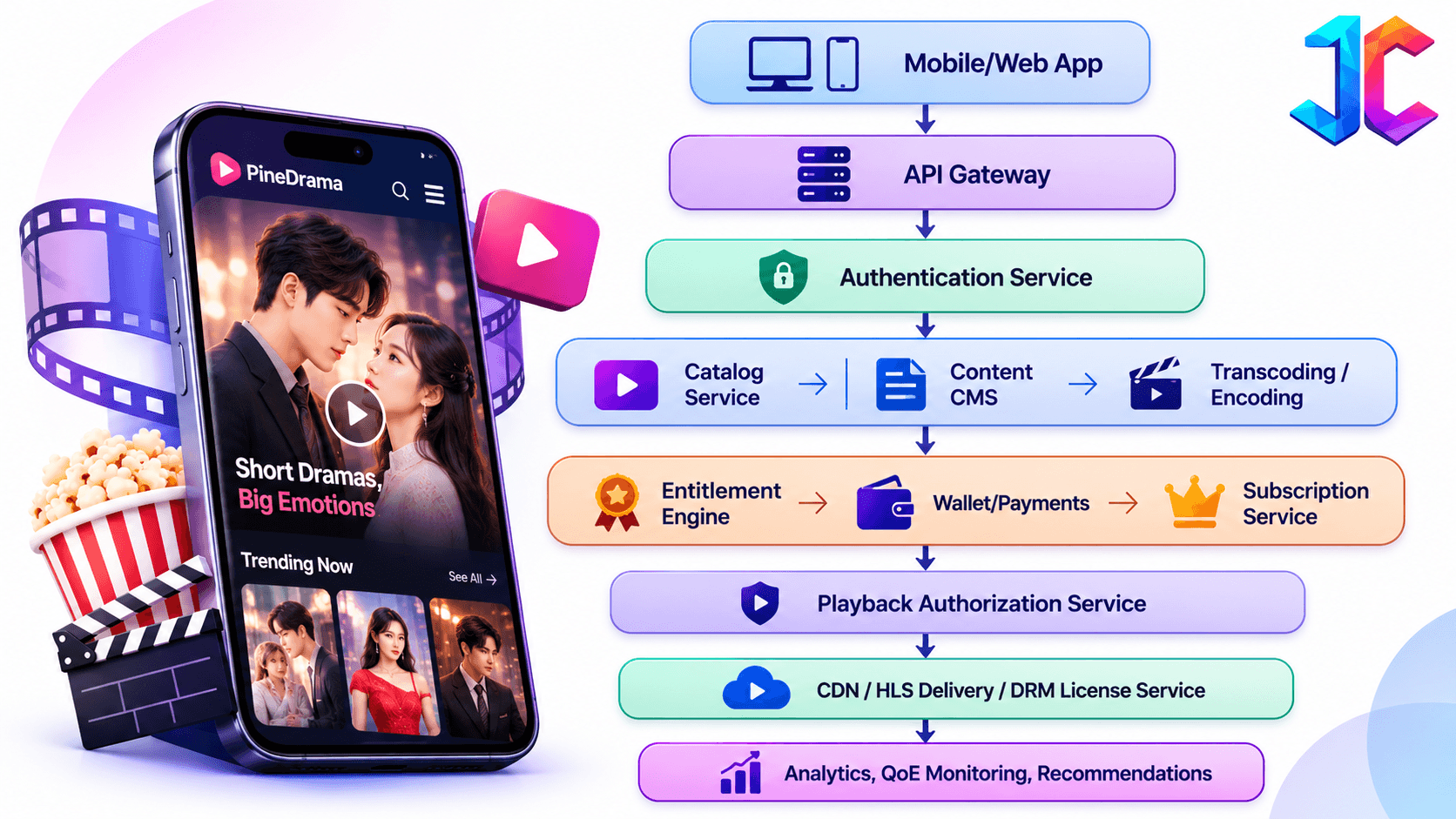
Database design
| Data entity | Key fields | Relationship |
|---|---|---|
| Users | User ID, email, locale, age signal, preferences | Owns wallet, watch history, entitlements |
| Series | Series ID, title, genre, status, rights owner | Contains seasons and episodes |
| Seasons | Season ID, series ID, release schedule | Contains episodes |
| Episodes | Episode ID, duration, rating, language, availability | Belongs to a season |
| Wallets | User ID, coin balance, reward balance | Linked to ledger entries |
| Transactions | Transaction ID, store, product, status, amount | Linked to entitlement grants |
| Entitlements | User ID, episode/series ID, source, expiry | Determines playback access |
| Watch history | User ID, episode ID, position, completion | Supports Continue Watching |
| Subscriptions | User ID, plan, status, renewal date | Grants catalog or series access |
| Licenses | Content ID, territory, language, start/end date | Controls distribution rights |
| Creator payouts | Creator ID, series ID, period, net revenue, share | Linked to revenue events |
Third-Party Integrations
Use third-party services selectively to reduce time to market, but retain ownership of user data, entitlement logic, and content operations.
| Integration | Examples | What it handles |
|---|---|---|
| Authentication | Firebase Auth, Auth0, Supabase Auth | Sign-in, passwordless login, and account recovery |
| Analytics | Firebase Analytics, Mixpanel, Amplitude | Funnels, retention, cohorts, and experiments |
| Crash and performance | Firebase Crashlytics, Sentry, Datadog | Crashes, errors, and app performance |
| Ad networks | Google Ad Manager, Meta Audience Network, AppLovin | Interstitial, rewarded, and in-feed ads |
| Payments | Apple In-App Purchase, Google Play Billing, Stripe, Razorpay | Store purchases, web payments, and regional methods |
| DRM | FairPlay, Widevine, PlayReady | License issuance and protected playback |
| Cloud video | AWS Elemental, Mux, Cloudflare Stream, Bunny Stream | Encoding, storage, playback, and delivery |
| Messaging | Firebase Cloud Messaging, OneSignal | Episode alerts, rewards, and win-back campaigns |
Video Streaming Performance Optimization
HLS is a delivery protocol; FairPlay, Widevine, and PlayReady are DRM technologies that protect content during playback. Do not treat them as interchangeable. HLS supports segmented delivery, captions, multiple audio tracks, and content protection; Apple documents FairPlay as a content-protection system for HLS.
Architecture essentials
| Component | Implementation | Benefit |
|---|---|---|
| Multi-bitrate encoding | Create multiple video renditions and audio tracks | Matches quality to network conditions |
| HLS packaging | Break episodes into short segments with playlists | Enables fast startup and quality switching |
| CDN | Cache segments near users and use tokenized URLs | Reduces latency and protects media URLs |
| DRM | FairPlay for Apple, Widevine for Android, PlayReady where required | Protects premium content |
| Preloading | Fetch the next episode’s manifest, first segments, subtitles, and entitlement state | Makes swipe-to-next feel instant |
| QoE monitoring | Track startup time, rebuffering, bitrate switches, and errors | Finds playback problems before users churn |
Reducing startup time
- Use a low-bitrate first rendition for fast startup.
- Preload the first few segments of the next entitled episode.
- Cache manifests and subtitles locally where appropriate.
- Resolve entitlements before the user reaches the paywall.
- Use CDN edge caching and origin shielding.
- Monitor time-to-first-frame by country, device, and network type.
Recovering from interruptions
- Automatically retry failed segment requests with exponential backoff.
- Switch to a lower rendition during network degradation.
- Resume from the last confirmed playback position after an interruption.
- Revalidate entitlements when returning from background or reconnecting.
- Show a non-intrusive reconnect state rather than forcing the user back to the feed.
Admin Dashboard
“The admin dashboard should let a small operations team manage a global content business efficiently without duplicating creator-facing functionality. Similarly, an AI girlfriend app development company can use a centralized admin dashboard to manage AI characters, content moderation, user activity, and platform compliance.”
Core modules
| Module | Capabilities |
|---|---|
| Series and episode management | Create series, seasons, episodes, metadata, thumbnails, subtitles, audio tracks, and publishing schedules |
| Coin and paywall configuration | Define free episodes, coin costs, bundles, passes, ad rewards, and regional pricing |
| User and subscription management | View accounts, entitlements, purchases, refunds, support tickets, and subscription status |
| Content performance reports | Completion, drop-off, retention, revenue, ad revenue, and paywall conversion by series and episode |
| Geographic restrictions | Control country, language, age rating, and rights-window availability |
| Promotional campaigns | Schedule free-access windows, coin bonuses, push notifications, and targeted offers |
| Moderation and compliance | Review flagged content, manage appeals, and maintain audit trails |
| Creator operations | Review creator applications, manage agreements, approve payouts, and resolve disputes |
Key Metrics
Measure both engagement and business performance at the episode level.
| Metric | Definition | Why it matters |
|---|---|---|
| Episode completion rate | Completed views divided by episode starts | Reveals story strength and pacing |
| Average episodes per session | Total episodes watched divided by sessions | Measures binge behavior |
| Episode-to-episode continuation rate | Users who start the next episode after finishing one | Tests cliffhanger effectiveness |
| First-paywall conversion rate | Users who unlock after seeing the first paywall | Tests paywall placement and offer |
| Free-to-paid conversion | Paying users divided by activated free users | Measures monetization efficiency |
| ARPPU | Revenue divided by paying users | Shows value per paying user |
| Series-level retention | Users returning for later episodes | Identifies sustainable franchises |
| Content ROI | Net content revenue divided by content cost | Guides renewal and commissioning decisions |
| Playback failure rate | Failed or abandoned playback events | Protects revenue and retention |
| Report resolution time | Time from report to moderation action | Measures trust-and-safety performance |
Regional Distribution and Localization
Localization should be a revenue system, not an afterthought.
What to manage
- Multiple language versions of the same series
- Country-specific subtitles and dubbing tracks
- Regional age ratings and content warnings
- Country-specific availability windows
- Local currency, tax, and price configuration
- Localized thumbnails, titles, descriptions, and promotional creatives
- Regional performance dashboards
Example: A Hindi revenge drama may perform well in India with Hindi audio and English subtitles. For Indonesia, the platform may use Indonesian subtitles, localized thumbnails, different coin bundles, and a separate promotional calendar.
Streaming Cost per Episode
Calculate streaming cost before scaling content. The basic formula is:
Cost per view = CDN egress cost + storage cost + transcoding cost + DRM cost ___________________________________________________________________ Completed or started episode views
Corrected example calculation
For a 90-second episode at an average bitrate of 2 Mbps:
90seconds * 2 Mbps = 180 megabits = 22.5 MB per view
For 1 million complete views:
22.5 MB * 1,000,000 = 22,500GB = 22.5TB
So, 1 million complete views generate approximately 22.5 TB of delivered data, not 225 TB. The earlier 225,000 GB figure would require substantially different assumptions, such as a much higher bitrate or much longer average viewing duration.
If CDN egress costs $0.085 per GB in a supported region, estimated egress cost is approximately:
22,500 * $0.085 = $1,912.50
AWS CloudFront charges for data transferred out from edge locations, with rates varying by region and usage tier; AWS also states that data transferred from AWS origins to CloudFront is not charged. Add storage, transcoding, DRM, logging, and support costs before calculating the final cost per view.
Content Acquisition vs. Original Production
| Factor | Licensed catalog | Original production |
|---|---|---|
| Speed to launch | Faster, if rights are available | Slower |
| Upfront cost | Licensing fees or revenue share | Script, cast, production, post-production, music |
| Ownership | Limited to license terms | Platform may own or control rights |
| Differentiation | Lower; competitors may license similar content | Higher; exclusive stories and franchises |
| Risk | Rights expiry and renewal risk | Production, talent, and market-performance risk |
| Best use | Fill catalog and test genres | Build signature series and long-term IP |
A practical launch strategy is to license a small amount of proven content while commissioning a few exclusive series that define the platform’s identity.
Launch Catalog Planning
Do not launch with a handful of random videos. Plan a catalog that supports repeated visits.
| Launch stage | Recommended catalog |
|---|---|
| Soft launch | 10–20 complete series, 300–800 episodes, 2–3 genres |
| Public launch | 30–50 series, 1,000–2,500 episodes, 4–6 genres |
| Growth stage | 75+ series, 5,000+ episodes, multiple languages and weekly releases |
| Mature platform | Large library plus original franchises, creator supply, and localized versions |
Maintain a predictable release calendar, for example, new episodes every weekday and two new series every week, so users have a reason to return.
How Much Does It Cost to Build an App Like PineDrama in 2026?
The following is a planning range, not a fixed quotation. Actual cost depends on region and team size, native versus cross-platform development, use of third-party streaming services, DRM licensing, content acquisition, and ongoing cloud/CDN spend.
Feature-wise development cost
| Workstream | Included scope | Estimated cost |
|---|---|---|
| Product discovery and UX | User flows, design system, viewer app, creator portal, admin console | $12,000–$35,000 |
| Mobile apps | iOS and Android viewer, feed, player, wallet, notifications, offline mode | $35,000–$90,000 |
| Backend and APIs | Authentication, catalog, entitlements, wallet, analytics, notifications | $30,000–$80,000 |
| Video streaming pipeline | Transcoding, HLS packaging, CDN integration, playback analytics, QoE monitoring | $25,000–$70,000 |
| DRM and anti-piracy | FairPlay, Widevine, tokenized URLs, watermarking, abuse controls | $18,000–$50,000 |
| CMS and admin console | Content ingestion, scheduling, moderation, rights, localization, reporting | $30,000–$80,000 |
| Payments and wallet | IAP, Google Play Billing, coins, receipts, refunds, reconciliation | $20,000–$50,000 |
| AI implementation | Recommendations, tagging, previews, cliffhanger analysis, dubbing workflow | $25,000–$90,000+ |
| Localization | Subtitles, translation workflow, dubbing integration, regional catalogs | $12,000–$45,000+ |
| Trust, safety, and moderation | Reporting, blocking, moderation queues, appeals, audit logs | $15,000–$45,000 |
| Creator economy | Onboarding, agreements, payouts, dashboards, dispute workflows | $20,000–$60,000 |
| QA, security, launch | Device testing, load testing, security review, app-store submission | $12,000–$35,000 |
Package reconciliation
| Package | Included workstreams | Estimated cost | Timeline |
|---|---|---|---|
| White-label MVP | Basic viewer app, CMS, coins, ads, basic analytics; limited DRM and AI | $40,000–$80,000 | 6–10 weeks |
| Custom MVP | Mobile apps, backend, streaming, CMS, wallet, payments, basic AI, moderation, QA | $100,000–$250,000 | 3–5 months |
| Enterprise platform | Full entitlement engine, DRM, creator portal, localization, advanced AI, moderation, multi-region operations | $250,000–$650,000+ | 6–12 months |
Cost variables
- Region and team size: North America, Western Europe, and specialized streaming talent usually cost more than offshore or hybrid teams
- Native vs. cross-platform: Native iOS/Android increases cost but can improve player, DRM, and performance control
- Third-party streaming services: Reduce build time but add recurring platform fees
- DRM licensing: FairPlay, Widevine, and PlayReady integrations may involve vendor, license, or support costs
- Content acquisition: Often the largest long-term cost; licensing, original production, talent, music, and localization are separate from app development
- Ongoing cloud and CDN: Scales with active users, video views, bitrate, storage, and geographic mix
Monthly operational cost
| Cost item | Typical early-stage range | What drives it |
|---|---|---|
| Cloud compute and databases | $500–$5,000 | API traffic, database size, background jobs, and AI inference |
| CDN and video delivery | $1,000–$50,000+ | Views, bitrate, geography, cache-hit ratio, and replay behavior |
| Storage | $100–$5,000+ | Master files, renditions, thumbnails, subtitles, and logs |
| Transcoding | $500–$10,000+ | Upload volume, output renditions, and re-encodes |
| DRM and security | $200–$5,000+ | Protected views, license requests, and vendor pricing |
| AI services | $500–$20,000+ | Recommendations, tagging, dubbing, previews, and moderation |
| Customer support and moderation | $2,000–$20,000+ | Ticket volume, languages, and moderation coverage |
| App-store and payment fees | Percentage of eligible digital revenue | Apple/Google store fees and payment-processing costs |
| Content acquisition or production | Highly variable | Licensed series, original productions, talent, music, and localization |
Example: A platform with 100,000 monthly active users, 20 episodes watched per user, and an average 90-second episode at 2 Mbps would deliver approximately 450 TB per month. At a $0.085/GB blended CDN rate, video delivery alone could cost roughly $38,250 per month before storage, transcoding, DRM, AI, and support costs. This is an illustrative calculation; CDN pricing varies by region, volume tier, cache-hit ratio, and provider.
Post-Launch Maintenance
Launch is not the end of the project. Budget for continuous product, security, and infrastructure work.
| Maintenance area | Activities | Recommended cadence |
|---|---|---|
| Security updates | Dependency patching, penetration testing, access reviews, and incident response | Monthly and quarterly |
| App updates | Bug fixes, OS compatibility, new features, and store-policy changes | Biweekly or monthly |
| Streaming optimization | Bitrate tuning, CDN configuration, preload strategy, and QoE fixes | Weekly monitoring; monthly optimization |
| Content operations | New episodes, localization, rights renewals, moderation, and catalog cleanup | Daily or weekly |
| Customer support | Refunds, playback issues, account recovery, and creator disputes | Daily |
| Infrastructure scaling | Capacity planning, autoscaling, database tuning, and cost optimization | Monthly and during campaigns |
| Analytics and experiments | Funnel analysis, A/B tests, retention cohorts, and pricing tests | Weekly or biweekly |
Development Roadmap
Weeks 1–4: Validation
- Select one launch niche and define the story format.
- Secure a launch catalog and define free/premium boundaries.
- Validate demand with landing pages, paid ads, and creator interviews.
- Finalize entitlement, wallet, content-rights, and moderation rules.
Weeks 5–14: MVP
- Build iOS, Android, and a responsive web viewer.
- Ship vertical player, feed, Continue Watching, CMS, wallet, coins, rewarded ads, and analytics.
- Launch in one or two geographies.
- Track episode completion, paywall conversion, buffering, refunds, and retention.
Months 4–8: Growth
- Add daily rewards, streaks, offline downloads, localization, creator onboarding, and deeper recommendations.
- Run A/B tests on paywall placement, coin bundles, ad frequency, and episode previews.
- Build episode-level content intelligence dashboards.
Months 9–18: Scale
- Launch creator marketplace and transparent revenue-share reporting.
- Add multi-region rights management and localized storefronts.
- Introduce interactive choices, AI-assisted dubbing, and cross-device entitlement sync.
- Expand after retention, content supply, and unit economics are proven.
Common Development Mistakes
| Mistake | Consequence | Better approach |
|---|---|---|
| Treating episodes as independent videos | Users lose narrative context and churn | Build series, season, episode, and continuation data models |
| Poorly timed paywalls | Low conversion and user frustration | Place paywalls after emotional peaks and test alternatives |
| Inadequate preloading | Buffering exactly at cliffhangers | Prefetch next-episode segments and entitlement state |
| Complicated coin purchase flows | Abandoned purchases | Show price, entitlement, and restore options clearly |
| Missing rights management | Takedowns, disputes, and regional violations | Track territory, language, exclusivity, and expiry |
| Insufficient episode analytics | Teams cannot improve stories or monetization | Track second-by-second drop-off and paywall conversion |
| Copying another app’s prices | Unprofitable or non-compliant pricing | Use market-specific pricing tests and store-compliant flows |
| Overusing AI claims | Poor quality and user distrust | Use AI for support tasks with human editorial review |
| Weak subscription lifecycle handling | Wrong entitlements, disputes, and revenue leakage | Automate renewals, grace periods, refunds, and revocations |
| Ignoring privacy and deletion | App-store rejection and regulatory risk | Build consent, retention, deletion, and takedown workflows early |
| Weak moderation operations | Unsafe community and app-store removal | Build reporting, blocking, escalation, and audit workflows |
| Spamming notifications | Opt-outs and churn | Use consent-based, frequency-capped, value-led notifications |
| Confusing HLS with DRM | Incorrect architecture and security gaps | Use HLS for delivery and FairPlay/Widevine/PlayReady for content protection |
| Underestimating operating costs | Cash-flow problems after launch | Model CDN, storage, AI, support, and content costs before scaling |
Conclusion
A PineDrama-like app succeeds when it treats story momentum as the core product. Build a vertical player, episode-level entitlements, a reliable coin and purchase system, a studio-grade CMS, AI-supported discovery and localization, and a monetization model that gives users both free and paid paths forward. Plan development cost, monthly operating cost, content acquisition, compliance, moderation, and post-launch maintenance together; otherwise, a technically strong app can still become commercially unviable.
FAQs
How many episodes should be free?
Offer enough free episodes to establish the story and create emotional investment, often 3–10 episodes then introduce the first unlock option after a major cliffhanger. ReelShort’s reported model commonly uses free opening episodes followed by coin-based access.
Should I use ads, coins, or subscriptions?
Use all three only after validating user behavior. Ads work well for scale and non-paying users; coins work for impulse unlocks; passes work for binge viewers. PineDrama’s public model emphasizes ads, while ReelShort, DramaBox, and ShortMax rely more heavily on coins, rewarded access, and passes.
What happens when a user cancels a subscription?
On Google Play, a canceled auto-renewing subscription generally retains access until the end of the current billing cycle; the user can resubscribe before that period ends. Your app should clearly show the renewal date, cancellation path, and entitlement expiry.
How should refunds affect coins and episodes?
Use the store’s refund event as the trigger. Revoke the associated entitlement, reverse wallet balances where applicable, and record the refund in the reconciliation ledger. The exact reversal rule depends on whether the purchase was a coin pack, episode unlock, pass, or subscription.
Do I need moderation if I only publish studio content?
Yes. You still need pre-publish review, copyright checks, age ratings, regional restrictions, comment moderation, reporting, and takedown workflows. If you allow creator uploads or public comments, Google Play requires in-app reporting and blocking functionality.
What should I build first: content or technology?
Build both in parallel, but do not launch on technology alone. Secure a launch catalog, define the story format, and validate monetization assumptions before investing heavily in advanced AI, creator marketplaces, or multi-country infrastructure.