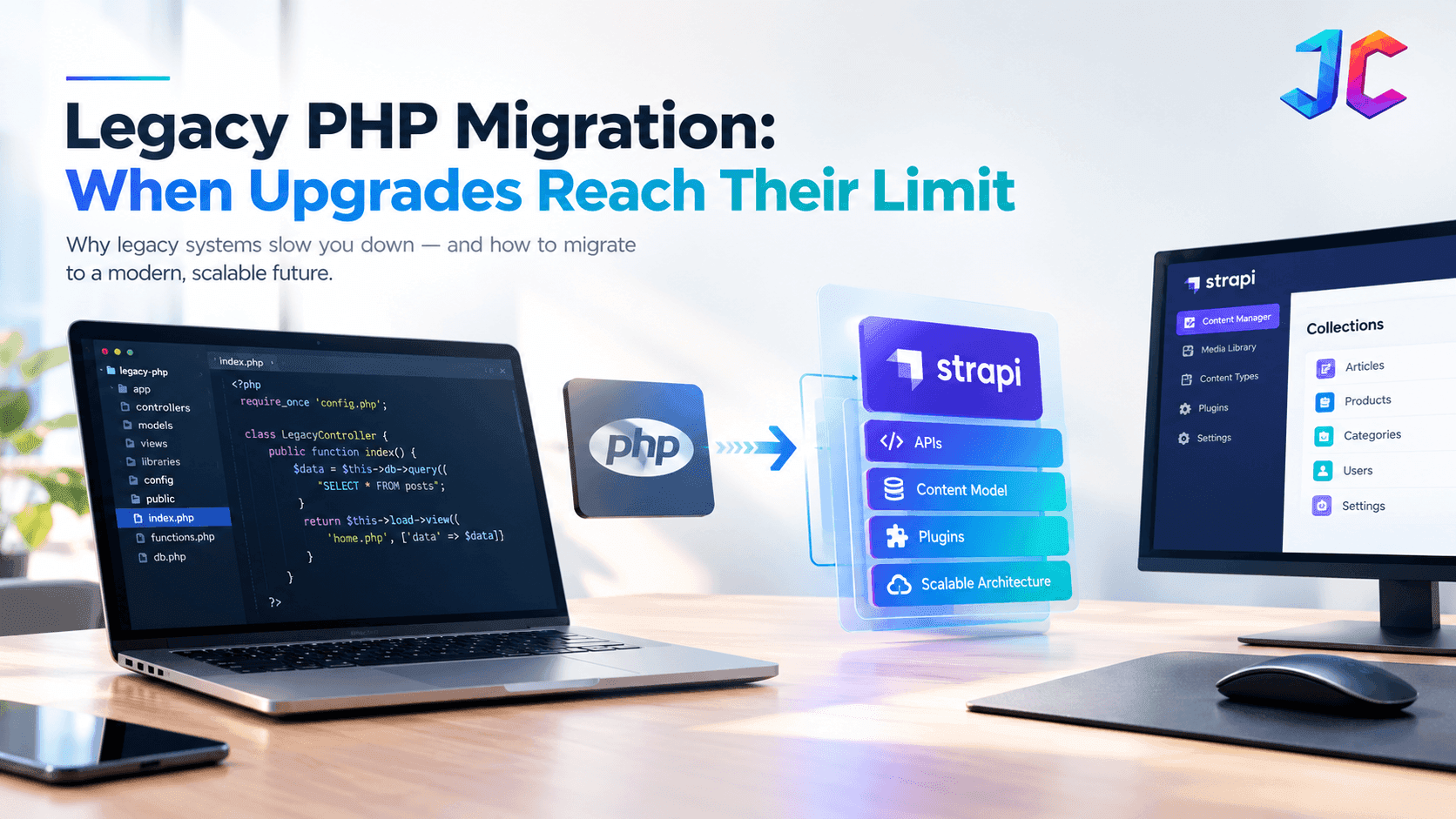
- Upgrade vs. Migration: A PHP upgrade solves runtime compatibility issues, while legacy PHP migration addresses deeper architectural problems, security gaps, and maintainability challenges.
- When Upgrades Reach Their Limit: Unsupported PHP versions, widespread runtime errors, deprecated language features, and abandoned third-party dependencies can make routine upgrades increasingly difficult.
- Security Risks: End-of-life PHP versions no longer receive official security fixes, increasing security, compliance, and operational risks.
The PHP Runway & The Hard Limits of Upgrading
As applications drift further behind the current release cycle, automated upgrades break down. The table below outlines the support status for modern PHP versions and the technical boundaries that make a basic upgrade impossible:
| PHP Version | Security Support Status | The Technical "Upgrade Limit" (Why Simple Upgrades Fail) |
|---|---|---|
| PHP 7.4 & Older | Ended November 2022 | Strict type escalations turn old notices into fatal errors; core database extensions (mysql_*) are completely gone. |
| PHP 8.0 | Ended November 2023 | Stricter internal functions and changes to string/number comparisons introduce quiet, undocumented logical failures. |
| PHP 8.1 | Ended December 2025 | Deprecation of implicit float-to-int conversions breaks older mathematical calculation logic and e-commerce calculations. |
| PHP 8.2 | Ends December 2026 | Deprecation of dynamic properties breaks heavily customized or procedural frameworks built without strict class definitions. |
| PHP 8.4 / 8.5 | Supported (Runway to 2028/2029) | Upgrading requires a complete rewrite of third-party dependencies, Composer packages, and server environments. |
Why PHP Upgrades Alone Stop Working
PHP version upgrades are necessary. They are not sufficient.
PHP 8.2 reaches end of security support on December 31, 2026, while PHP 8.3, 8.4, and 8.5 have longer support windows. Running an unsupported version means no security patches, no bug fixes, and growing compatibility risk with modern libraries and hosting environments.
But upgrading the runtime does not automatically fix:
- Spaghetti code with no test coverage
- Tightly coupled modules that break when one changes
- Manual deployment and no CI/CD
- Security gaps in authentication, file uploads, or API access
- Database schemas that have evolved without documentation
- Integrations held together by cron jobs and hope
These are architectural problems. A PHP version bump does not solve them.
The Upgrade vs. Modernization Distinction
| Dimension | PHP Upgrade | Legacy PHP Modernization |
|---|---|---|
| Primary goal | Runtime compatibility | Architectural fitness |
| Scope | PHP version, deprecated functions, extensions | Code structure, architecture, security, integrations |
| Typical duration | Weeks | Months |
| Risk | Low to medium | Medium to high |
| Business outcome | Supported runtime | Scalable, maintainable platform |
| When it is enough | Codebase is healthy, just outdated runtime | Architecture itself is the bottleneck |
The 7 Signals Upgrades Have Reached Their Limit
Not every legacy PHP application needs a full rebuild. However, these seven signals indicate that upgrades alone will not resolve underlying operational risks.
1. You cannot upgrade PHP without breaking the application
If moving from PHP 7.4 to 8.1, or 8.1 to 8.3, breaks core functionality, the problem is not the PHP version. It is the code coupling to deprecated patterns, old extensions, or unsupported libraries.
- Measurable Indicator: Running static analysis tools (such as PHPStan or Psalm) against a newer PHP target yields hundreds of fatal errors, deprecated library functions, or removed core extension calls.
- Practical Example: The application relies on legacy extensions removed in PHP 8 (such as
mcryptor old MySQL drivers) or obsolete functions likecreate_function(). Upgrading the runtime immediately halts execution because the codebase lacks strict typing compatibility. - What it means: The codebase has architectural debt that a version bump cannot fix without rewriting foundational components.
2. Security fixes are reactive, not planned
If your team only patches when something breaks, or when a vulnerability is publicly disclosed, you are running on borrowed time. Unsupported PHP versions receive no security patches at all ([PHP Supported Versions].
- Measurable Indicator: Time-to-patch for critical Common Vulnerabilities and Exposures (CVEs) exceeds 30 days, or dependency vulnerability scans (via
composer auditor Snyk) reveal dozens of abandoned, unpatchable packages. - Practical Example: Your application runs on PHP 7.4 or an unmaintained framework version. When a critical remote code execution flaw is discovered, the team cannot apply security patches because updating one package causes breaking changes across custom business logic.
- What it means: Security has become reactive firefighting rather than proactive governance, exposing customer data and business continuity to unacceptable risk.
3. Every release requires manual QA and prayer
If deploying a small change requires hours or days of manual testing because automated tests do not exist, the codebase has become too fragile to iterate on safely.
- Measurable Indicator: Regression testing cycles take multiple days per sprint, automated test coverage is near zero, and production hotfixes are required within 48 hours of most releases.
- Practical Example: A minor modification to customer profile settings unexpectedly breaks checkout billing because the two modules share undocumented global state. Developers must manually verify dozens of screens before every deploy to ensure basic functionality remains intact.
- What it means: Fragility has crippled development velocity. The application requires automated test coverage and CI/CD pipelines before it can evolve safely.
4. Integrations are held together by cron jobs and hope
If product data, CRM syncs, or customer portals depend on manual scripts or undocumented cron jobs, the architecture has become a liability.
- Measurable Indicator: High failure rates in scheduled tasks, absence of message queues or dead-letter queues, and lack of automated alerts when sync scripts fail.
- Practical Example: Customer records, ERP data, or third-party CRM syncs depend on standalone CLI PHP scripts executed via cron without retry logic, rate limiting, or transaction logging. If an external API times out, data remains silently desynchronized until a customer complains.
- What it means: The system lacks a decoupled integration and API layer, turning essential business connections into fragile points of failure.
5. New feature requests take months instead of weeks
If adding a simple feature requires touching multiple tightly coupled modules, the architecture has become a bottleneck for business velocity.
- Measurable Indicator: Lead time for changes (from feature approval to production deployment) consistently increases sprint over sprint, even for simple UI or workflow additions.
- Practical Example: Adding a new payment gateway or a custom coupon code requires editing procedural code across 15 separate files, templates, and raw SQL queries rather than plugging into a modular service class or API handler.
- What it means: Architectural debt has created a bottleneck for business velocity, preventing the organization from responding quickly to market opportunities.
6. Nobody on the team understands the full system
If documentation is missing, key developers have left, and the codebase has become “that one app nobody wants to touch,” knowledge risk has become a business risk.
- Measurable Indicator: A bus factor of one or zero, absence of architectural diagrams or API documentation, and persistent developer reluctance to accept tickets touching legacy core modules.
- Practical Example: The engineers who built the custom application several years ago have departed. The current team maintains an unspoken rule never to modify legacy helper files because nobody understands what side effects will occur across other modules.
- What it means: Institutional knowledge loss has transformed code debt into an operational liability. The system requires discovery, documentation, and phased restructuring.
7. The business cannot scale without breaking the application
If traffic growth, new markets, or new product lines consistently break the application, the architecture has hit its ceiling.
- Measurable Indicator: Server CPU and memory spike uncontrollably under moderate traffic surges, database lock contention spikes during concurrent transactions, and page response times degrade past 2,000 ms.
- Practical Example: During a marketing campaign or product launch, database connections exhaust their pool due to unindexed queries and persistent monolithic sessions, causing 504 gateway timeouts for checkout customers.
- What it means: The application has reached its architectural performance ceiling. Modernization is no longer optional; it is a fundamental business requirement.
Migration & Modernization Strategies
When standard syntax refactoring reaches its limit, engineering teams must evaluate three structural strategies. Each balances business continuity against future technical flexibility.
| Strategy | Ideal Use Case | Core Benefits | Critical Trade-Offs & Risks |
|---|---|---|---|
| Incremental Refactoring | Core workflows are highly valuable, and the system architecture can be isolated in stages. | • Zero downtime • Continued feature delivery • Lower immediate budget |
• Legacy and modern code must coexist • High regression risk without comprehensive automated tests |
| Framework Migration | Application logic is sound, but it is trapped in an abandoned or homegrown framework (e.g., FuelPHP to Laravel). | • Retains domain logic • Access to modern package ecosystems • Standardized security |
• Requires extensive structural mapping • Risk of missing implicit database behaviors or route configurations |
| Rearchitect & Cross-Platform Move | The system requires massive scalability, or the business is moving away from the PHP ecosystem. | • Eliminates PHP technical debt • Modern microservices architecture (e.g., Java/.NET + React) |
• High cost and long timelines • Risk of failing to uncover undocumented business rules hidden in the old code |
The Decision Framework: Upgrade, Refactor, or Rebuild?
Not every legacy PHP application needs the same treatment. Deciding the right path requires evaluating four crucial technical dimensions:
- Technical Discovery Findings: Are dependencies documented and actively maintained, or are core packages completely abandoned?
- Test Coverage Baseline: Can automated test suites catch regressions during refactoring, or must test harnesses be built from scratch?
- Business Logic Assessment: Is business logic cleanly isolated and well understood, or is it scattered across view templates, database triggers, and procedural scripts?
- Rollback and Continuity Planning: Can changes be deployed incrementally with immediate rollback capability, or does a release require high-risk cutovers?
| Situation | Recommended Path | Evaluation Drivers | Why |
|---|---|---|---|
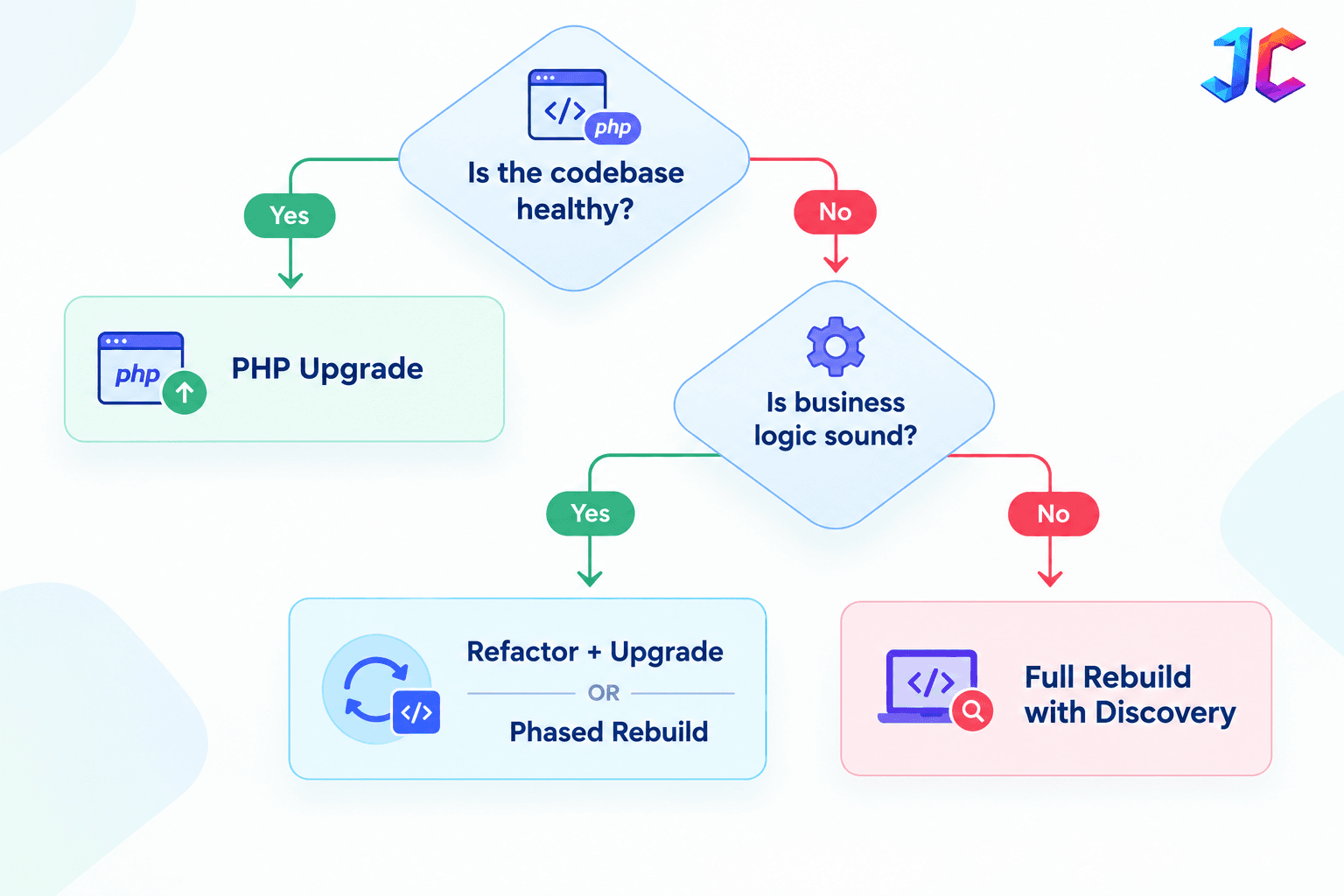
| Codebase is healthy, just outdated runtime | PHP Upgrade | High test coverage, clear dependencies, low coupling | Lowest risk, fastest win, restores security compliance |
| Codebase is fragile but business logic is sound | Refactor + Upgrade | Recoverable architecture, sound business rules, manageable debt | Fixes debt incrementally without the expense of a full rebuild |
| Architecture is the bottleneck, business logic is sound | Phased Rebuild (e.g., Laravel) | Monolithic coupling, heavy integration debt, sound business logic | Delivers modern MVC architecture without losing proprietary business logic |
| Application is unmaintainable, business logic is unclear | Full Rebuild with Discovery | Total lack of documentation, obsolete frameworks, severe data debt | Eliminates compounding debt by starting fresh with proper architecture |
Decision Flow
A Step-by-Step Legacy PHP Migration Roadmap
A successful legacy PHP migration begins with understanding the existing application before changing its code or architecture.
Phase 1: Technical Discovery
Document the current PHP version, framework, dependencies, database, scheduled jobs, external integrations, and critical business workflows. Identify unsupported components, undocumented dependencies, and high-risk areas.
Phase 2: Migration Strategy
Determine whether the application needs a PHP upgrade, targeted refactoring, a phased Laravel rebuild, or a complete replacement. Define the scope, target architecture, testing requirements, and acceptable downtime.
Phase 3: Testing and Compatibility
Review dependency compatibility and establish regression tests for critical workflows. Where automated testing is limited, prioritize authentication, payments, order processing, data synchronization, and other business-critical functions.
Phase 4: Implementation and Data Validation
Implement the selected migration strategy in manageable stages. Validate database transformations, integration behavior, permissions, and business rules before moving workloads into production.
Phase 5: Deployment and Recovery Planning
Test the release process in a staging environment. Verify backups, monitoring, rollback or recovery procedures, and production readiness before launch.
Phase 6: Post-Migration Monitoring
Monitor errors, failed background jobs, response times, data integrity, and critical workflows after deployment. Compare results against the baseline established before migration.
A phased roadmap helps teams control risk, validate assumptions early, and make informed decisions throughout the modernization process.
PHP Migration vs Laravel Migration: What’s the Difference?
These terms are often used interchangeably, but they mean different things.
| Term | What It Means | Typical Scope |
|---|---|---|
| PHP migration | Moving to a newer PHP version or modernizing legacy PHP code | Runtime, dependencies, compatibility |
| PHP application migration | Moving an entire application to a new architecture or platform | Code, data, integrations, deployment |
| Laravel migration | Moving or rebuilding an application within the Laravel framework | Routes, data, authentication, APIs, deployment |
| Laravel database migration | Managing schema changes within Laravel’s migration system | Database schema, versioning, rollbacks |
A PHP migration may involve upgrading from PHP 7.4 to 8.3. A Laravel migration may involve rebuilding a legacy application within the Laravel framework, including routes, authentication, APIs, and deployment workflows.
Both can be part of a larger legacy PHP application modernization program.
The Laravel Migration Path: When It Makes Sense
Laravel is often the right choice when the application needs:
- Structured routing and MVC architecture
- Built-in authentication and authorization
- Queue and background job support
- Eloquent ORM for database interactions
- A mature ecosystem for testing, deployment, and security
Laravel 12 supports PHP 8.2 through 8.5, with security support until February 24, 2027. Laravel 13, released in Q1 2026, supports PHP 8.3 through 8.5 with security support until Q1 2028.
Laravel Migration Is Not Just a Framework Change
A proper Laravel migration includes:
- Application and dependency assessment
- Architecture decision: replatform, refactor, or rebuild
- Data mapping and Laravel database migration strategy
- API and integration validation
- Security hardening and testing
- Performance, observability, and rollback planning
Teams should also assess known Laravel security vulnerabilities, dependency versions, authentication flows, file uploads, permissions, exposed environment variables, and API controls. Security should be treated as a design requirement, not as a checklist added after launch.
Database Integrity and Post-Migration Validation
Database migration is more than transferring records from one environment to another. The process must preserve relationships, business rules, and the integrity of critical transactions.
Before migration, document the existing schema, foreign-key relationships, indexes, constraints, and data dependencies. Identify fields that require transformation and determine how legacy inconsistencies will be handled.
During migration, validate record counts, important fields, relationships, and business totals. For applications with frequent database writes, establish a synchronization and cutover strategy appropriate to the acceptable downtime.
Laravel database migrations can version and manage schema changes, but they do not automatically validate every business rule or guarantee that existing data has been transferred correctly.
After deployment, monitor application errors, failed transactions, background jobs, and data discrepancies. Retain verified backups and document recovery procedures so the team can respond if critical issues emerge.
The appropriate strategy depends on database complexity, application traffic, downtime requirements, and the consequences of data loss.
The Real Cost of Legacy PHP Migration
PHP migration cost is one of the most searched, and most misunderstood, topics in this space.
Publishing arbitrary, unverified price estimates creates false expectations because no two legacy systems share the same technical profile. The actual cost of a legacy PHP migration is governed by architectural complexity and operational risks rather than page counts alone:
- Custom Integrations and Middleware: Each third-party API, payment gateway, ERP bridge, and webhook handler requires reverse engineering, authentication updating, and end-to-end testing.
- Code Quality and Test Coverage: Codebases lacking automated unit or integration tests require teams to construct regression suites before refactoring, significantly impacting project hours.
- Database Schema Complexity: Unnormalized legacy schemas, missing foreign keys, polymorphic tables, and millions of transactional rows demand custom data extraction, transformation, and reconciliation scripts.
- Acceptable Downtime and Cutover Strategy: Zero-downtime cutovers require dual-writing architectures, background synchronization, and canary deployments, requiring substantially more engineering than scheduled maintenance windows.
- Modernization Scope (Upgrade vs. Refactor vs. Rebuild): A targeted PHP version upgrade represents the lowest engineering effort, while a phased Laravel rebuild or full replatform requires extensive discovery and architectural design.
- Team Familiarity and Documentation: Undocumented systems with absent original authors require extensive technical discovery to reconstruct business rules before code changes begin.
How to Prepare for a PHP Migration Estimate
To obtain an accurate, reliable migration scope without relying on unverified estimates, engineering teams should prepare five key inputs:
- Codebase Assessment: Generate static analysis reports (using PHPStan, Psalm, or Rector) to quantify syntax deprecations, abandoned dependencies, and lines of code.
- Integration Inventory: Catalog every internal and external service, scheduled cron script, webhook, payment provider, and file storage dependency.
- Database Complexity Review: Document table volume, storage engine types, stored procedures, triggers, and approximate row counts for transactional datasets.
- Testing Baseline: Audit existing automated test coverage and identify critical user journeys that require manual QA scripts.
- Downtime Tolerance Definition: Establish clear business constraints regarding maintenance windows, acceptable read-only states, or strict zero-downtime continuous operations.
A paid, structured discovery phase is the only reliable way to translate these inputs into an actionable project timeline and budget.
Common PHP Migration Mistakes to Avoid
Even a technically successful migration can create business problems if critical dependencies and workflows are overlooked.
- Rebuilding without discovery: Replacing an application before documenting its business logic can introduce functional gaps.
- Ignoring dependencies: Unsupported packages, extensions, and external integrations can cause compatibility problems after deployment.
- Skipping regression tests: Missing tests make it harder to detect broken workflows before users experience them.
- Overlooking database integrity: Incorrect mappings or incomplete validation can lead to missing, duplicated, or inconsistent records.
- Underestimating downtime: Production cutover, data synchronization, and recovery requirements should be planned in advance.
- Ignoring SEO requirements: Changes to URLs, metadata, canonical tags, or rendering can affect organic search visibility.
- Treating launch as the finish line: Post-deployment monitoring is necessary to identify performance issues and unexpected application behavior.
The most effective way to reduce these risks is to establish clear acceptance criteria, validate critical workflows, and prepare a tested recovery strategy before production deployment.
The Legacy PHP Migration Checklist
Before starting any migration, confirm:
- Current PHP version and end-of-life date are documented
- All custom integrations are mapped and tested
- Database schema is documented, indexed, and versioned
- Test coverage baseline is established for critical business paths
- Security posture is reviewed: authentication, uploads, API access, secrets
- Staging release process and rollback procedures are tested
- Business logic is documented or extracted from legacy code
- Team familiarity and institutional knowledge risks are evaluated
- Upgrade vs. refactor vs. rebuild path is finalized with clear acceptance criteria
- Laravel security vulnerabilities and dependency CVEs are audited if Laravel is in scope
Future Impact: AI, Composable Architecture, and Security
The next phase of PHP modernization will be shaped by three forces.
1. AI-assisted refactoring will accelerate, not replace, engineering
AI tools can help identify deprecated patterns, suggest refactors, and generate test scaffolding. But they cannot replace architectural judgment, business logic understanding, or security review.
The teams that win will use AI to accelerate refactoring, not to skip it.
2. Composable architecture will become the norm
More organizations will separate content management (CMS) from business logic (application) from frontend delivery. This means PHP applications will increasingly integrate with headless CMS platforms, APIs, and specialized services.
This is where CMS migration services and headless CMS development company expertise intersect with PHP modernization. A Strapi or headless CMS may manage content, while Laravel handles business logic and secure APIs.
3. Security will become a design requirement, not a checklist
As PHP versions reach end-of-life faster and attack surfaces grow, security can no longer be an afterthought. Teams must build security into the architecture from day one: authentication, authorization, file uploads, API controls, and dependency management.
Running an unsupported PHP version is not just a technical debt issue; it is a business risk.
When PHP Modernization Connects to CMS Migration
Many legacy PHP applications are tangled with a CMS, WordPress, custom CMS, or a headless platform. In these cases, PHP modernization and CMS migration are part of the same program.
| Scenario | Recommended Approach |
|---|---|
| Legacy PHP app + WordPress CMS | Assess both together; may need phased migration |
| Legacy PHP app + headless CMS (Strapi) | Separate content (CMS) from business logic (PHP/Laravel) |
| Legacy PHP app + custom CMS | Full modernization may include CMS replacement |
| Legacy PHP app + no CMS | Pure application modernization; CMS may be added later |
This is where hire Strapi developer and headless CMS development company searches often begin, when teams realize their legacy PHP application needs a modern content layer, not just a code refactor.
WordPress vs. Strapi: A Brief Comparison
When modernizing a content-heavy PHP application, teams frequently evaluate whether to retain WordPress or migrate to a headless CMS like Strapi:
- Architecture: WordPress is traditionally monolithic, combining database, PHP templating, and administration into one tightly coupled stack. Strapi is headless and API-first, built on Node.js to deliver structured JSON payloads via REST or GraphQL to any modern frontend (such as Next.js or mobile applications).
- Performance & Scalability: Monolithic WordPress installations often suffer from plugin bloat and heavy database queries. Decoupling content with Strapi and serving static or server-rendered pages via Next.js provides faster response times, reduced server overhead, and enhanced Core Web Vitals.
- Security & Attack Surface: WordPress sites remain frequent targets for automated exploits targeting third-party plugins and themes. Strapi isolates content administration behind an API, removing direct web access to server-side templates and database layers.
- Custom Business Workflows: WordPress is optimized primarily for editorial blogging and standard publishing. Strapi offers flexible content-type builders, custom lifecycle hooks, and extensible plugins tailored to omnichannel digital platforms.
A comprehensive, feature-by-feature evaluation of these two platforms is explored in a dedicated comparison guide.
How to Measure Migration Success
A successful legacy PHP migration should deliver measurable improvements across both technical performance and business outcomes. Teams should track five core dimensions:
- Security Posture: Elimination of unsupported PHP runtimes, zero unpatched high-severity CVEs in dependencies, strict role-based access control (RBAC), and secure credential storage.
- System Reliability and Uptime: Reduction in runtime fatal errors, elimination of silent background job failures, automated crash alerting, and lower Mean Time to Resolution (MTTR).
- Application Performance: Measurable reduction in Time to First Byte (TTFB), faster API response latencies under concurrent load, and optimized database query execution times.
- Deployment Quality and Velocity: Faster release cycles (reducing release lead times from months to days), automated CI/CD validation, and zero emergency hotfixes required post-deployment.
- Data Integrity and Reconciliation: 100% reconciliation between legacy and target databases, zero orphaned records, and preserved audit trails for critical business transactions.
FAQs
What is the difference between PHP migration and PHP upgrade?
A PHP upgrade moves the runtime to a newer version (e.g., 7.4 to 8.3). A PHP migration can include that upgrade plus code refactoring, dependency updates, and architectural changes. An upgrade fixes runtime compatibility; a migration fixes architectural debt.
When should I choose Laravel migration over a PHP upgrade?
Choose Laravel migration when the application architecture itself is the bottleneck, tight coupling, no test coverage, fragile integrations, and the business logic is sound enough to preserve. A PHP upgrade alone will not fix architectural debt.
How long does a PHP migration take?
The timeline for a PHP migration typically ranges from several weeks for a simple runtime upgrade to several months for a phased refactor or framework rebuild. Exact duration depends on project scope, custom integration volume, database schema complexity, automated test coverage, and acceptable downtime constraints. A dedicated technical discovery phase provides the only reliable schedule estimate.
How much does legacy PHP migration cost?
Cost depends directly on code quality, custom integrations, test coverage, database schema complexity, acceptable downtime requirements, and whether the project involves an upgrade, refactor, or rebuild. Because every legacy application carries unique technical debt, engineering teams should conduct a structured discovery phase rather than relying on unverified estimates.
What are common Laravel security vulnerabilities to watch for?
Common areas include outdated dependencies, insecure file uploads, exposed environment variables, weak authorization checks, overly broad API access, and missing logs or monitoring. Security should be reviewed as part of the migration, not after.
Can I migrate legacy PHP to Strapi instead of Laravel?
Strapi is a headless CMS, not a full application framework. It can manage content and expose APIs, but it does not replace Laravel for business logic, authentication, or complex workflows. The right approach depends on whether your need is content management, application logic, or both.
How do I know if my application needs a full rebuild?
If the architecture is the bottleneck, business logic is unclear or undocumented, and the codebase has become unmaintainable, a full rebuild with a discovery phase may be the right call. If business logic is sound but architecture is weak, a phased rebuild is often better.
Conclusion
Legacy PHP migration is not a one-size-fits-all decision. It is an architectural spectrum spanning runtime upgrades, modular refactoring, phased framework migrations, and full platform rebuilds.
There is no rigid formula where a specific number of warning signs automatically triggers a complete rebuild. Instead, the right path must be evaluated based on business impact, security exposure, architectural limitations, and a thorough technical assessment of the existing codebase.
Upgrades fix runtime compatibility. Modernization fixes architectural debt. Knowing the difference, and grounding the strategy in disciplined discovery, testing, and database validation, is what separates a successful modernization initiative from an expensive mistake.